Copyright © 2007–2025 The MacPorts Project
Copyright © 2002–2004 The OpenDarwin Project
MacPorts is an easy to use system for compiling, installing, and managing open source software. MacPorts may be conceptually divided into two main parts: the infrastructure, known as MacPorts base, and the set of available ports. A MacPorts port is a set of specifications contained in a Portfile that defines an application, its characteristics, and any files or special instructions required to install it. This allows you to use a single command to tell MacPorts to automatically download, compile, and install applications and libraries. But using MacPorts to manage your open source software provides several other significant advantages. For example, MacPorts:
Installs automatically any required support software, known as dependencies, for a given port.
Provides for uninstalls and upgrades for installed ports.
Confines ported software to a private “sandbox” that keeps it from intermingling with your operating system and its vendor-supplied software to prevent them from becoming corrupted.
Allows you to create pre-compiled binary installers of ported applications to quickly install software on remote computers without compiling from source code.
MacPorts is developed on macOS, though it is designed to be portable so it can work on other Unix-like systems, especially those descended from the Berkeley Software Distribution (BSD). In practice, installing ports only works on macOS. MacPorts base can be compiled on Linux (and possibly other POSIX-compatible systems) where it is mainly used to set up mirrors and generate support files for installations on macOS.
The following notational conventions are used in the MacPorts Guide to distinguish between terminal input/output, file text, and other special text types.
Terminal I/O and file text.
$Commands to be typed into a terminal window.Command output to a terminal window.
File text.
Other special text types.
A hyperlink: spontaneous combustion.
A file:
/var/log/system.log.A command: ifconfig.
An option: port
install
This chapter shows you how to install MacPorts and its prerequisites step-by-step. Note that the section about installing Xcode is macOS-specific. If you wish to install MacPorts on another platform, first make sure you have a working C compiler installed, skip ahead to installing MacPorts from source, and continue to the end of the chapter.
Xcode is a package provided by Apple containing compilers, libraries and additional tools required to develop applications for macOS.
Note
Always make sure to install the latest available version of Xcode for your macOS release; using outdated versions of Xcode may cause port install failures. Also note that Xcode is not updated via OS X's Software Update utility on OS versions prior to 10.6, and is updated via the Mac App Store starting with 10.7.
Follow the instructions for your version of macOS:
(Optional) Download the latest version of Xcode from the Apple developer website or get it using the Mac App Store.
A few ports require a full Xcode installation to use, but most don’t (read the description of the use_xcode keyword for specifics). If you are OK with being unable to use these ports, you do not need to install Xcode.
Next, open a terminal, run xcode-select --install, and
click the Install button to install the required command line developer tools. Don't worry if you see
a message telling you the software cannot be installed because it is not currently available from the
Software Update Server. This usually means you already have the latest version installed. You can also
get the command line tools from the
Apple developer website.
Download the latest version of Xcode from the Apple developer website or get it using the Mac App Store.
Xcode 4.3 and later do not automatically install the command line tools, but MacPorts requires them. To install them, open the Xcode application, go to the Preferences window, to the Downloads section, and click the Install button next to Command Line Tools. Be sure to return to this window after every Xcode upgrade to ensure that the command line tools are also upgraded.
If you wish to create Installer packages with port pkg, you will also need
to install PackageMaker, which is in the “Auxiliary Tools for Xcode” package as of
Xcode 4.3. The download page for this package can be opened via the Xcode -> Open Developer Tool ->
More Developer Tools... menu item. After downloading and mounting the disk image, drag the
PackageMaker application to your /Applications directory.
If you are using Mac OS X 10.6, there are two branches of Xcode which could be considered to be the latest, 3.2.x and 4.x. Xcode 4 costs money, but Xcode 3 is still available free of charge. There are two options for downloading it:
Xcode 3.2 - smaller download, but you will need to run Software Update after installing to get the latest version. Note that Apple might at some point discontinue providing these updates via their update servers.
Xcode 3.2.6 and iOS SDK 4.3 - includes the iOS SDK which is not needed for MacPorts.
Both are available from the Apple developer website. You may also be able to install Xcode 3.2 from your Mac OS X 10.6 DVD and then run Software Update to get the latest version.
Ensure that those of the following options that are available in the installer for your version of Xcode are selected:
If you have an earlier release of Mac OS X, you may download the latest version of Xcode for Mac OS X 10.5 (Xcode 3.0 and Xcode 3.1 Developer Tools) or 10.4 (Xcode 2.4.1 and Xcode 2.5 Developer Tools) from the Apple developer website.
Ensure that those of the following options that are available in the installer for your version of Xcode are selected:
If you are using macOS, you should install MacPorts using the macOS package installer unless you do not wish
to install it to /opt/local/, the default MacPorts location, or if you wish to install
a pre-release version of MacPorts base. However, if you wish to install multiple copies of MacPorts or install
MacPorts on another OS platform, you must install MacPorts from
the source code.
The macOS package installer automatically installs MacPorts, sets the shell environment, and runs a selfupdate operation to update the ports tree and MacPorts base with the latest release.
Download the latest
MacPorts-2.12.5-installer from the releases on GitHub. Here are direct links for the latest versions of macOS:....pkg- macOS 15 Sequoia:
- macOS 14 Sonoma:
- macOS 13 Ventura:
- macOS 12 Monterey:
- macOS 11 Big Sur:
- macOS 10.15 Catalina:
- macOS 10.14 Mojave:
- macOS 10.13 High Sierra:
- macOS 10.12 Sierra:
Double-click the downloaded package installer to perform the default “easy” install.
After this step you are done already, MacPorts is now installed and your shell environment was set up automatically by the installer. To confirm the installation is working as expected, now try using port in a new terminal window.
$port versionVersion: 2.12.5
In case of problems such as “command not found”, make sure that you opened a new terminal window or consult Section 2.5, “MacPorts and the Shell”. Otherwise, please skip the remainder of this chapter and continue with Chapter 3, Using MacPorts in this guide.
If you installed MacPorts using the package installer, skip this section. To install MacPorts from the source code, follow the steps below.
Download and extract the MacPorts 2.12.5 tarball. Either do so using your browser and the Finder, or use the given commands in a terminal window.
$curl -O https://distfiles.macports.org/MacPorts/MacPorts-2.12.5.tar.bz2$tar xf MacPorts-2.12.5.tar.bz2Afterwards, perform the commands shown in the terminal window. If you wish to use a path other than
/opt/local, follow the instructions for installing multiple copies of MacPorts instead.$cd MacPorts-2.12.5/$./configure$make$sudo make installPlease continue with Section 2.5, “MacPorts and the Shell” to set up your shell environment.
If you installed MacPorts using the package installer, skip this section.
There are times when some may want to run MacPorts from a version newer than the current stable release. Maybe there's a new feature that you'd like to use, or it fixes an issue you've encountered, or you just like to be on the cutting edge. These steps explain how to setup MacPorts for developers, using only Git to keep MacPorts up to date.
Though a distinction is made between pre-release and release versions of MacPorts base, the ports collection supports no such distinction or versioning. The selfupdate command installs the latest ports tree, and updates MacPorts base to the latest released version.
Check out MacPorts source
Pick a location to store a working copy of the MacPorts code. For this example,
/opt/mportswill be used, but you can put the source anywhere. This example will create/opt/mports/macports-basecontaining everything needed for MacPorts.$mkdir -p /opt/mports$cd /opt/mports$git clone https://github.com/macports/macports-base.git$cd macports-base$git checkout v2.12.5 # skip this if you want to use the development versionBuild and Install MacPorts
MacPorts uses autoconf and makefiles for installation. These commands will build and install MacPorts to
/opt/local. You can add--prefixto./configureto relocate MacPorts to another directory if needed.$cd /opt/mports/macports-base$./configure --enable-readline$make$sudo make install$make distclean(Optional) Configure MacPorts to use port information from Git
This step is useful if you want to do port development. Check out the ports tree from git:
$cd /opt/mports$git clone https://github.com/macports/macports-ports.gitThen open
/opt/local/etc/macports/sources.confin a text editor. The last line should look like this:rsync://rsync.macports.org/macports/release/tarballs/ports.tar [default]
Change it to point to the working copy you checked out:
file:///opt/mports/macports-ports [default]
Now MacPorts will look for portfiles in the working copy and use Git instead of rsync to update your ports tree.
Environment
You should setup your PATH and other environment options according to Section 2.5, “MacPorts and the Shell”.
Occasionally a MacPorts developer may wish to install more than one MacPorts instance on the same
host. Only one copy of MacPorts may use the default prefix /opt/local, so for
additional installations use the option --prefix as shown below. It's also recommended
to change the applications dir using --with-applications-dir to avoid conflicts in
/Applications/MacPorts.
Use --without-startupitems to automatically set startupitem_install no
in the new macports.conf, which is required to avoid conflicts in
/Library/LaunchAgents or /Library/LaunchDaemons.
Note
The first command temporarily removes the standard MacPorts binary paths because they must not be present while installing a second instance.
$export PATH=/bin:/sbin:/usr/bin:/usr/sbin$MP_PREFIX=/opt/macports-test$./configure --prefix=$MP_PREFIX --with-applications-dir=$MP_PREFIX/Applications --without-startupitems$make$sudo make install
MacPorts base upgrades are performed automatically (when a newer release is available) during a selfupdate operation. To upgrade a copy of MacPorts that was installed from source to the newer release of the source code, simply repeat the source install with the newer version of the MacPorts source code.
Uninstalling MacPorts is a drastic step and, depending on the issue you are experiencing, you may not need to do so. If you are unsure, ask on the macports-users mailing list first. If you are sure you want to uninstall, read on.
If you want to uninstall MacPorts and the port command is functioning, first uninstall all the installed ports by running this command in the Terminal:
$sudo port -fp uninstall installed
All that will be left in your installation prefix now will be files that were not registered to any
port. This includes configuration files, databases, any files which MacPorts renamed in order to allow a
forced installation or upgrade, and the base MacPorts software itself. You may wish to save your
configuration files (most are in $prefix/etc), databases, or any other unique data
by moving it aside.
If the port command is not functioning, you can proceed on to the next steps, but if you had installed any ports that install files to nonstandard locations, those files might not be removed.
When MacPorts is installed, a macports macOS user and group are created for
privilege separation. If you want to remove them, you can use these commands from an account that has
admin privileges:
$sudo dscl . -delete /Users/macports$sudo dscl . -delete /Groups/macports
If you configured MacPorts to use a different user or group name, then specify that instead of
macports.
Individual ports may create users and groups as well; you can remove them with the same commands, but
replacing macports with the user or group name you wish to delete.
If you want to remove all remaining traces of MacPorts, run the following command in the Terminal. If
you have changed prefix, applications_dir or
frameworks_dir from their default values, then replace
/opt/local with your prefix, replace
/Applications/MacPorts with your applications_dir, and/or add
your frameworks_dir to the list, respectively.
If you are running macOS 10.15 Catalina or later and have not disabled System Integrity Protection
(SIP), you will need to remove the
macports user first.
$sudo rm -rf \ /opt/local \ /Applications/DarwinPorts \ /Applications/MacPorts \ /Library/LaunchDaemons/org.macports.* \ /Library/Receipts/DarwinPorts*.pkg \ /Library/Receipts/MacPorts*.pkg \ /Library/StartupItems/DarwinPortsStartup \ /Library/Tcl/darwinports1.0 \ /Library/Tcl/macports1.0 \ ~/.macports
If you use a shell other than bash (perhaps tcsh), you may need to adjust the above to fit your shell's syntax.
Depending on which version of MacPorts you have and which ports you have installed, not all of the above paths will exist on your system; this is OK.
MacPorts requires that some environment variables be set in the shell. When MacPorts is installed using the macOS package installer, a “postflight” script is run after installation that automatically adds or modifies a shell configuration file in your home directory, ensuring that it defines variables according to the rules described in the following section. Those installing MacPorts from source code must modify their environment manually using the rules as a guide.
Depending on your shell and which configuration files already exist, the installer may use
.zprofile, .profile, .bash_login,
.bash_profile, .tcshrc, or .cshrc.
The postflight script automatically sets the PATH variable, and optionally the
MANPATH and DISPLAY variables according to the rules described
below. If a current shell configuration file exists at installation time it is renamed to
“mpsaved_$timestamp”. Those installing MacPorts
from source code must modify their environment manually using the rules as a guide.
Required:
PATHvariableThis variable is set by the postflight script to prepend the MacPorts executable paths to the current path as shown. This puts the MacPorts paths at the front of
PATHso that the MacPorts binaries will take precedence over vendor-supplied binaries.export PATH=/opt/local/bin:/opt/local/sbin:$PATH
Note
The user environment's $PATH is not in effect while ports are being installed, because the $PATH is scrubbed before ports are installed, and restored afterwards. To change the search path for locating system executables (rsync, tar, etc.) during port installation, see the macports.conf file variable
binpath. But changing this variable is for advanced users only, and is not generally needed or recommended.Optional:
MANPATHvariableCondition: If prior to MacPorts installation a
MANPATHvariable exists in a current.profilethat contains neither the value${prefix}/share/man,nor any empty items separated by a colon, the postflight script sets theMANPATHvariable as shown below. Otherwise, theMANPATHvariable is omitted.export MANPATH=/opt/local/share/man:$MANPATH
Optional:
DISPLAYvariableCondition: If installing on a Mac OS X version earlier than 10.5 (Leopard), and if a shell configuration file exists at time of MacPorts installation without a
DISPLAYvariable, the postflight script sets aDISPLAYvariable as shown below. TheDISPLAYvariable is always omitted on Mac OS X 10.5 or higher.export DISPLAY=:0.0
To verify that the file containing the MacPorts variables is in effect, type env in the terminal to verify the current environment settings after the file has been created. Example output for env is shown below.
Note
Changes to shell configuration files do not take effect until a new terminal session is opened.
MANPATH=
TERM_PROGRAM=Apple_Terminal
TERM=xterm-color
SHELL=/bin/bash
TERM_PROGRAM_VERSION=237
USER=joebob
__CF_USER_TEXT_ENCODING=0x1FC:0:0
PATH=/opt/local/bin:/opt/local/sbin:/bin:/sbin:/usr/bin:/usr/sbin
PWD=/Users/joebob
EDITOR=/usr/bin/pico
SHLVL=1
HOME=/Users/joebob
LOGNAME=joebob
DISPLAY=:0.0
SECURITYSESSIONID=b0cea0
_=/usr/bin/env
You can set an environment variable in order to use your favorite text editor with the port edit command.
MacPorts will check MP_EDITOR, VISUAL and
EDITOR in this order, allowing you to either use a default editor shared with other
programs (VISUAL and EDITOR) or a MacPorts-specific one
(MP_EDITOR).
For example, to use the nano editor, add this line to your bash config:
export EDITOR=/usr/bin/nano
To use the user-friendly GUI editor BBEdit (installation required), add this line:
export EDITOR=/Applications/BBEdit.app/Contents/Helpers/bbedit_tool
To keep a command-line text editor as default while using BBEdit with portfiles, add this:
export EDITOR=/usr/bin/vi
export MP_EDITOR=/Applications/BBEdit.app/Contents/Helpers/bbedit_tool
This chapter describes using port, port variants, common tasks and port binaries.
- 3.1.1. port help
- 3.1.2. port selfupdate
- 3.1.3. port sync
- 3.1.4. port diagnose
- 3.1.5. port reclaim
- 3.1.6. port list
- 3.1.7. port search
- 3.1.8. port info
- 3.1.9. port deps
- 3.1.10. port rdeps
- 3.1.11. port variants
- 3.1.12. port install
- 3.1.13. port notes
- 3.1.14. port clean
- 3.1.15. port uninstall
- 3.1.16. port contents
- 3.1.17. port installed
- 3.1.18. port outdated
- 3.1.19. port upgrade
- 3.1.20. port dependents
- 3.1.21. port livecheck
- 3.1.22. port lint
- 3.1.23. port load
- 3.1.24. port unload
port is the main utility used to interact with MacPorts. It is
used to update Portfiles and the MacPorts infrastructure, and install and manage
ports. Note that not all actions are listed here; see port(1) for the full list.
The help action shows some brief information about the specified action, or if no
action is specified, shows basic usage information for port in general.
$port help selfupdate
Usage: selfupdate --no-sync

Upgrade MacPorts itself and run the sync target

--no-sync   Do not run the sync target, i.e., do not update the ports tree.
           Only checks for (and installs, if available) new versions of
MacPorts.The selfupdate action should be used regularly to update the local ports tree with
the global MacPorts ports repository so you will have the latest versions of software packages
available. It also checks for new releases of MacPorts itself, and upgrades it when necessary.
$sudo port selfupdate
---> Updating MacPorts base sources using rsync
MacPorts base version 2.12.5 installed,
MacPorts base version 2.12.5 downloaded.
---> Updating the ports tree
---> MacPorts base is already the latest version
If selfupdate detects that a newer version of MacPorts is available, it automatically
updates the installed copy of MacPorts base to the latest released version. In that case, you will see
this message:
---> Updating MacPorts base sources using rsync
MacPorts base version 2.12.4 installed,
MacPorts base version 2.12.5 downloaded.
---> Updating the ports tree
---> MacPorts base is outdated, installing new version 2.12.5
Installing new MacPorts release in /opt/local as root:admin; permissions 755
If the selfupdate procedure fails you'll see a message like this:
Error installing new MacPorts base: command execution failed
As always, you can use the debug flag -d to enable verbose output. If your
selfupdate failed, re-run it with debug output enabled to see all output generated by
the build system.
$sudo port -d selfupdate
The output may give you an idea why the build failed. Look for the first occurrences of
“error”. If you cannot figure out what's wrong yourself, feel free to ask on the
<macports-users@lists.macports.org> mailing list and attach the output generated by
sudo port -d selfupdate.
selfupdate accepts a single switch:
--no-syncOnly update MacPorts itself, do not update the tree of
Portfiles.
The sync action performs a subset of selfupdate. It synchronizes the
ports tree, as does selfupdate, but it does not check for MacPorts upgrades. On macOS,
unless there is a special reason not to do so, run selfupdate instead.
sync does not accept any switches.
The diagnose action checks for common issues in the user's environment and reports all
issues it finds to the user, along with possible fixes for said problem.
diagnose accepts a single switch:
--quietOnly displays warnings and errors, rather than the status of all tests run.
The reclaim action attempts to reclaim space by uninstalling inactive ports, and
removing unnecessary files that were downloaded during the installation process.
reclaim accepts switches to configure automatic reminders.
If passed, the reclaim process will not be run.
--enable-remindersEnable regular reminders to run port reclaim.
--disable-remindersDisable regular reminders to run port reclaim.
The list action lists the currently available version of the specified ports, or if
no ports are specified, displays a list of all available ports. The list of available ports is very
long, so use search if you are looking for a specific
port.
$port list
Note
port list always lists the most recent version available in MacPorts, which is
not necessarily the version you have installed. For this reason, port list
installed likely produces unexpected output. In most cases where you would
list, using installed or echo is the better
choice instead. Both port installed and port echo installed
would produce the output you might expect from the command, port list installed
will not (and, to make matters worse, will be slow).
You will hardly need port list at all to work with MacPorts. When searching, port search is the better choice and when trying to list ports, port installed and port echo are much more useful.
The search action allows finding ports by partial matches of the name or description.
Other fields can be matched against, and matched in different ways, by using options. port
search is the tool of choice if you are looking for a specific software in MacPorts. We
recommend you read up on some of its flags to improve your efficiency when searching for ports. Run
port help search for an exhaustive list of possible switches.
Suppose you are looking for PHP in MacPorts. You might start with port search php
and notice your query produces a lot of output. In fact, at the time of writing this, this search
produces 661 matches. By default, port search searches both name and description of
a port. While we're looking for PHP, we can reduce the number of hits by using the
--name flag. Furthermore, we only want ports whose name starts with “php”,
so we add the --glob flag (actually, we could leave it out because it is the default)
and modify the search term to php*:
$port search --name --glob 'php*'
Furthermore, we can enable compact output by using the --line switch. This causes only
a single line to be printed for each match:
$port search --name --line --glob 'php*'
Among a large number of PHP modules you will find the main PHP ports, which are named
php<version>. Choose one to install.
If you know regex and know about the format of the PHP versions, you can further reduce the output of port search:
$port search --name --line --regex '^php\d*$'
php     5.5       lang www    PHP: Hypertext Preprocessor
php4    4.4.9     lang www    PHP: Hypertext Preprocessor
php5    5.3.28    lang www    PHP: Hypertext Preprocessor
php52   5.2.17    lang www    PHP: Hypertext Preprocessor
php53   5.3.28    lang www    PHP: Hypertext Preprocessor
php54   5.4.31    lang www    PHP: Hypertext Preprocessor
php55   5.5.15    lang www    PHP: Hypertext Preprocessor
php56   5.6.0RC2  lang www    PHP: Hypertext Preprocessor
Let us look at another example that is less complicated. Assuming you are looking for
rrdtool, a popular system to store and graph time-series data, the simple search
approach works well:
$port search rrd
cacti @0.8.8b (net)
    Cacti is a complete RRDtool network graphing solution.

jrrd @1.0.4 (java)
    Java interface to RRDTool

netmrg @0.20 (net)
    An RRDtool frontend for network monitoring, reporting, and graphing that generates day/week/month
    MRTG style graphs.

network-weathermap @0.97c (net)
    Weathermap is a network visualisation tool, to take graphs you already have and display an
    overview of your network as a map. It supports RRD, MRTG (RRD and old log-format), and
    tab-delimited text files. Other sources are via plugins or external scripts.

php-rrd @1.1.3 (php, net, devel)
    PHP rrdtool extension

php5-rrd @1.1.3 (php, net, devel)
    PHP rrdtool extension

php5-rrdtool @1.0.5 (php, net, devel)
    this port is only a stub and has been made obsolete by php5-rrd

php53-rrd @1.1.3 (php, net, devel)
    PHP rrdtool extension

php54-rrd @1.1.3 (php, net, devel)
    PHP rrdtool extension

php55-rrd @1.1.3 (php, net, devel)
    PHP rrdtool extension

rrdtool @1.4.7_5 (net)
    Round Robin Database

Found 11 ports.
The possible switches to search and their meaning are:
--case-sensitiveMatch the search string in a case-sensitive manner.
--exactMatch the literal search string exactly.
--globTreat the given search string as glob search string (i.e., expand wildcards
*,?, and[chars]). This is the default behavior.--regexTreat the given search string as regular expression.
--fieldTest the search string against
<field>. Can be specified multiple times to test against multiple fields. The default is--name --description. Possible values for<field>are--category,--categoriesSearch for ports in a given category.
-
--depends,--depends_build,--depends_extract,--depends_fetch,--depends_lib,--depends_run Search for ports that depend on the port given as search string. The
--dependsis an alias for all other--depends_options combined. Note that only dependencies specified in default variants will be found.--description,--long_descriptionTest the search string against ports' descriptions.
--homepageTest the search string against the homepage field of all ports.
--maintainer,--maintainersSearch for ports maintained by a specific maintainer.
--nameSearch only ports' names.
--portdirTest the search string against the path of the directory that contains the port.
--variant,--variantsSearch for variant names.
The info action is used to get information about a port: name, version, description,
variants, homepage, dependencies, license, and maintainers.
$port info yubico-pam
yubico-pam @2.16 (security)
Variants:             universal

Description:          The Yubico PAM module provides an easy way to integrate the YubiKey into your
                      existing user authentication infrastructure. The module can be configured to
                      validate YubiKeys against Yubico's YubiCloud infrastructure, a custom YubiKey
                      validation server or it can be used for offline authentication with newer
                      YubiKeys supporting a challenge-response protocol.
Homepage:             https://github.com/Yubico/yubico-pam

Build Dependencies:   pkgconfig, autoconf, automake, libtool
Library Dependencies: ykpers, yubico-c-client
Platforms:            darwin
License:              BSD
Maintainers: cal@macports.orgThe deps action lists the dependencies of a port. Dependencies are the packages
required by a port at runtime (library and runtime dependencies) or required to build it (build,
fetch, extract, and patch dependencies), or required to run its test suite (test dependencies).
$port deps apache2
Full Name: apache2 @2.2.27_0+preforkmpm
Library Dependencies: apr, apr-util, expat, openssl, pcre, perl5, zlib
Note that the list of dependencies might depend on the variants you chose. For example, choosing the
+openldap variant of apache2 adds a dependency on
openldap:
$port deps apache2 +openldap
Full Name: apache2 @2.2.27_0+openldap+preforkmpm
Library Dependencies: apr, apr-util, expat, openssl, pcre, perl5, zlib, openldap
deps accepts three switches:
--indexDo not read the
Portfileto determine dependencies. Instead, rely on the information cached in the port index. Note that (despite specifying them), this option will ignore any effects of variants. It is, however, much faster.--no-buildExclude dependencies only required at build time, i.e., fetch, extract, patch, and build dependencies.
--no-testExclude test dependencies.
The rdeps action is like deps, but operates recursively.
That is, each of the ports that the given port depends on is listed, and then for each of those
ports, its dependencies are listed, and so on. Unlike deps, the output is also
not split into sections for each dependency type, each port is simply listed on its own line
with a level of indentation indicating how many levels deep the dependency occurs.
$port rdeps gettext
The following ports are dependencies of gettext @0.22.5_0:
  ncurses
  gettext-tools-libs
    libiconv
      gperf
    libtextstyle
    gettext-runtime
rdeps accepts four switches:
--fullNormally, each distinct port is only shown in the output once. This option instead prints a line for every dependency encountered in a full traversal of the dependency graph. Beware, this can produce extremely large amounts of output for some ports.
--indexDo not read the
Portfileto determine dependencies. Instead, rely on the information cached in the port index. Note that (despite specifying them), this option will ignore any effects of variants. It is, however, much faster.--no-buildExclude dependencies only required at build time, i.e., fetch, extract, patch, and build dependencies.
--no-testExclude test dependencies.
The variants action allows you to check what variations of a port are available
before you install it. Variants are a way for port authors to provide options you can use to customize
your build at install time. See Invoking Port Variants
below to install ports that have variants.
$port variants apache2 +universal
apache2 has the variants:
   eventmpm: Use event MPM (experimental)
     * conflicts with preforkmpm workermpm
   openldap: Enable LDAP support through OpenLDAP
[+]preforkmpm: Use prefork MPM
     * conflicts with eventmpm workermpm
  +universal: Build for multiple architectures
   workermpm: Use worker MPM
     * conflicts with eventmpm preforkmpm
This output lists all variants followed by their description. If a variant depends on or conflicts
with other variants, a line detailing that follows. A variant name prefixed by +
indicates that it has been enabled (on the command line), while a prefix - indicates
that it has been disabled. When bracketed, a prefix + means that the variant is enabled
by default.
Any [] are derived from the Portfile.
While () are derived from the variants.conf.
See Section 6.2.3, “variants.conf” for more information on
variants.conf.
The action install is used to install a port. Once you determined the name of a port
you want (possibly using port search), you
can install it using this command. See Section 3.2.1, “Invoking Variants” on how to choose
variants when installing a new port. For example,
$sudo port install apache2 -preforkmpm +workermpm
installs the apache2 port without the preforkmpm, but with the
workermpm variant.
If the installation of a port fails, you can enable verbose or debug output by giving the
-v or -d flag to port:
$sudo port -v install apache2
All debug information is also kept in main.log for the port you
installed. Its path will be printed automatically if the installation fails. You can manually get the
path using port logfile portname. Note that logfiles will
automatically be deleted on successful installation.
If the installation of a port fails, you should always clean and try again, i.e., run
$sudo port cleanportname
and re-execute the command you ran before.
You might also want to try enabling trace mode, which can prevent conflicts caused by files installed
by other ports or in common system locations, such as /usr/local. To do that,
re-run the installation with the -t flag, i.e.,
$sudo port -t installportname
If the port still fails to install after you have followed these steps, please file a ticket and attach the main.log of
a clean attempt.
Note
The installation of a single port consists of multiple phases. These phases are fetch, extract,
patch, configure, build, destroot, archive, and finally install. You may break up a port's
installation into smaller steps for troubleshooting by using the name of one of these phases as
action rather than install. For example
$sudo port destroot apache2
will run the installation of apache2 until the destroot phase. See Section 5.3, “Port Phases” for a complete list of phases and a detailed description.
install takes the following switches:
--no-rev-upgradeBy default, a binary sanity check called
rev-upgradeis run automatically after each successful installation. Pass this flag, if you want to avoid running this step, for example if you want to run it explicitly later after a number of installations using sudo port rev-upgrade, or if you know it will detect problems but want to defer dealing with them.--unrequestedBy default, each port you install using the
installexplicitly (contrary to ports installed as a dependency of a different port) is marked as “requested”. If you want MacPorts to treat a port you installed manually as if it was automatically installed as a dependency (e.g., if a dependency failed to build and you re-tried installing the dependency only), pass this flag.
The notes action is used to display any notes that a port's author
included. These can contain anything, but by convention are brief, and typically contain quick
start steps for configuring and using the port, pitfalls to watch out for, or other
information that users should be aware of. These same notes are also displayed after installing a port.
Many ports have no notes. More extensive documentation can often be found at a port's
homepage, or in its installed files.
$port notes xinit
--->  xinit has the following notes:
  To use MacPorts' X11 as the default server, install xorg-server, log out, and
  log back in.
The action clean deletes intermediate files created by MacPorts while installing
a port. A port clean is often necessary when builds fail and should be the first
thing to try after a failed installation attempt.
$sudo port cleanportname
port clean can also be used to remove corrupted downloads after a failed
fetch phase, by specifying the --dist flag:
$sudo port clean --distportname
deletes all files that have been downloaded for the given port.
clean accepts the following options:
--archiveRemove temporary archives.
--distRemove downloaded files.
--logsRemove log files.
--workRemove the
workdirectory, i.e., the directory used by MacPorts to build a software. This removes all traces of an attempted build and is the default operation.--allAll of the above combined.
The uninstall action will remove an installed port. It is one of the actions you will
use fairly often in MacPorts.
$sudo port uninstallportname
MacPorts will refuse to uninstall ports that are still needed by other ports. For example:
$sudo port uninstall libcomerr
--->  Unable to uninstall libcomerr @1.42.9_0, the following ports depend on it:
--->    kerberos5 @1.11.3_0
--->    subversion @1.8.9_0
--->    subversion-perlbindings-5.16 @1.8.9_0
Error: port uninstall failed: Please uninstall the ports that depend on libcomerr first.
You can recursively uninstall all ports that depend on the given port before uninstalling the port
itself to work around this. To do that, use the --follow-dependents flag.
$sudo port uninstall --follow-dependents libcomerr
You can also override this safety check using the -f (force) flag. Since
this will obviously break the dependents you shouldn't do this unless you know what you are
doing.
$sudo port -f uninstall libcomerr
Uninstalling a port will not uninstall ports that have been automatically installed as dependencies of
the uninstalled port and are otherwise unused. You can trigger this behavior by passing the
--follow-dependencies flag. Ports that were manually installed (i.e., are marked as
“requested”) or have other dependents will not be removed. You can manually uninstall the
unneeded ports later using the leaves pseudo-port, e.g., using sudo port
uninstall leaves.
uninstall supports the following switches:
--follow-dependentsRecursively uninstall ports that depend on the specified port before uninstalling the port itself. See also the textual description above.
--follow-dependenciesAlso uninstall ports that were automatically installed as dependencies of the removed port and are no longer needed.
--no-execAvoid running any uninstall hooks, such as commands that update cache files.
The contents action displays a list of all files that have been installed by a given
port. You can only use contents for ports you installed.
$port contents xorg-renderproto
Port xorg-renderproto contains:
  /opt/local/include/X11/extensions/render.h
  /opt/local/include/X11/extensions/renderproto.h
  /opt/local/lib/pkgconfig/renderproto.pc
  /opt/local/share/doc/renderproto/renderproto.txt
Common uses for contents are finding the location of a port's executable after
installing it. The following line is usually helpful in this case:
$port -q contentsportname| grep -E '/s?bin/'
The -q (quiet) flag suppresses the header line in this case, but is not strictly necessary.
contents accepts:
--sizePrints a human-readable representation of the files' sizes.
--units UNITUsed in conjunction with
--sizeto choose the unit of the file size. Valid parameters forUNITareBList sizes in bytes.
K,Ki, orKiBList sizes in
KiB, i.e., 1024 bytes.Mi, orMiBList sizes in
MiB, i.e., 1024 * 1024 bytes.Gi, orGiBList sizes in
GiB, i.e., 1024 * 1024 * 1024 bytes.k, orkBList sizes in
kB, i.e., 1000 bytes.M, orMBList sizes in
MB, i.e., 1000 * 1000 bytes.G, orGBList sizes in
GB, i.e., 1000 * 1000 * 1000 bytes.
The installed action displays the installed versions and variants of the specified
ports, or if no ports are specified, all installed ports. It also displays whether a port is
“active”, i.e., whether the files belonging to this port are currently present on disk or
inactive, i.e., stashed away in a compressed tarball.
$port installed
The following ports are currently installed:
  a52dec @0.7.4_0 (active)
  adns @1.4_0 (active)
  apache2 @2.2.27_0+preforkmpm (active)
  apr @1.5.1_0 (active)
  apr-util @1.5.3_0 (active)
  aquaterm @1.1.1_0 (active)
  asciidoc @8.6.9_1+python27 (active)
  …
  XviD @1.3.3_0 (active)
  xz @5.0.5_0 (active)
  yasm @1.2.0_0 (active)
  ykpers @1.12.0_0 (active)
  youtube-dl @2014.07.25.1_0+python27 (active)
  yubico-c-client @2.12_0 (active)
  yubico-pam @2.16_0 (active)
  zlib @1.2.8_0 (active)
Use -v to also display the platform and CPU architecture(s) for which the
ports were built, and any variants which were explicitly negated.
$port -v installed libsdl
The following ports are currently installed:
  libsdl @1.2.15_3-x11 (active) platform='darwin 13' archs='x86_64'
The outdated action checks your installed ports against the current ports tree to see
they have been updated since you installed them. Note that you will only get new versions by updating
your ports tree using selfupdate (or
sync).
$port outdated
The following installed ports are outdated:
gnupg                          1.4.16_0 < 1.4.18_0
gnupg2                         2.0.22_2 < 2.0.25_0
gpg-agent                      2.0.22_1 < 2.0.25_0
gpgme                          1.5.0_0 < 1.5.1_0
HexFiend                       2.1.2_1 < 2.3.0_0
libksba                        1.0.8_0 < 1.3.0_0
p5.16-class-methodmaker        2.180.0_1 < 2.210.0_0
p5.16-gnupg-interface          0.330.0_3 < 0.500.0_1
p5.16-ipc-run                  0.910.0_1 < 0.920.0_0
port outdated lists the ports for which an upgrade is available and on the second column, why MacPorts thinks the port needs an upgrade. In most cases, this will be an increase in the version number. If it isn't, more details will be given.
The upgrade action upgrades installed ports and their dependencies to the latest
version available in MacPorts. In most cases, you will run
$sudo port upgrade outdated
to update all ports that have an upgrade available. You can, however, selectively upgrade ports if you want to delay other upgrades until later. This is not recommended unless you know what you are doing, since you might experience software errors for the ports that have not yet been upgraded. To upgrade individual ports, specify the name(s) of the port(s) to upgrade:
$sudo port upgrade gnupg2
Note that MacPorts may decide to upgrade other dependent ports before upgrading the port you requested to be updated. Do not attempt to prevent this, since it will very likely lead to problems later.
Note
upgrade does not uninstall the old version of a port. Instead, it deactivates it,
i.e., it stashes the files belonging to the older version away in a tarball. This allows you to go
back to the older version if there happens to be a problem with the updated one. To do that,
run
$port installedportname
to determine the version number of the old version you want to re-activate, and run
$sudo port activateportname@old-version
to go back to the old version.
If you do not want to keep the old versions around while upgrading, you can pass
-u when upgrading:
$sudo port -u upgrade outdated
However, we instead recommend keeping the older versions around for a while and running
$sudo port uninstall inactive
once in a while.
upgrade accepts a number of switches:
--forceAlways consider the given ports outdated, regardless of whether they actually are.
--enforce-variantsIf the installed variants do not match those requested, upgrade (and change variants) even if the port is not outdated. You can use this to switch the variant selection on an installed port, e.g., using
$sudo port upgrade --enforce-variants apache2 -preforkmpm +workermpmNote that
--enforce-variantswill also enforce your variant selection in all dependencies. If you know this is not necessary, you can avoid processing dependencies using the global-nflag:$sudo port -n upgrade --enforce-variants apache2 -preforkmpm +workermpm--no-replaceDo not automatically install replacement ports for a port that you have installed, but was replaced with a different one.
The dependents action reports what ports depend upon a given (installed) port, if
any.
$port dependents openssl
apache2 depends on openssl
curl depends on openssl
cyrus-sasl2 depends on openssl
git depends on openssl
kerberos5 depends on openssl
lftp depends on openssl
libssh depends on openssl
mosh depends on openssl
openldap depends on openssl
p5.16-net-ssleay depends on openssl
python27 depends on openssl
python32 depends on openssl
qt4-mac depends on openssl
ruby19 depends on openssl
serf1 depends on openssl
textmate2 depends on openssl
wireshark depends on openssl
Note that dependents does not work for ports that are not installed on your system.
If you want to find out, which ports depend on a port that you have not installed, you can use
$port echo depends:portname
This command will, however, not cover dependencies that are only present in non-default variants.
The livecheck action checks to see if the application corresponding to a given port
has been updated at the developer's download site. This action is mostly useful for port maintainers to
determine whether their port needs to be updated, but other may also wish to see if a port packages the
latest available version. See Section 5.9, “Livecheck / Distcheck” for more information on
livecheck.
$port livecheck rb19-sass
rb19-sass seems to have been updated (port version: 3.3.10, new version: 3.3.14)
Note
If livecheck finds no higher version at the port's download site, it prints
nothing. The option -d (debug) may be used for detailed livecheck processing
information.
The lint action checks if the Portfile conforms to the MacPorts standards
specified in Portfile Development. You should use this if you
modified a Portfile before submitting patches back to MacPorts.
If a Portfile validates fine the following message is shown.
$port lint rb19-sass
--->  Verifying Portfile for rb19-sass
--->  0 errors and 0 warnings found.
Otherwise the warnings and errors are listed.
$port lint abiword
--->  Verifying Portfile for abiword
Warning: Variant use_binary does not have a description
Warning: Variant use_source does not have a description
Warning: no license set
--->  0 errors and 3 warnings found.
lint has the following flag:
--nitpickEnables additional checks that are mostly whitespace-related and best practices.
Some ports install software that is meant to run as a daemon. Or in other words, a long-running background process.
Examples of this are database servers like MySQL or PostgreSQL.
On macOS, launchd is primarily responsible for starting, stopping, and managing long-running services.
Ports that want to run daemon processes can install their own .plist file(s)
into launchd. These files will allow launchd to start and
manage the port's daemon processes.
So once a port is installed, the load action can be used to do the above
and activate the port's launchd service(s):
$sudo port load prometheus
---> Loading startupitem 'prometheus' for prometheus
Now the port's service(s) should be running in launchd. This can be verified with the launchctl command:
$sudo launchctl list | grep macports
49119 0 org.macports.prometheus
To stop the daemon service and mark it as disabled for launchd, use the port unload command.
As discussed in the port load section, the port load command can be used to install and activate a port's daemon service(s) in launchd.
The unload action reverses this.
port unload will stop the port's daemon processes, and mark the port's service
.plist as disabled:
$sudo port unload prometheus
---> Unloading startupitem 'prometheus' for prometheus
The port's service(s) should no longer be present in launchctl list.
Variants are a way for port authors to provide options for a port that may be chosen at installation. Typically, variants are optional features that can be enabled, but are not necessarily useful for all users and are thus not enabled by default. To display the available variants for a port, if any, use this command:
$port variantsportname
For example:
$port variants apache2
apache2 has the variants:
   eventmpm: Use event MPM (experimental)
     * conflicts with preforkmpm workermpm
   openldap: Enable LDAP support through OpenLDAP
[+]preforkmpm: Use prefork MPM
     * conflicts with eventmpm workermpm
   universal: Build for multiple architectures
   workermpm: Use worker MPM
     * conflicts with eventmpm preforkmpm
This output lists all variants followed by their description. If a variant depends on or conflicts
with other variants, a line with the details on that follows. Variant lines that have a
+ are enabled and those with - are disabled.
Any [] are derived from the Portfile.
While () are derived from the variants.conf.
See Section 6.2.3, “variants.conf” for more information on
variants.conf.
A variant can only be selected when a port is installed. After you have determined what variants a given port has, if any, you may install a port using a variant by specifying its name preceded by a plus sign on the command line, for example
$sudo port install apache2 +openldap
Multiple variants can be selected by simply listing them one after another separated by a space.
$sudo port install apache2 +openldap +universal
Use a minus sign to deselect a variant that is on by default.
$sudo port install apache2 -preforkmpm +workermpm
Note that you will not see any confirmation of successful variant selection and MacPorts will not warn you if you misspelled a variant's name. If your installation is successful, but the chosen feature still seems to be missing, check for possible typos. You can use port installed to verify that the port has been installed with the chosen variant.
This happens because MacPorts will also use the specified variants for any dependencies. For example,
$sudo port install apache2 +mariadb
is accepted even though apache2 does not have a +mariadb variant. However,
it depends on the apr-util port which does have the +mariadb
variant and will be installed with it.
MacPorts will remember the variants that were used when installing a port. If you upgrade a port later, the same variants will be used, unless you manually specify different variants.
A Portfile can specify a default set of variants that will be used when you do
not manually override it. Not all ports specify default variants – if there are no default variants, no
variants are chosen by default.
If you wish to disable a variant that has been enabled by default, either by the
Portfile, or by your configuration in variants.conf, you can
negate the variant in question by prefixing the variant name with a minus on the command line:
$sudo port install apache2 -preformmpm +workermpm
This section lists common operations you may want to perform when managing a MacPorts installation. These
are the workflows you will need most while using MacPorts. We recommend you read at least this section as
a primer into how to use MacPorts. More details about the usage can be found in Section 3.1, “The port Command”
and the port(1) manpage available by running man 1 port in
a Terminal.
Mind the “sudo” for some of the subsequent examples, which is necessary if you have a default MacPorts installation.
The local ports tree is a collection of files that contain information on which packages are available
through MacPorts and how they can be installed. You should regularly update your ports tree to get
access to updated versions of software and bug fixes. To do that, use selfupdate:
$sudo port selfupdate
Password:
---> Updating MacPorts base sources using rsync
MacPorts base version 2.12.5 installed,
MacPorts base version 2.12.5 downloaded.
---> Updating the ports tree
---> MacPorts base is already the latest version

The ports tree has been updated. To upgrade your installed ports, you should run
  port upgrade outdated
To see what's new after running selfupdate, you can use port
outdated to generate a list of ports that have newer versions available. This can help in
estimating the time required for sudo port upgrade outdated, even though this depends
on further factors such as binary package availability and a port's build time.
$port outdated
The following installed ports are outdated:
gnupg                          1.4.16_0 < 1.4.18_0
gnupg2                         2.0.22_2 < 2.0.25_0
gpg-agent                      2.0.22_1 < 2.0.25_0
gpgme                          1.5.0_0 < 1.5.1_0
HexFiend                       2.1.2_1 < 2.3.0_0
libksba                        1.0.8_0 < 1.3.0_0
p5.16-class-methodmaker        2.180.0_1 < 2.210.0_0
p5.16-gnupg-interface          0.330.0_3 < 0.500.0_1
p5.16-ipc-run                  0.910.0_1 < 0.920.0_0
To upgrade all your installed and outdated ports, run
$sudo port upgrade outdated
In case you want to upgrade only a specific port (not recommended unless you know what you are doing), replace “outdated” in the command given above with the port's name:
$sudo port upgrade makedepend
Password:
---> Computing dependencies for makedepend
---> Fetching makedepend
---> Attempting to fetch makedepend-1.0.3.tar.bz2 from http://lil.fr.distfiles.macports.org/makedepend
---> Verifying checksum(s) for makedepend
---> Extracting makedepend
---> Configuring makedepend
---> Building makedepend
---> Staging makedepend into destroot
---> Computing dependencies for makedepend
---> Installing makedepend @1.0.3_0
---> Deactivating makedepend @1.0.2_0
---> Activating makedepend @1.0.3_0
---> Cleaning makedepend
Note that MacPorts will upgrade any dependencies of a port first before updating the port itself. So even if you request the update of a single port only, other ports may be upgraded first because they are in the dependency tree. Do not try to avoid this, as it will very likely lead to problems later on – the new version of the port you want to upgrade might require the newer dependency, or it might only have been upgraded at all to be rebuilt against the updated dependency, in which case avoiding the update of the dependency defeats the purpose of the reinstallation.
By default, upgrading ports in MacPorts does not remove the older versions. This is a safety measure to ensure you can go back to a working and tested version in case an update goes wrong. To save disk space, you should periodically uninstall any old versions you no longer need.
Use
$port installed inactive
to get a list of inactive ports you likely no longer need.
The following ports are currently installed:
  gnupg @1.4.16_0
  gnupg2 @2.0.22_2
  gpg-agent @2.0.22_1
  gpgme @1.5.0_0
  HexFiend @2.1.2_1
  libksba @1.0.8_0
  p5.16-class-methodmaker @2.180.0_1
  p5.16-gnupg-interface @0.330.0_3
  p5.16-ipc-run @0.910.0_1
Check the list for any ports you might still want to keep. To remove all of them at once, run
$sudo port uninstall inactive
Password:
--->  Uninstalling p5.16-gnupg-interface @0.330.0_3
--->  Cleaning p5.16-gnupg-interface
--->  Uninstalling gnupg @1.4.16_0
--->  Cleaning gnupg
--->  Uninstalling gpgme @1.5.0_0
--->  Cleaning gpgme
--->  Uninstalling gnupg2 @2.0.22_2
--->  Cleaning gnupg2
--->  Uninstalling gpg-agent @2.0.22_1
--->  Cleaning gpg-agent
--->  Uninstalling HexFiend @2.1.2_1
--->  Cleaning HexFiend
--->  Uninstalling libksba @1.0.8_0
--->  Cleaning libksba
--->  Uninstalling p5.16-class-methodmaker @2.180.0_1
--->  Cleaning p5.16-class-methodmaker
--->  Uninstalling p5.16-ipc-run @0.910.0_1
--->  Cleaning p5.16-ipc-run
Of course you could also select only a specific inactive port, but that requires to specify the exact version:
$sudo port uninstall HexFiend @2.1.2_1
Password:
--->  Uninstalling HexFiend @2.1.2_1
--->  Cleaning HexFiend
To uninstall all inactive ports but a single one, you can use the following shortcut:
$sudo port uninstall inactive and notportname
If you want to find all ports that depend on a given other port, you can use
$port echo depends:portname
If you are only interested in the dependent ports that you actually have installed, you can use the
quicker and more accurate dependents:
$port dependentsportname
gnupg2 depends on libksba
gpg-agent depends on libksba
MacPorts also has a recursive version of the dependents action called rdependents:
$port rdependents libksba
The following ports are dependent on libksba:
  gnupg2
    gpgme
  gpg-agent
Finally, to find out which port you manually installed caused the automatic installation of a dependency, use the following expression:
$port installed requested and rdependentof:portname
$port installed requested and rdependentof:libksba
The following ports are currently installed:
  gnupg2 @2.0.25_0 (active)
After a while of using MacPorts, installing and uninstalling ports, packages that have been
automatically installed as dependencies for other ports are left behind, even though they are no longer
necessary. Ports that have not been manually installed (“requested”) and do not have any
dependents are called “leaves” and can be identified using the leaves
pseudo-port, for example in conjunction with the echo or installed
action.
$port echo leaves
git-flow                       @0.4.1_2
gmake                          @4.0_0
gpgme                          @1.5.1_0
hs-download-curl               @0.1.4_0
pkgconfig                      @0.28_0
py27-docutils                  @0.12_0
python32                       @3.2.5_0
texi2html                      @5.0_1
yasm                           @1.2.0_0
These leaves may be wanted, but are in most cases unneeded. See Section 3.3.7, “Keep Your Installation Lean by Defining Leaves as Requested Ports” to find out how to mark some of the leaves as requested. You can uninstall all leaves using
$sudo port uninstall leaves
Note that the uninstallation can cause new ports to become leaves. To uninstall all leaves, you can use the rleaves pseudo-port instead.
To go through this process interactively so you can make sure you're not uninstalling anything you want to keep,
you can install the port_cutleaves port. After installation, run it with
$sudo port_cutleaves
Well, before we come to the procedure of defining your requested ports, let's have a look at a typical scenario where you want to understand what is actually installed and what is on the other hand truly necessary for your system. Say checking leaves of your MacPorts installation gives this output:
$port echo leaves
git-flow                       @0.4.1_2
gmake                          @4.0_0
gpgme                          @1.5.1_0
hs-download-curl               @0.1.4_0
pkgconfig                      @0.28_0
py27-docutils                  @0.12_0
python32                       @3.2.5_0
texi2html                      @5.0_1
yasm                           @1.2.0_0
Now it is up to the user to decide what's needed and what is not. We've noticed
pkgconfig is needed to build many ports, and while it is strictly not needed after
installation, we'd like to keep it around to avoid installing it over and over again.
python32, texi2html, and yasm are only needed to
update mplayer2, and since that software is rarely updated, we will re-install those
ports again when they are needed. Since they are all distributable, MacPorts will use pre-built binaries
for their installation anyway, so re-installing them wouldn't take long anyway. We don't really know why
the rest of the leaves were installed, so we're just going to remove them for now.
Since we decided to keep pkgconfig, we are going to mark it as manually installed
(“requested” in MacPorts lingo) using:
$sudo port setrequested pkgconfig
When you've step-by-step figured out which ports you want to keep on your system and have set them as requested, you'll have a list of unnecessary ports, which you can get rid of using
$sudo port uninstall leaves
Note that uninstalling leaves may mark new ports as leaves, so you will have to repeat the process.
You can install the port_cutleaves port, which is a special script for the job. It
allows you to interactively decide whether to keep or uninstall a port. Run it as
$sudo port_cutleaves
[Leaf 1 of 8] hs-download-curl @0.1.4_0 (active):
  [keep] / (u)ninstall / (f)lush / (a)bort:
** hs-download-curl @0.1.4_0 will be kept.

[Leaf 2 of 8] gmake @4.0_0 (active):
  [keep] / (u)ninstall / (f)lush / (a)bort: u
** gmake @4.0_0 will be uninstalled.

[Leaf 3 of 8] texi2html @5.0_1 (active):
  [keep] / (u)ninstall / (f)lush / (a)bort: u
** texi2html @5.0_1 will be uninstalled.

[Leaf 4 of 8] yasm @1.2.0_0 (active):
  [keep] / (u)ninstall / (f)lush / (a)bort: u
** yasm @1.2.0_0 will be uninstalled.

[Leaf 5 of 8] python32 @3.2.5_0 (active):
  [keep] / (u)ninstall / (f)lush / (a)bort: u
** python32 @3.2.5_0 will be uninstalled.

[Leaf 6 of 8] py27-docutils @0.12_0 (active):
  [keep] / (u)ninstall / (f)lush / (a)bort: u
** py27-docutils @0.12_0 will be uninstalled.

[Leaf 7 of 8] git-flow @0.4.1_2 (active):
  [keep] / (u)ninstall / (f)lush / (a)bort: u
** git-flow @0.4.1_2 will be uninstalled.

[Leaf 8 of 8] gpgme @1.5.1_0 (active):
  [keep] / (u)ninstall / (f)lush / (a)bort: u
** gpgme @1.5.1_0 will be uninstalled.

--->  Deactivating gmake @4.0_0
--->  Cleaning gmake
--->  Uninstalling gmake @4.0_0
--->  Cleaning gmake
--->  Deactivating texi2html @5.0_1
--->  Cleaning texi2html
--->  Uninstalling texi2html @5.0_1
--->  Cleaning texi2html
--->  Deactivating yasm @1.2.0_0
--->  Cleaning yasm
--->  Uninstalling yasm @1.2.0_0
--->  Cleaning yasm
--->  Deactivating python32 @3.2.5_0
--->  Cleaning python32
--->  Uninstalling python32 @3.2.5_0
--->  Cleaning python32
--->  Deactivating py27-docutils @0.12_0
--->  Cleaning py27-docutils
--->  Uninstalling py27-docutils @0.12_0
--->  Cleaning py27-docutils
--->  Deactivating git-flow @0.4.1_2
--->  Cleaning git-flow
--->  Uninstalling git-flow @0.4.1_2
--->  Cleaning git-flow
--->  Deactivating gpgme @1.5.1_0
--->  Cleaning gpgme
--->  Uninstalling gpgme @1.5.1_0
--->  Cleaning gpgme

The following ports were uninstalled:
  gmake @4.0_0
  texi2html @5.0_1
  yasm @1.2.0_0
  python32 @3.2.5_0
  py27-docutils @0.12_0
  git-flow @0.4.1_2
  gpgme @1.5.1_0

Search for new leaves?
  [no] / (y)es: y

[Leaf 1 of 1] py27-roman @2.0.0_0 (active):
  [keep] / (u)ninstall / (f)lush / (a)bort: u
** py27-roman @2.0.0_0 will be uninstalled.

--->  Deactivating py27-roman @2.0.0_0
--->  Cleaning py27-roman
--->  Uninstalling py27-roman @2.0.0_0
--->  Cleaning py27-roman

The following ports were uninstalled:
  py27-roman @2.0.0_0

Search for new leaves?
  [no] / (y)es: y

There are no new leaves to process.
You can get a list of all ports you previously set as requested (or installed manually) using:
$port installed requested
We recommend you check the list of leaves from time to time to keep your system free of too much “garbage”. You should also periodically check the list of your requested ports and mark any ports you no longer need as unrequested using
$sudo port unsetrequestedportname
Then check for new leaves to cut down the number of installed ports and the size of your MacPorts installation.
MacPorts can pre-compile ports into binaries so applications need not be compiled when installing on a target system. MacPorts supports two types of binaries: archives and packages.
Binary archives can only be used on a target system running MacPorts. They allow MacPorts utilities to
skip the build (which is usually the phase that takes longest) and begin installation after the destroot
phase. Binary archives are automatically created whenever a port is installed, and can also be
downloaded from a server. MacPorts runs a buildbot infrastructure that creates prebuilt binary packages
for all ports in MacPorts for the default installation prefix. Buildbots exist for systems later or
equal to Snow Leopard. If a port builds successfully and its license and those of its dependencies allow
binary redistribution, the archives are uploaded to packages.macports.org and will be
automatically used by MacPorts during installation.
You can manually create an archive (and see debug output for its creation) using
$sudo port -d archive logrotate
--->  Installing logrotate @3.8.6_2+gzip
[…]
DEBUG: Creating logrotate-3.8.6_2+gzip.darwin_13.x86_64.tbz2
[…]
a .
a ./+COMMENT
a ./+CONTENTS
a ./+DESC
a ./+PORTFILE
a ./+STATE
a ./opt
a ./opt/local
a ./opt/local/etc
a ./opt/local/sbin
a ./opt/local/share
a ./opt/local/var
a ./opt/local/var/run
a ./opt/local/var/run/logrotate
a ./opt/local/var/run/logrotate/.turd_logrotate
a ./opt/local/share/logrotate
a ./opt/local/share/man
a ./opt/local/share/man/man5
a ./opt/local/share/man/man8
a ./opt/local/share/man/man8/logrotate.8.gz
a ./opt/local/share/man/man5/logrotate.conf.5.gz
a ./opt/local/share/logrotate/CHANGES
a ./opt/local/share/logrotate/COPYING
a ./opt/local/share/logrotate/logrotate.conf.example
a ./opt/local/share/logrotate/org.macports.logrotate.plist.example
a ./opt/local/sbin/logrotate
a ./opt/local/etc/logrotate.d
a ./opt/local/etc/logrotate.d/.turd_logrotate
DEBUG: Archive logrotate-3.8.6_2+gzip.darwin_13.x86_64.tbz2 packaged
Binary archive files are placed in ${prefix}/var/macports/software/. The archive
file type is set in macports.conf using the
portarchivetype key. The default format is tbz2; other options are:
tar, tbz, tbz2, tgz,
tlz, txz, xar, zip,
cpgz, and cpio.
Binary packages are standalone binary installers that are precompiled; they do not require MacPorts on
the target system. As such, they are helpful in generating disk images or installers to be redistributed
to users without relying on MacPorts for installation. Binary installers created with MacPorts are
usually .pkg (macOS Installer packages). MacPorts can also convert
a .pkg package into a macOS .dmg disk image. You can create binary
packages using port as shown in the following examples.
Warning
If you want to create installer packages using MacPorts for redistribution, make sure you do not
use a standard installation of MacPorts in /opt/local. If you do that, your
installer package conflicts with MacPorts on systems that do have MacPorts
installed.
Instead, follow Section 2.2.4, “Install Multiple MacPorts Copies” and choose a prefix specific
to the software you are trying to package, e.g., /opt/logrotate for
logrotate. Then use this custom MacPorts installation to build your package.
Create a macOS .pkg installer for the pstree port:
$sudo port pkg pstree
You may also create a macOS .dmg disk image file instead:
$sudo port dmg pstree
In most cases you probably want to package a port and all its library and runtime dependencies in a single package. You can use a metapackage to do this. Create one using:
$sudo port mpkg gimp2
Just as with a single package, a metapackage can also be wrapped in a .dmg.
$sudo port mdmg gimp2
All packages are placed in a port's work directory, which you can locate using:
$port workportname
A port is a distribution of software that can be compiled and
installed using MacPorts. A Portfile describes all
the required steps such as where to get the source code from upstream,
which patches have to be applied and which other tools and commands are
required to build the source code.
Each port consists of multiple files in a directory, usually within
a category subdirectory of the root of a ports tree. The MacPorts
Project distributes the main ports tree that is by default
configured
in all installations of MacPorts. This section serves as a reference for
the directory structure of a single port and the layout of the files
within. The only required file in a port is the
Portfile.
A MacPorts Portfile is a Tcl script that usually contains only the simple keyword/value combinations and Tcl extensions as described in the Portfile Reference chapter, though it may also contain arbitrary Tcl code. Every port has a corresponding Portfile, but Portfiles do not completely define a port's installation behavior since MacPorts base has default port installation characteristics coded within it. Therefore Portfiles need only specify required options, though some ports may require non-default options.
A common way for Portfiles to augment or override MacPorts base
default installation phase characteristics is by using
Portfile phase declaration(s). If you use Portfile
phase declaration(s), you should know how to identify the
“global” section of a Portfile. Any statements not contained
within a phase declaration, no matter where they are located in a Portfile,
are said to be in the global section of the Portfile; therefore the global
section need not be contiguous. Likewise, to remove statements from the
global section they must be placed within a phase declaration.
The main phases you need to be aware of when making a Portfile are these:
Fetch
Extract
Patch
Configure
Build
Destroot
The default installation phase behavior performed by the MacPorts base works fine for applications that use the standard configure, make, and make install steps, which conform to phases configure, build, and destroot respectively. For applications that do not conform to this standard behavior, any installation phase may be augmented using pre- and/or post- phases, or even overridden or eliminated. See Example Portfiles below.
Note
For a detailed description of all port phases, see the Portfile Reference chapter.
Here we list the individual Portfile components for an application that conforms to the standard configure, make, and make install steps of most open source application installs.
Modeline
This should be the first line of a Portfile. It sets the correct editing options for vim and emacs. See Port Style for more information. Its use is optional and up to the port maintainer.
# -*- coding: utf-8; mode: tcl; tab-width: 4; indent-tabs-mode: nil; c-basic-offset: 4 -*- vim:fenc=utf-8:ft=tcl:et:sw=4:ts=4:sts=4
PortSystem line
This statement is required for all ports.
PortSystem 1.0
Port name
name rrdtool
Port version
version 1.2.23
Port categories
A port may belong to more than one category, but the first (primary) category should match the directory name in the ports tree where the Portfile is to reside.
categories net
Platform statement
platforms darwin
Port maintainers
A port's maintainers are the people who have agreed to take responsibility for keeping the port up-to-date. The
maintainerskeyword lists the maintainers' GitHub usernames or email addresses, preferably in the obfuscated form which hides them from spambots. For more, see the full explanation of the maintainers keyword in the Global Keywords section of the Portfile Reference chapter.maintainers @neverpanic \ jdoe \ example.org:julesvernePort description
description Round Robin Database
Port long_description
long_description    RRDtool is a system to store and display time-series \
                    data
A port's application homepage
homepage https://people.ee.ethz.ch/~oetiker/webtools/rrdtool/
A port's download URLs
master_sites        https://oss.oetiker.ch/rrdtool/pub/ \
                    ftp://ftp.pucpr.br/rrdtool/
Port checksums
The checksums specified in a Portfile are checked with the fetched tarball for security. For the best security, use rmd160 and sha256 checksum types. Checksums should also include the target file's size.
checksums               rmd160  7bbfce4fecc2a8e1ca081169e70c1a298ab1b75a \
                        sha256  2829fcb7393bac85925090b286b1f9c3cd3fbbf8e7f35796ef4131322509aa53 \
                        size    1061530
To find the correct checksums for a port's distribution file, follow one of these examples:
%%openssl dgst -rmd160 rrdtool-1.2.23.tar.gz%%openssl dgst -sha256 rrdtool-1.2.23.tar.gzRIPEMD160( ... rrdtool-1.2.23.tar.gz)= 7bbfce4fecc2a8e1ca081169e70c1a298ab1b75a SHA256( ... rrdtool-1.2.23.tar.gz)= 2829fcb7393bac85925090b286b1f9c3cd3fbbf8e7f35796ef4131322509aa53
or update the version in the Portfile:
%%sudo port edit rrdtooland run:
%%port -v checksum rrdtool---> Fetching distfiles for rrdtool ---> Verifying checksums for rrdtool ---> Checksumming rrdtool-1.2.23.tar.gz Error: Checksum (rmd160) mismatch for rrdtool-1.2.23.tar.gz Portfile checksum: rrdtool-1.2.23.tar.gz rmd160 ...WRONGCHECKSUM... Distfile checksum: rrdtool-1.2.23.tar.gz rmd160 7bbfce4fecc2a8e1ca081169e70c1a298ab1b75a Error: Checksum (sha256) mismatch for rrdtool-1.2.23.tar.gz Portfile checksum: rrdtool-1.2.23.tar.gz sha256 ...WRONGCHECKSUM... Distfile checksum: rrdtool-1.2.23.tar.gz sha256 2829fcb7393bac85925090b286b1f9c3cd3fbbf8e7f35796ef4131322509aa53 The correct checksum line may be: checksums rmd160 7bbfce4fecc2a8e1ca081169e70c1a298ab1b75a \ sha256 2829fcb7393bac85925090b286b1f9c3cd3fbbf8e7f35796ef4131322509aa5 Error: Failed to checksum rrdtool: Unable to verify file checksums Error: See ...SOMEPATH.../rrdtool/main.log for details. Error: Follow https://guide.macports.org/#project.tickets to report a bug. Error: Processing of port rrdtool failedPort dependencies
A port's dependencies are ports that must be installed before another port is installed.
depends_lib         port:perl5.8 \
                    port:tcl \
                    port:zlib
Port configure arguments (optional)
configure.args      --enable-perl-site-install \
                    --mandir=${prefix}/share/man
In this section we begin by taking a look at a complete simple Portfile; then we see how to augment default phases by defining pre- and post- phases, how to override default phases, and finally how to eliminate port phases.
# -*- coding: utf-8; mode: tcl; tab-width: 4; indent-tabs-mode: nil; c-basic-offset: 4 -*- vim:fenc=utf-8:ft=tcl:et:sw=4:ts=4:sts=4

PortSystem          1.0

name                rrdtool
version             1.2.23
categories          net
platforms           darwin
license             GPL-2+
maintainers         julesverne
description         Round Robin Database
long_description    RRDtool is a system to store and display time-series data
homepage            https://people.ee.ethz.ch/~oetiker/webtools/rrdtool/
master_sites        https://oss.oetiker.ch/rrdtool/pub/ \
                    ftp://ftp.pucpr.br/rrdtool/

checksums           rmd160  7bbfce4fecc2a8e1ca081169e70c1a298ab1b75a \
                    sha256  2829fcb7393bac85925090b286b1f9c3cd3fbbf8e7f35796ef4131322509aa53 \
                    size    1061530

depends_lib         path:bin/perl:perl5 \
                    port:tcl \
                    port:zlib

configure.args      --enable-perl-site-install \
--mandir=${prefix}/share/manTo augment a port's installation phase, and not override it, you may use pre- and post- installation phases as shown in this example.
post-destroot {
    # Install example files not installed by the Makefile
    file mkdir ${destroot}${prefix}/share/doc/${name}/examples
    file copy ${worksrcpath}/examples/ \
        ${destroot}${prefix}/share/doc/${name}/examples
}To override the automatic MacPorts installation phase processing, define your own installation phases as shown in this example.
destroot {
    xinstall -m 755 -d ${destroot}${prefix}/share/doc/${name}
    xinstall -m 755 ${worksrcpath}/README ${destroot}${prefix}/share/doc/${name}
}To eliminate a default phase, simply define a phase with no contents as shown.
build {}Note
Because many software packages do not use
configure, a keyword is provided to eliminate the
configure phase. Another exception is the
destroot phase may not be eliminated. See the
chapter Portfile Reference for full
information.
Startupitems may be placed in the global section of a Portfile.
startupitem.create      yes
startupitem.name        nmicmpd
startupitem.executable "${prefix}/bin/nmicmpd"Variants are a way for port authors to provide options that may be invoked at install time. They are declared in the global section of a Portfile using the “variant” keyword, and should include carefully chosen variant descriptions.
The most common actions for user-selected variants is to add or remove dependencies, configure arguments, and build arguments according to various options a port author wishes to provide. Here is an example of several variants that modify depends_lib and configure arguments for a port.
variant fastcgi description {Add fastcgi binary} {
    configure.args-append \
            --enable-fastcgi \
            --enable-force-cgi-redirect \
            --enable-memory-limit
}

variant gmp description {Add GNU MP functions} {
    depends_lib-append port:gmp
    configure.args-append --with-gmp=${prefix}

}

variant sqlite description {Build sqlite support} {
    depends_lib-append \
        port:sqlite3
    configure.args-delete \
        --without-sqlite \
        --without-pdo-sqlite
    configure.args-append \
        --with-sqlite \
        --with-pdo-sqlite=${prefix} \
        --enable-sqlite-utf8
}
Note
Variant names may contain only the characters A-Z, a-z, 0-9, underscore “_”, and period “.”. Therefore, take care to never use hyphens in variant names.
In the example variant declaration below, the configure argument
--without-x is removed and a number of others are
appended.
variant x11 description {Builds port as an X11 program with Lucid widgets} {
    configure.args-delete   --without-x
    configure.args-append   --with-x-toolkit=lucid \
                            --without-carbon \
                            --with-xpm \
                            --with-jpeg \
                            --with-tiff \
                            --with-gif \
                            --with-png
    depends_lib-append      lib:libX11:XFree86 \
                            lib:libXpm:XFree86 \
                            port:jpeg \
                            port:tiff \
                            port:libungif \
                            port:libpng
}If a variant requires options in addition to those provided by keywords using -append and/or -delete, in other words, any actions that would normally take place within a port installation phase, do not try to do this within the variant declaration. Rather, modify the behavior of any affected phases when the variant is invoked using the variant_isset keyword.
post-destroot {
    xinstall -m 755 -d ${destroot}${prefix}/etc/
    xinstall ${worksrcpath}/examples/foo.conf \
        ${destroot}${prefix}/etc/

    if {[variant_isset carbon]} {
        delete ${destroot}${prefix}/bin/emacs
        delete ${destroot}${prefix}/bin/emacs-${version}
    }
}Variants are used to specify actions that lie outside the core functions of an application or port, but there may be some cases where you wish to specify these non-core functions by default. For this purpose you may use the keyword default_variants.
default_variants +foo +bar
Note
The default_variant keyword may only be used in the global Portfile section.
MacPorts subports are a way of declaring multiple related ports in a single Portfile. It is especially helpful to use subports when the related ports share variables or keywords, because they can be declared in the shared part of the Portfile and used by each subport.
subport name body
The subport declaration causes MacPorts to define an additional port, with the name given by the declaration. The keywords for the subport are those in the global section of the Portfile, and those in the brace-enclosed body.
For example, if a Portfile contains:
Portfile                   1.0

name                       example

depends_lib                aaa
configure.args             --bbb

subport example-sub1 {
    depends_lib-append     ccc
    configure.args         --ddd
}

subport example-sub2 {
    depends_lib-append     eee
    configure.args-append  --fff
}
MacPorts will produce the same results as if there were three Portfiles:
Portfile                   1.0

name                       example
# Note: For the parent port, 'subport' has the same value as 'name'.
# Also, one cannot override the subport name; it's shown here merely
# to illustrate what the value is set to, for the given context.
#subport                   example

depends_lib                aaa
configure.args             --bbb
Portfile                   1.0

name                       example
# Value for 'subport' shown here for illustration purposes only; see note above.
#subport                   example-sub1

depends_lib                aaa
depends_lib-append         ccc
configure.args             --ddd
Portfile                   1.0

name                       example
# Value for 'subport' shown here for illustration purposes only; see note above.
#subport                   example-sub2

depends_lib                aaa
depends_lib-append         eee
configure.args             --bbb
configure.args-append      --fff
Because MacPorts treats each subport as a separate port declaration, each subport will have its own, independent phases: fetch, configure, build, destroot, install, activate, etc. However, because the subports share the global declaration part, all the subports will by default share the same dist_subdir. This means that MacPorts only needs to fetch the distfiles once, and the remaining subports can reuse the distfiles.
Patch files are files created with the Unix command diff that are applied using the command patch to modify text files to fix bugs or extend functionality.
If you wish to contribute modifications or fixes to a Portfile, you should do so in the form of a patch. Follow the steps below to create Portfile patch files
Make a copy of the Portfile you wish to modify; both files must be in the same directory, though it may be any directory.
%%cp -p Portfile Portfile.origEdit the file to make it as you want it to be after it is fetched.
Now use the Unix command diff -u to create a “unified” diff patch file. Put the name of the port in the patchfile, for example, Portfile-rrdtool.diff.
%%diff -u Portfile.orig Portfile > Portfile-rrdtool.diffA patch file that is a “unified” diff file is the easiest to interpret by humans and this type should always be used for ports. The Portfile patch below will change the version and checksums when applied.
--- Portfile.orig        2011-07-25 18:52:12.000000000 -0700
+++ Portfile    2011-07-25 18:53:35.000000000 -0700
@@ -2,7 +2,7 @@
 PortSystem          1.0
 name                foo

-version             1.3.0
+version             1.4.0
 categories          net
 maintainers         nomaintainer
 description         A network monitoring daemon.
@@ -13,9 +13,9 @@

 homepage            http://rsug.itd.umich.edu/software/${name}

 master_sites        ${homepage}/files/
-checksums           rmd160 f0953b21cdb5eb327e40d4b215110b71
+checksums           rmd160 01532e67a596bfff6a54aa36face26ae
 extract.suffix      .tgz
 platforms           darwin
Now you may attach the patch file to a MacPorts Trac ticket for the port author to evaluate.
Necessary or useful patches to application source code should generally be sent to the application developer rather than the port author so the modifications may be included in the next version of the application.
Generally speaking, you should create one patch file for each
logical change that needs to be applied. Patchfile filenames should
uniquely distinguish the file and generally be of the form
<identifier>.diff
or <identifier>.patch,
where the identifier is a reference to the
problem or bug it is supposed to solve. An example filename would be
destdir-variable-fix.diff.
To create a patch to modify a single file, follow the steps below.
Locate the file you wish to patch in its original location within the unpacked source directory and make a duplicate of it.
%%cd ~/Downloads/foo-1.34/src%%cp -p Makefile.in Makefile.in.origEdit the file and modify the text to reflect your corrections.
Now cd to the top-level directory of the unpacked source, and use the Unix command diff -u to create a “unified” diff patch file.
%%cd ~/Downloads/foo-1.34%%diff -u src/Makefile.in.orig src/Makefile.in > destdir-variable-fix.diffYou should execute diff from the top-level directory of the unpacked source code, because during the patch phase MacPorts by default uses the patch argument
-p0, which does not strip prefixes with any leading slashes from file names found in the patch file (as opposed to-p1that strips one, etc), and any path not relative to the top-level directory of the unpacked source will fail during the patch phase.Note
If you find an existing source file patch you wish to use that contains leading path information (diff was executed from a directory higher than the top-level source directory), you will need to use the patch phase keyword
patch.pre_argsto specify a-pxvalue for how many prefixes with leading slashes are to be stripped off.A patch file that is a “unified” diff file is the easiest to interpret by humans and this type should always be used for ports. See the example below where a patch adds
DESTDIRsupport toMakefile.in.--- src/Makefile.in.orig 2007-06-01 16:30:47.000000000 -0700 +++ src/Makefile.in 2007-06-20 10:10:59.000000000 -0700 @@ -131,23 +131,23 @@ $(INSTALL_DATA)/gdata $(INSTALL_DATA)/perl install-lib: - -mkdir -p $(INSTALL_LIB) + -mkdir -p $(DESTDIR)$(INSTALL_LIB) $(PERL) tools/install_lib -s src -l $(INSTALL_LIB) $(LIBS) - cp $(TEXT) $(INSTALL_LIB)/ + cp $(TEXT) $(DESTDIR)$(INSTALL_LIB)/Place the patch
destdir-variable-fix.diffin the directory${portpath}/filesand use it in a port using thepatchfileskeyword.${portpath}may be in a local Portfile repository during development, orfiles/may be in a port's${portpath}in the global MacPorts repository.patchfiles destdir-variable-fix.diff
MacPorts applies patch files automatically, but you may want to know how to apply patch files manually if you want to test patch files you have created or you wish to apply uncommitted Portfile patches.
Change to the directory containing the file to be patched. In this example, we'll apply a Portfile patch to the postfix port.
%%cd $(port dir postfix)Now apply the patch from your Downloads folder, or wherever you put it. The patchfile knows the name of the file to be patched.
%%patch -p0 < ~/Downloads/Portfile-postfix.diffpatching file Portfile
To create and test Portfiles that are not yet published in the MacPorts ports tree,
you may create a local Portfile repository as shown. Replace the hypothetical user
julesverne with your username in the example below.
Open
sources.confin a text editor. For example, to open it into TextEdit:%%open -e ${prefix}/etc/macports/sources.confInsert a URL pointing to your local repository location before the rsync URL as shown.
file:///Users/julesverne/ports
rsync://rsync.macports.org/macports/release/tarballs/ports.tar [default]
Note
The file URL should always appear before the rsync URL so that local Portfiles can be tested that are duplicated in the MacPorts tree, because port will always operate on the first Portfile it encounters.
Place the Portfiles you create inside a directory whose name matches the port, which should in turn be placed inside a directory that reflects the port's primary category (the first category entry in the Portfile). For example, to create the directory for a hypothetical port “bestevergame” and to begin editing its Portfile in TextEdit, you can use these commands:
%%mkdir -p ~/ports/games/bestevergame%%cd ~/ports/games/bestevergame%%touch Portfile%%open -e PortfileSee other sections in the Guide for help writing Portfiles. If you've already written the Portfile elsewhere, you can instead copy the Portfile into this directory.
If your Portfile needs to apply any patches to the port's source files, create a
filesdirectory and place the patchfiles in it, and reference the patchfiles in your Portfile, as explained in Creating Source Code Patches.After you create or update your Portfile, use portindex in the local repository's directory to create or update the index of the ports in your local repository.
%%
cd ~/ports%%portindexCreating software index in /Users/julesverne/ports Adding port games/bestevergame Total number of ports parsed: 1 Ports successfully parsed: 1 Ports failed: 0
Once the local port is added to the PortIndex,
it becomes available for searching or installation as with any other
Portfile in the MacPorts tree:
%%port search bestever
bestevergame @1.1 (games)
The Best Ever GameThis section contains practical guidelines for creating Portfiles that install smoothly and provide consistency between ports. The following sections are on the TODO list.
Portfiles may be thought of as a set of declarations rather than a piece of code. It is best to format the port file is if it were a table consisting of keys and values. In fact, the simplest of ports will only contain a small block of values. Nicely formatted compact tables will result in more values being visible at the same time.
The two columns should be separated by spaces (not tabs), so you should set your editor to use soft tabs, which are tabs emulated by spaces. By default, the top line of all Portfiles should use a modeline that defines soft tabs for the vim and emacs editors as shown.
# -*- coding: utf-8; mode: tcl; tab-width: 4; indent-tabs-mode: nil; c-basic-offset: 4 -*- vim:fenc=utf-8:ft=tcl:et:sw=4:ts=4:sts=4
The left column should consist of single words, and will be separated from the more complex right side by spaces in multiples of four. Variable assignments and variant declarations are exceptions, and may be considered a single word on the left side, with a single space between words.
set libver "8.5"
When items require multiple lines with line continuation, they can be separated from the previous and next items with a blank line. Indent the additional lines to the same column that the right side begins on in the first line.
checksums               rmd160  7bbfce4fecc2a8e1ca081169e70c1a298ab1b75a \
                        sha256  2829fcb7393bac85925090b286b1f9c3cd3fbbf8e7f35796ef4131322509aa53 \
                        size    1061530
Should a key item such as a phase or variant require braces, the opening brace should appear on the same line and the closing brace should be on its own line. The block formed by the braces is indented for visual clearance. Braces merely quoting strings, for example the description of variants, are placed on the same line without line breaks.
variant mysql5 description {Enable support for MySQL 5} {
    depends_lib-append        port:mysql5
    configure.args-replace    --without-mysql5 --with-mysql5
}
Frequently multiple items are necessary in the second column. For
example, to set multiple source download locations, multiple
master_sites must be defined. Unless the second column
items are few and short you should place each additional item on a new
line and separate lines with a backslash. Indent the lines after the
first line to make it clear the items are second column values and also
to emphasize the unity of the block.
destroot.keepdirs    ${destroot}${prefix}/var/run \
                     ${destroot}${prefix}/var/log \
${destroot}${prefix}/var/cache/mrtgFor packages that use a configuration file, it's generally desirable to not overwrite user-changes in the config file when performing an upgrade or reinstall.
post-destroot {
    # Move conf file to sample so it does not get overwritten
    file rename ${destroot}${prefix}/etc/apcupsd/apcupsd.conf \
                ${destroot}${prefix}/etc/apcupsd/apcupsd.conf.sample
}

post-activate {
    # Create initial conf file if needed
    if {![file exists ${prefix}/etc/apcupsd/apcupsd.conf]} {
        file copy ${prefix}/etc/apcupsd/apcupsd.conf.sample \
                  ${prefix}/etc/apcupsd/apcupsd.conf
    }
}TODO: Set variables so changing paths may be done in one place; use them anytime it makes updates simpler: distname ${name}-src-${version}
If there is the need to replace a port with another port or a
renaming is necessary for some reason, the port should be marked as
replaced_by.
As an illustration of a typical workflow the port “skrooge-devel” shall be taken. This port had been used for testing new versions of skrooge, but it turned out to have become unnecessary due to the fact that skrooge's developers currently prefer a distribution via port “skrooge” instead.
At the end of this section the use of the obsolete PortGroup is suggested as an even shorter approach to the below described workflow.
Skrooge's original devel port file looked like this:
# -*- coding: utf-8; mode: tcl; tab-width: 4; indent-tabs-mode: nil; c-basic-offset: 4 -*- vim:fenc=utf-8:ft=tcl:et:sw=4:ts=4:sts=4

PortSystem          1.0
PortGroup           kde4    1.1

fetch.type          svn
svn.url             svn://anonsvn.kde.org/home/kde/trunk/extragear/office/skrooge
svn.revision        1215845

name                skrooge-devel
version             0.8.0-${svn.revision}

categories          kde finance
maintainers         mk pixilla openmaintainer
description         Skrooge
long_description    Personal finance management tool for KDE4, with the aim of being highly intuitive, while \
                    providing powerful functions such as reporting (including graphics), persistent \
                    Undo/Redo, encryption, and much more...

conflicts           skrooge

platforms           darwin
license             GPL-3

homepage            https://skrooge.org
master_sites        https://skrooge.org/files/

livecheck.type      none

distname            skrooge

depends_lib-append  port:kdelibs4 \
                    port:libofx \
                    port:qca-ossl \
                    port:kdebase4-runtime \
                    port:oxygen-icons
The following steps have to be taken to ensure a smooth transition
for a MacPorts user updating his local installation using
sudo port upgrade:
add the line
replaced_by foowhere foo is the port this one is replaced by; when a user upgrades this port, MacPorts will instead install the replacement portreplaced_by skrooge
increase the version, revision, or epoch, so that users who have this port installed will get notice in
port
                outdated
that they should upgrade it and trigger the above processrevision 1
clear distfiles (have a line reading only
distfiles) so that no distfile is downloaded for this stub portdistfiles
delete master_sites since there aren't any distfiles to download
disable livecheck
livecheck.type none
add a pre-configure block with a
ui_errorandreturn -code errorexplaining to users who try to install this port that the port has been replacedpre-configure { ui_error "Please do not install this port since it has been replaced by 'skrooge'." return -code error }
With above modifications the port file eventually looks like this:
# -*- coding: utf-8; mode: tcl; tab-width: 4; indent-tabs-mode: nil; c-basic-offset: 4 -*- vim:fenc=utf-8:ft=tcl:et:sw=4:ts=4:sts=4
PortSystem 1.0
name skrooge-devel
svn.revision 1215845
version 0.8.0-${svn.revision}
revision 1
replaced_by skrooge
categories kde finance
maintainers mk pixilla openmaintainer
description Skrooge
long_description Personal finance management tool for KDE4, with the aim of being highly intuitive, while \
providing powerful functions such as reporting (including graphics), persistent \
Undo/Redo, encryption, and much more...
platforms darwin
license GPL-3
homepage https://skrooge.org
livecheck.type none
pre-configure {
    ui_error "Please do not install this port since it has been replaced by 'skrooge'."
    return -code error
}
distfilesA user upgrading ports will experience the following for port “skrooge-devel”:
%%sudo port upgrade skrooge-devel
--->  skrooge-devel is replaced by skrooge
--->  Computing dependencies for skrooge
--->  Fetching skrooge
--->  Verifying checksum(s) for skrooge
--->  Extracting skrooge
--->  Configuring skrooge
--->  Building skrooge
--->  Staging skrooge into destroot
--->  Deactivating skrooge-devel @0.8.0-1215845_0
--->  Cleaning skrooge-devel
--->  Computing dependencies for skrooge
--->  Installing skrooge @0.8.0.6_0
--->  Activating skrooge @0.8.0.6_0
##########################################################
# Don't forget that dbus needs to be started as the local
# user (not with sudo) before any KDE programs will launch
# To start it run the following command:
# launchctl load /Library/LaunchAgents/org.freedesktop.dbus-session.plist
##########################################################

######################################################
#  Programs will not start until you run the command
#  'sudo chown -R $USER ~/Library/Preferences/KDE'
#  replacing $USER with your username.
######################################################
--->  Cleaning skrooge
In case a user actually tries to install the obsolete port “skrooge-devel” it would be pointed out by an error message that this is impossible now:
%%sudo port install skrooge-devel
--->  Fetching skrooge-devel
--->  Verifying checksum(s) for skrooge-devel
--->  Extracting skrooge-devel
--->  Configuring skrooge-devel
Error: Please do not install this port since it has been replaced by 'skrooge'.
Error: Target org.macports.configure returned:
Log for skrooge-devel is at: /opt/local/var/macports/logs/_opt_local_var_macports_sources_rsync.macports.org_release_ports_kde_skrooge-devel/main.log
Error: Status 1 encountered during processing.
To report a bug, see <https://guide.macports.org/#project.tickets>
Using the PortGroup obsolete makes the task described in the previous subsection much easier:
# -*- coding: utf-8; mode: tcl; tab-width: 4; indent-tabs-mode: nil; c-basic-offset: 4 -*- vim:fenc=utf-8:ft=tcl:et:sw=4:ts=4:sts=4

PortSystem          1.0
PortGroup           obsolete 1.0

name                skrooge-devel
replaced_by         skrooge
svn.revision        1215845
version             0.8.0-${svn.revision}
revision            2
categories          kde finance
The PortGroup defines a number of reasonable defaults for a port that is only
there to inform users that they should uninstall it and install something else
instead. You might want to override some of the defaults though. For details have
a look at the PortGroup's source code in
${prefix}/var/macports/sources/rsync.macports.org/macports/release/tarballs/ports/_resources/port1.0/group/obsolete-1.0.tcl.
Note
replaced_by can be specified before or after the
PortGroup line.
If a port has to be removed from MacPorts one should consider the hints concerning replacing it by some alternative port given above. It is recommended to wait one year before the port directory is actually removed from the MacPorts ports tree.
If there is no replacement for a port, it can simply be deleted immediately.
The buildbot is a port build service which builds ports using the MacPorts Buildbot (MPBB) scripts.
Every time a maintainer commits changes to MacPorts' ports Git repository the buildbot will check whether a rebuild of the corresponding port(s) would be necessary. If the port(s) in question are distributable their binary archives will be kept for subsequent distribution for all versions of the Mac operating system for which build machines are available. See the list of builders to find out which platforms these currently are.
If a build error occurred for a port its maintainer will be informed via an email so that problems which did not surface on the maintainer's machine will not go unnoticed.
Thus the buildbot helps to keep MacPorts consistent on various macOS versions, i.e., a maintainer does not need access to these versions anymore in order to assure that the port(s) maintained build without problems. Currently only the default port variants will be built and kept.
The web page at build.macports.org offers several views of the recent builds and of their success. Port maintainers will find the waterfall and the builders views most useful, since they give information about the build status and offer the possibility to build one's port(s) on specific builders.
Also, a web page at ports.macports.org provides an alternate view of buildbot activity. Enter the name of the port you are interested in. That takes you to a summary page, which shows the success or failure of the last recorded build on each OS version. See the "Port Health" indicators near the top. Click on those indicators to to see a description of the latest build on build.macports.org. Click the Build Information tab to see all recorded builds.
This chapter serves as a reference for the major elements of a Portfile: port phases, dependencies, StartupItems, variables, keywords, and Tcl extensions.
MacPorts keywords are used to specify required or optional items within a Portfile, or to override default options used by MacPorts base for individual ports. Keywords are to be used within the “global” and “variant” sections of Portfiles, and not within optional port phase declarations.
The global keywords listed below specify information for ports as a whole, whereas the keywords listed under a port phase specify information to be used during a particular installation phase.
- PortSystem
The first non-comment line of every Portfile; it should be followed by PortGroup inclusions (if any) and then a blank line. It defines which version of the Portfile interpreter will be used. (There is currently only one version.)
PortSystem 1.0
- name
The name of the port. To avoid special interpretation by shells and the like, names should contain only alphanumeric characters, underscores, dashes and periods. For projects whose proper names contain “+” characters, change these to “x” (e.g., “libstdc++” becomes “libstdcxx”).
name foo
- version
The version of the software. Version numbers are often dotted decimals, though some projects may use other formats.
The version keyword should adhere as closely as possible to the format used by the upstream project (e.g., as reported by a program's
-vor--versionflag or on the project's web site), omitting any precedingvor other extraneous characters that are not part of the version number. Especially, the version should not be misformatted merely to accommodate an unusual distfile name. For example, if the distfile name isfoo-v1_2_3.tar.gzand the project reports its version asv1.2.3, the version keyword should be set to1.2.3and distname should be overridden as needed (ideally by transforming the version using a procedure such asstring map).When updating the version of a port that installs a dynamic library, check (by examining the second line of output from the
otool -Lcommand run on the library before and after upgrading) whether its install name has changed. If it has, increase the revision of every port that links with the library to rebuild it with the new library.version 1.23.45
- revision
An optional integer (the default is
0) that is incremented when a port is updated independently of the version of the software. The revision line usually follows the version line.In Portfiles that have subports, it is often appropriate for each subport (including the main port) to have a separate revision line. (This does not usually apply to Portfiles for Perl, PHP, Python, or Ruby modules which create numerous similar subports for the same version of the software.)
It is recommended to set the revision in all ports, even if the revision is 0. This makes it easier for other developers to see where to increase the revision in your port, should that need arise. This is especially helpful for Portfiles that have subports.
When increasing the revision in a Portfile with subports, consider carefully which of the subports (possibly including the main port) need to have their revisions increased.
When increasing the revision in a Portfile that does not have any revision lines yet, take a moment to check if the Portfile has subports.
Just like when a port's version increases, a port is considered outdated when its revision increases. To avoid causing users to rebuild ports unnecessarily, don't increase the revision unless doing so would result in a change for users who already have the ports installed.
Some examples of situations in which a port's revision should usually be increased:
changing configure arguments or build flags or any other change that will cause the installed files to be different
installing additional files, such as documentation, or removing any files which had previously been installed
changing the names or locations of any installed files
adding a dependency that causes the installed files to be different
a library dependency's install_name has changed
removing a variant that a user might have installed
adding a variant name to default_variants
Some examples of situations in which a port's revision should not usually be increased:
fixing a build failure
adding a dependency to depends_fetch, depends_extract, depends_patch, depends_build, or depends_test
adding a direct dependency on a port that was already an indirect dependency
changing a dependency's type, e.g. from depends_lib to depends_build
removing a dependency that is not used
setting or changing the port's license
adding a new non-default variant
removing a variant name from default_variants
changing comments or whitespace in the Portfile
any other change to the Portfile that does not change the files it installs
revision 1
- epoch
An optional integer (the default is
0) that must be increased when a port is updated to a version that appears (according to thevercmpprocedure's version number comparison algorithm) to be less than the previous version. For example, updating from2.0-rc1to2.0, or from1.10to1.2, or from20070928to1.0.The purpose of increasing the epoch is to cause MacPorts to consider a port to be outdated, even if that wouldn't otherwise be the case due to the specific version numbers. Don't set the epoch unless it's required. In most ports, the version number advances according to the normal dotted-decimal sequence, so most ports will never have a need to set the epoch.
Some Portfile authors have used large epoch values that look like dates in YYYYMMDD format (e.g.,
20091231). When it is necessary to increase the epoch in such ports, the new epoch can be set to the current date. It is not recommended to use this format when adding an epoch to a port that does not already have one; instead, just set the epoch to1, and when needing to increase an existing small epoch, increase it by 1.epoch 1
Note
A port's epoch can never be decreased. Removing the epoch from the port would decrease it to its default value of
0, so once added to a port the epoch can also never be removed. When adding an epoch, take extra care to ensure that it is necessary, since a mistakenly added epoch cannot be undone. In Portfiles that have subports with different software versions, consider whether the epoch needs to be increased in all subports or only in some of them.- categories
The category under which the ported software falls. The first category should be the same as the directory within which the Portfile is stored; secondary and tertiary categories may be selected.
categories net security
- maintainers
A port's maintainers are the people who have agreed to take responsibility for keeping the port up-to-date. Most ports have only a single maintainer, but some ports have two or more co-maintainers. The
maintainerskeyword lists the maintainers' GitHub usernames or email addresses. GitHub usernames start with an@symbol. Email addresses are preferably listed in the obfuscated form below to hide them from spambots:For addresses in domain @macports.org, simply omit the domain name.
For addresses in other domains, e.g.,
<account@example.org>, use the conventionexample.org:accountto specify the address.
In the example below, the port is maintained by a GitHub user named neverpanic, and the owners of the two email addresses
<jdoe@macports.org>and<julesverne@example.org>maintainers @neverpanic \ jdoe \ example.org:julesverneBraces can be used to express that these refer to the same person, for example the GitHub username and an email. In the following example, the port is maintained by a GitHub user named jverne, that can also be contacted directly at
<julesverne@example.org>.maintainers {@jverne example.org:julesverne}Note
The address
nomaintainerdesignates a port that is not maintained by anybody and may be modified by any committer. Feel free to claim maintainership of a nomaintainer port if desired. The addressopenmaintainerdesignates a port that has a maintainer who allows minor changes to be committed without his or her prior approval. Port maintainers who are not committers are encouraged to addopenmaintainerto their ports.- description
A short sentence fragment describing the software.
description a classic shooter arcade game
- long_description
One or more sentences describing the software.
The long description can be based on a description provided by the upstream project (e.g., in its readme or on its web site) but avoid repeating information already present elsewhere in the Portfile, such as the software's license (see the
licensekeyword) or the platforms on which it runs (see theplatformskeyword), and avoid including information irrelevant to a MacPorts user, such as compilation instructions or other steps the Portfile has already performed for the user. More specific usage instructions are best left to thenoteskeyword.If a port provides a program that is different from the port name, it can be a good idea to include the program name in the long description so that a user could find it by searching.
Long descriptions are usually a single paragraph. MacPorts will word-wrap long lines to the terminal width as needed. Break long lines with escaped newlines for better legibility within the Portfile. If literal newlines need to be displayed to the user, they can be inserted using
\n. Place the\nat the beginning of the next line, not at the end of the previous line. To create a new paragraph, insert two newlines.Sometimes the port's name and short description are reused as part of the long description. When referencing the
descriptionkeyword (or any other list keyword with more than one item), it should be preceded with the expand operator.long_description ${name} is {*}${description} derived from \ the game alien-munchers. Not suitable for \ children under two years old.long_description foobar provides the following programs: \ \n \ \n* foo, a lorem ipsum utility \ \n* bar, a high-performance amet consectetur \ \n* baz, an eiusmod tempor converter- homepage
The software's primary web site.
Usually the homepage should be a URL that does not redirect to another URL. For example, if an http URL redirects to an https URL, list the https URL. Or if a URL without a trailing slash redirects to the URL with the trailing slash, list the URL with the trailing slash. If the project advertises a short URL that redirects to a longer URL, it is acceptable to list the short URL despite the redirect.
When the homepage is just a hostname with no path component, don't include a trailing slash.
homepage https://www.example.org/apps/
homepage https://www.example.com
- platforms
A list of the platforms on which the port is expected to work. Defaults to
darwinif not set. Consists of a list of platform specifiers, each of which is at minimum a platform name and may also include version information. Possible platform names are:darwin(equivalent to specifying bothmacosxandpuredarwin)macosx(macOS as distributed by Apple)puredarwin(the open-source Darwin OS without Apple's proprietary components)freebsdlinuxnetbsdopenbsdsolarissunos
A platform specifier that is just a platform name is purely informational for users; it is displayed in the output of
port infobut has no other effect. Ports for software that does not require macOS-specific features can generally use the default value ofdarwin. Most ports use this value on the presumption that they would work on Pure Darwin, even if that has not been attempted. Ports for software that is known to require macOS-specific features should usemacosx. Including the xcode portgroup will change the default tomacosxautomatically.See also
os.platform.platforms macosx freebsd
(Added: MacPorts 2.8.0) A platform specifier can also be a list, where the first element is a platform name and subsequent elements are pairs of comparison operators and versions. This indicates the version ranges of each platform that the port works on.
If a platform specifier's name matches
${os.platform}, then each comparison operator in the specifier is applied to${os.version}as the left operand and the listed version as the right operand. If any of the comparisons evaluate to false, then the default value ofknown_failis changed toyes.Possible operators are:
<,<=,>,>=,==,!=. The==and!=operators support globbing. The rest of the operators compare as per thevercmpcommand.Examples:
A port that works on Darwin 12 and later:
platforms {darwin >= 12}A port that works on Darwin versions between 10 and 19 inclusive:
platforms {darwin >= 10 < 20}A port that works on Darwin versions between 10 and 19 but not version 12.x:
platforms {darwin >= 10 != 12.* < 20}The special value
anycan also be used to indicate that a port will install identical files across platforms or platform versions. This can help to reduce the number of binary archives that have to be built. In most cases, this is only applicable to ports that don't install any architecture-specific files.Ports that install identical files on any platform should use:
platforms any
Ports that install identical files on any Darwin version, but may install different files on other platforms (or don't work on other platforms), should use:
platforms {darwin any}It is possible to combine
anywith version ranges. A port that only works on Darwin 17 or later and installs identical files regardless of the Darwin version would do this:platforms {darwin any >= 17}- supported_archs
The CPU architectures for which this port can be built. Archs currently supported by macOS are: arm64, i386, ppc, ppc64, x86_64. If this option is not set, it is assumed that the port can build for all archs. If a port does not install any architecture-specific files, use the special value
noarch.If the building architecture isn't among supported_archs, port fails with an error message, except when building on x86_64 and supported_archs contains i386 or when building on ppc64 and supported_archs contains ppc, in which case the port will be built in 32-bit mode.
supported_archs i386 ppc
supported_archs noarch
- license
The proper format for license consists of the license name, followed by a hyphen and number if indicating a specific version. A space should be placed between licenses if there is more than one that applies. If an element in the license list is itself a list, it is interpreted as offering a choice of any one of the licenses in the sub-list.
If the version number is a “.0” version, the “.0” should be omitted to make the version an integer. If the author gives the choice of using a given license or “any later version” of it, append a plus sign (+) to the version number. If the version specified in this case is also the earliest version, just leave out the version number entirely since it implies all versions.
license GPL-3
license {freetype GPL}- license_noconflict
By default, it is assumed that ports may use libraries or headers from their dependencies and thus form a derivative work. A dependency with an incompatible license thus prevents the port from being distributed in binary form. If a dependency with an incompatible license is not used in such a way that a derivative work is formed, or should not prevent binary distribution for any other reason, add its name to this list.
license_noconflict openssl
license_noconflict readline gdbm
- use_xcode
(Added: MacPorts 2.6.0) By default, it is assumed on macOS that ports will not need tools from Xcode.app unless (1) Command Line Tools aren't installed, (2) you are on an old version of Mac OS X that does not support the xcode-select mechanism, or (3) the port uses
build.type xcodeor includes thexcodePortGroup. If a port needs to use Xcode (i.e., xcodebuild) in any way,use_xcode yesshould be set or the port should include the xcode PortGroup. The environment variable DEVELOPER_DIR is now exported during all build phases, set to the value of${configure.developer_dir}which may be the directory of Xcode or CLT depending on use_xcode. This means that libxcselect shims (i.e., /usr/bin/clang) will resolve to Xcode/CLT. Build systems that ignore the environment may accidentally use Xcode which will cause a failure in trace mode.use_xcode no
use_xcode yes
- known_fail
Setting this option to
yesindicates that the port is known not to work. Users will be told this and asked for confirmation if they attempt to install it, and the Buildbot and GitHub Actions will not attempt to build it.Don't set this option conditionally on the basis of anything that can change dynamically, such as
$build_archor$xcodeversion, since it will be recorded in the static PortIndex. If a port works only on certain OS versions, use theplatformsoption to indicate this rather than settingknown_faildirectly.known_fail yes
- macosx_deployment_target
The macOS release to target.
During the configure phase, environment variable
MACOSX_DEPLOYMENT_TARGETis set to the specified value.This option is also used when building binary packages, via
port pkg,port mpkg,port dmg, andport mdmg. Specifically, MacPorts will create a package/DMG that is compatible with the desired macOS release. In addition, it is used to set version-related metadata for the Apple installer package, includingallowed-os-versions.macosx_deployment_target 10.8
- installs_libs
By default, it is assumed that ports may install libraries or headers that can be incorporated into their dependents. If this is not the case, set
installs_libstono. This means that this port's dependents need not check that it is installed for the same architectures as them; that it is permissible to distribute binaries of the dependents even if their licenses conflict with the license of this port; and that updates to this port can never result in broken dynamic linking in its dependents.installs_libs no
- add_users
Consists of a list of usernames and settings. At appropriate times during the port installation process, a user will be created for each username with the corresponding settings.
Settings are of the form
name=value. A setting applies to the username that appeared most recently before it in the list.Applicable options are:
group,gid(may be used instead ofgroup),passwd,realname,home, andshell.add_users squid \ group=squid \ realname=Squid\ Proxy \ home=${prefix}/var/squidadd_users user1 group=mygroup \ user2 group=mygroup
Global variables are variables available to any Portfile. For a list of additional variables available to ports that are assigned to a MacPorts Portgroup, see portgroup(7).
All of these variables except prefix are
read-only!
- prefix
Installation prefix, set at compile time and displayed in
${prefix}/etc/macports/macports.conf—- may be overridden on a per-port basis, for example to install into a wholly-contained subdirectory of ${prefix}, but most ports should have no reason to do so.Default:
/opt/local- libpath
Path to the MacPorts Tcl libraries.
- portpath
Full path to the Portfile of the port being executed. Portfile repositories are defined in the file sources.conf.
Default:
${prefix}/var/macports/sources/rsync.macports.org/macports/release/tarballs/ports/<category>/<portname>/- filesdir
Path to files directory relative to
${portpath}.Value:
files- filespath
Full path to files directory.
Value:
${portpath}/${filesdir}- workpath
Full path to work directory.
Value:
${portbuildpath}/work- worksrcpath
Full path to extracted source code.
Value:
${workpath}/${worksrcdir}- destroot
Full path into which software will be destrooted.
Value:
${workpath}/destroot- distpath
Location to store downloaded distfiles.
Value:
${portdbpath}/distfiles/${dist_subdir}- install.user
The Unix user at the time of port installation.
- install.group
The Unix group at the time of port installation.
- os.platform
The underlying operating system platform (e.g., “darwin” on macOS, “freebsd”, etc.).
- os.arch
The hardware architecture -- either “powerpc”, “i386”, or “arm”.
- os.version
The version number of the host operating system (e.g., “12.3.0” for Darwin 12.3.0 a.k.a. OS X 10.8.3).
- os.endian
Endianness of the processor -- either “big” (on PowerPC systems) or “little” (on Intel and Apple Silicon systems).
- os.major
The major version number of the host operating system (e.g., “12” for Darwin 12.x).
- macos_version
The full macOS version number of the host operating system, if applicable (e.g., “10.15.7”).
- macos_version_major
The major macOS version number of the host operating system, if applicable (e.g., “12” for Monterey or “10.15” for Catalina).
- xcodeversion
The installed version of Xcode, if any (e.g., “14.0.1”).
- xcodecltversion
(Added: MacPorts 2.8) The installed version of the Command Line Tools for Xcode, if any (e.g., “14.0.0.0.1.1661618636”).
- universal_possible
Boolean value indicating whether it is possible to build universal binaries given the configured SDK and universal_archs and the port's supported_archs.
The MacPorts port installation process has a number of distinct phases that are described in detail in this section. The default scripts coded into MacPorts base performs the standard configure, make, and make install steps. For applications that do not conform to this standard, installation phases may be declared in a Portfile to augment or override the default behavior as described in the Portfile Development chapter.
- fetch
Fetch the
${distfiles}from${master_sites}and place it in${prefix}/var/macports/distfiles/${name}.Do not fetch anything outside the fetch phase if at all possible. We don't disallow it entirely because there are (unfortunately) some build systems that will not work that way. When available, use source-provided controls to prevent unexpected remote fetching.
- checksum
Compare
${checksums}specified in aPortfileto the checksums of the fetched ${distfiles}.- extract
Unzip and untar the
${distfiles}into the path ${prefix}/var/macports/build/..../work- patch
Apply optional patch files specified in
${patchfiles}to modify a port's source code file(s).- configure
Execute
${configure.cmd}in${worksrcpath}.- build
Execute
${build.cmd}in${worksrcpath}.- test
Execute commands to run test suites bundled with a port, available only for a fraction of ports. This is an optional phase, run only if port test is executed, and always works with a build from source, not a binary. A failure is only for the user's information, and does not block a subsequent installation from the build.
- destroot
Execute the command make install
DESTDIR=${destroot}in${worksrcpath}.Note
Using a
DESTDIRvariable is a part of standard GNU coding practices, and this variable must be supported in an application's install routines for MacPorts' destroot phase to work without manual Portfile scripting or source patching. Urge developers to fully supportDESTDIRin their applications.Understanding the destroot phase is critical to understanding MacPorts, because, unlike some package management systems, MacPorts “stages” an installation into an intermediate location, not the final file destination. MacPorts uses the destroot phase to provide:
Port uninstalls - a port's files may be cleanly uninstalled because all files and directories are recorded during install.
Multiple port versions may be installed on the same host, since a port's files are not directly inserted into
${prefix}but rather hard-linked into${prefix}from an intermediate location during a later activation phase.
Any empty directories in
${destroot}upon completion of the destroot phase are removed unless a directory name is placed in the value field of the optionaldestroot.keepdirskeyword.- install
Archive a port's destrooted files into
${prefix}/var/macports/software. See Port Images in the MacPorts Internals chapter for details.- activate
Extract the port's files from the archive in
${prefix}/var/macports/softwareto their final installed locations, usually inside${prefix}.
MacPorts keywords are used to specify required or optional items within a Portfile, or to override default options used by MacPorts base for individual ports. Keywords are to be used within the “global” and “variant” sections of Portfiles, and not within optional port phase declarations.
In other words, port phase keywords are not located within port phase declarations, but rather they refer to port phases and set options for those phases, and they take effect whether or not phase declarations have been explicitly defined in a Portfile.
Keyword list modifiers are keywords that end in -append, -delete or -replace. Keywords that support list modifiers are identified under appropriate reference sections below.
-append adds a value to the keyword, -delete removes a previously added item. -replace takes two arguments and replaces the first value from the keyword with the second value. -strsed treats the keyword value as a string and filters it through strsed using the given pattern. There is also a deprecated syntax for -replace which takes only one argument and behaves the same as -strsed.
Keyword list modifiers are most frequently used for these three purposes:
Preserve configure defaults set by a previously executed Portfile keyword or by MacPorts base
MacPorts base sets the gcc compiler flags CFLAGS and LDFLAGS for all ports using
configure.cflagsandconfigure.ldflags, therefore to keep from overwriting the default compiler flags useconfigure.cflags-appendandconfigure.ldflags-append.configure.cflags-appendconfigure.ldflags-append
Preserve PortGroup Dependencies
Ports in a PortGroup have default library dependencies set by MacPorts base. Therefore, never use
depends_libin ports belonging to a PortGroup or it will overwrite the default library dependencies. Instead, usedepends_lib-append.Add or Delete Items for Variants
When a variant requires more or fewer dependencies, distfiles, or patchfiles, when the variant is invoked you want to add or remove items to the appropriate keyword values list set in the global section of the Portfile. Use the appropriate keywords, for example:
depends_lib-appendordepends_lib-deleteordepends_lib-replacedistfiles-appendordistfiles-deleteordistfiles-replacepatchfiles-appendorpatchfiles-deleteorpatchfiles-replace
Keywords that support pre_args and post_args are used to assemble
command strings together in a row, as described in the reference
sections below. But it should be noted that all keyword argument
modifiers implicitly support keyword list modifiers. For example, the
keyword configure.pre_args also supports
configure.pre_args-append and
configure.pre_args-delete.
The list of keywords related to the fetch phase.
- master_sites
A list of URLs from which a port's
${distfiles}may be retrieved.Keyword values for
master_sitesmay include predefined site lists known as “mirrors”, such as sourceforge, gnu, etc. The file(s) declared in${distfiles}will be fetched from one of the locations defined inmaster_sites, while trying to find the best reachable mirror for the user's connection.For a complete list of mirrors and their list of sites, see the file
mirror_sites.tcllocated in_resources/port1.0/fetch/in the ports tree.Note
If a
master_siteskeyword has multiple values, after any mirrors are expanded the list of sites is sorted by ping response times. The sites are then tried in sorted order until matching${distfiles}are found.Default:
none(but themacports_distfilesmirror is always implicitly appended)Examples:
master_sites        https://www.example.org/files/ \
                    https://mirror.example.org/example_org/files/
You may also use mirror site lists predefined by MacPorts. Here the sourceforge, gnu, and freebsd mirrors are used.
master_sites sourceforge gnu freebsd
When using mirror master_sites, the subdirectory
${name}is checked on every mirror. If the mirror subdirectory does not match ${name}, then you may specify it using after the mirror separated by a colon.master_sites sourceforge:widget \ gnu:widgetFor ports that must fetch multiple download files from different locations, you must label the files with tags and match the tags to a
distfileskeyword. The format ismirror:subdirectory:tag.In the example below, file_one.tar.gz is fetched from sourceforge mirrors in subdirectory
${name}; file tagtwo.tar.gz is fetched from the gnu mirrors in subdirectory sources.master_sites sourceforge::tagone \ gnu:sources:tagtwo distfiles file_one.tar.gz:tagone \ file_two.tar.gz:tagtwo
- master_sites.mirror_subdir
Subdirectory to append to all mirror sites for any list specified in
${master_sites}.Default:
${name}Example:
master_sites.mirror_subdir magic
- patch_sites
A list of sites from which a port's patchfiles may be downloaded, where applicable.
Default:
${master_sites}Example:
patch_sites ftp://ftp.patchcityrepo.com/pub/magic/patches
- patch_sites.mirror_subdir
Subdirectory to append to all mirror sites for any list specified in
${patch_sites}.Default:
${name}Example:
patch_sites.mirror_subdir magic
- distname
The name of the distribution filename, not including the extract suffix (see below).
Default:
${name}-${version}Example:
distname ${name}
- distfiles
The full distribution filename, including the extract suffix. Used to specify non-default distribution filenames; this keyword must be specified (and tags used) when a port has multiple download files (see master_sites).
Default:
${distname}${extract.suffix}Examples:
distfiles ${name}-dev_src.tgzdistfiles file_one.tar.gz:tagone \ file_two.tar.gz:tagtwo
- dist_subdir
The last path component of
${distpath}. Override it to store multiple ports' distfiles in the same directory (such as multiple ports providing different versions of the same software), or if a stealth update has occurred.Default:
${name}Examples:
dist_subdir gcc
dist_subdir ${name}/${version}_1
- worksrcdir
Sets the path to source directory relative to workpath. It can be used if the extracted source directory has a different name than the distfile. Also used if the source to be built is in a subdirectory.
Default:
${distname}Examples:
worksrcdir ${name}-src-${version}worksrcdir ${distname}/src
Some mirrors require special options for a resource to be properly fetched.
- fetch.type
Change the fetch type. This is only necessary if a bzr, cvs, git, hg, or svn checkout is being used.
standardis used for a normal http or ftp fetch using${distfiles}and is used as default.Default:
standardValues:
standardbzrcvsgithgsvnExample:
fetch.type          svn
svn.url             svn://example.org
svn.revision        2100
- fetch.user
HTTP or FTP user to fetch the resource.
Default: none
Example:
TODO: add example
- fetch.user_agent
User-Agent string to send when fetching the resource.
Default: MacPorts/x.y.z libcurl/x.y.z
Example:
fetch.user_agent Mozilla/5.0
- fetch.password
HTTP or FTP password to fetch the resource.
Default: none
Example:
TODO: add example
- fetch.use_epsv
Whether to use EPSV command for FTP transfers.
Default:
yesExample:
fetch.use_epsv no
- fetch.ignore_sslcert
Whether to ignore the host SSL certificate (for HTTPS).
Default:
noExample:
fetch.ignore_sslcert yes
Bzr may be used as an alternative method of fetching distribution files using the keywords in this section. However, fetching via bzr may cause non-reproducible builds, so it is strongly discouraged.
The bzr fetch.type
is used to fetch source code from a bzr repository.
- bzr.url
This specifies the url from which to fetch files.
Default: none
Examples:
bzr.url lp:inkscape
bzr.url lp:~callelejdfors/pycg/trunk
- bzr.revision
Optional tag for fetching with bzr, this specifies the revision to checkout
Default: -1 (the last committed revision)
Example:
bzr.revision 2209
CVS may be used as an alternative method of fetching distribution files using the keywords in this section. However, fetching via CVS may cause non-reproducible builds, so it is strongly discouraged.
The cvs fetch.type
is used to fetch source code from a CVS repository.
- cvs.root
Specify the url from which to fetch files.
Default: none
Example:
cvs.root :pserver:anonymous@cvs.sv.gnu.org:/sources/emacs
- cvs.password
Password to login to the CVS server.
Default: none
Example:
cvs.password nice-password
- cvs.tag
Optional for fetching with CVS, this specifies the code revision to checkout.
Default: none
Example:
cvs.tag HEAD
- cvs.date
A date that identifies the CVS code set to checkout.
Default: none
Example:
cvs.date "12-April-2007"
- cvs.module
A CVS module from which to check out the code.
Default: none
Example:
cvs.module Sources
Git may be used as an alternative method of fetching distribution files using the keywords in this section. However, fetching via Git may cause non-reproducible builds, so it is strongly discouraged.
The git fetch.type
is used to fetch source code from a git repository.
- git.url
This specifies the url from which to fetch files.
Default: none
Examples:
git.url git://git.kernel.org/pub/scm/git/git.git
git.url https://www.kernel.org/pub/scm/git/git.git
- git.branch
Optional tag for fetching with git, this specifies the tag or other commit-ish that git should checkout. Note that any tag on a branch besides HEAD should be prefixed by origin/.
Default: none
Example:
git.branch 72bf1c8
git.branch origin/next
Mercurial may be used as an alternative method of fetching distribution files using the keywords in this section. However, fetching via Mercurial may cause non-reproducible builds, so it is strongly discouraged.
The hg fetch.type
is used to fetch source code from a Mercurial repository.
- hg.url
This specifies the url from which to fetch files.
Default: none
Examples:
hg.url https://www.kernel.org/hg/index.cgi/linux-2.6/
hg.url http://hg.intevation.org/mercurial
- hg.tag
Optional tag which should be fetched. Can be a Mercurial tag or a revision. To prevent non-reproducible builds use of tip as revision is discouraged.
Default: tip
Example:
hg.tag v1.3
hg.tag ceb884843737
Subversion may be used as an alternative method of fetching distribution files using the keywords in this section. However, fetching via Subversion may cause non-reproducible builds, so it is strongly discouraged.
The svn fetch.type
is used to fetch source code from an svn repository.
- svn.url
This specifies the url from which to fetch files.
Default: none
Examples:
svn.url https://www.example.com/svn-repo/mydirectory
svn.url svn://svn.example.com/svn-repo/mydirectory
- svn.revision
Optional tag for fetching with Subversion, this specifies the peg revision to checkout; it corresponds to the @REV syntax of the svn cli.
Default: none
Example:
svn.revision 37192
- svn.method
Optional tag for fetching with Subversion, this specifies whether to check out the code into a working copy, or just export it without the working copy metadata. An export is preferable because it takes half the disk space, but some software expects to be built in a working copy (for example because it wants to record the revision number into itself somewhere).
Default: export
Example:
svn.method checkout
The list of keywords related to the checksum phase.
- checksums
Checksum(s) of the distribution files. For ports with multiple distribution files, filenames must be included to associate files with their checksums. Each checksum entry should also indicate the file's size.
At least two checksum types (typically rmd160 and sha256) should be used to ensure the integrity of the distfiles.
Default: none
Examples:
checksums           rmd160  0c1147242adf476f5e93f4d59b553ee3ea378b23 \
                    sha256  baf8a29ff721178317aac7b864c2d392b1accc02de8677dd24c18fd5717bf26e \
                    size    1039840
checksums ${distname}${extract.suffix} \ rmd160 0c1147242adf476f5e93f4d59b553ee3ea378b23 \ sha256 883715307c31ae2c145db15d2404d89a837f4d03d7e6932aed21d1d1f21dad89 \ size 2429530 \ hobbit.tar.gz \ rmd160 82b9991f3bf0ceedbf74c188c5fa44b98b5e40c9 \ sha256 2c3afd16915e9f8eac2351673f8b599f5fd2ff9064d4dfe61f750d72bab740b3 \ size 8594032
The list of keywords related to the extract phase.
- extract.asroot
This keyword is used to specify that the extract phase should be done as the root user.
Default:
noExample:
extract.asroot no
- extract.suffix
This keyword is used to specify the extract suffix type.
Default:
.tar.gzExample:
extract.suffix .tgz
- use_7z
This keyword is for downloads that are compressed using the 7z algorithm. When invoked, it automatically sets:
extract.suffix = .7z
extract.cmd = 7za
Default:
noExample:
use_7z yes
- use_bzip2
This keyword is for downloads that are tarred and bzipped. When invoked, it automatically sets:
extract.suffix = .tar.bz2
extract.cmd = bzip
Default:
noExample:
use_bzip2 yes
- use_dmg
This keyword is for downloads that are packaged as a DMG file. When invoked, it automatically sets:
extract.suffix = .dmg
extract.cmd = hdiutil
Default:
noExample:
use_dmg yes
- use_lzip
This keyword is for downloads that are compressed using the lzma algorithm. When invoked, it automatically sets:
extract.suffix = .tar.lz
extract.cmd = lzip
Default:
noExample:
use_lzip yes
- use_lzma
This keyword is for downloads that are compressed using the lzma algorithm. When invoked, it automatically sets:
extract.suffix = .lzma
extract.cmd = lzma
Default:
noExample:
use_lzma yes
- use_tar
This keyword is for downloads that are uncompressed tar archives. When invoked, it automatically sets:
extract.suffix = .tar
extract.cmd = tar
extract.pre_args = -xf
Default:
noExample:
use_tar yes
- use_zip
This keyword is for downloads that are zipped. When invoked, it automatically sets:
extract.suffix = .zip
extract.cmd = unzip
extract.pre_args = -q
extract.post_args = "-d ${extract.dir}"
Default:
noExample:
use_zip yes
- use_xz
This keyword is for downloads that are compressed using the xz tool. When invoked, it automatically sets:
extract.suffix = .tar.xz
extract.cmd = xz
Default:
noExample:
use_xz yes
- extract.mkdir
This keyword is used to specify if the directory
worksrcdiris part of the distfile or if it should be created automatically and the distfiles should be extracted there instead. This is useful for distfiles with a flat structure which would pollute theworksrcdirwith lots of files.Default:
noExample:
extract.mkdir yes
- extract.only, extract.only-append, extract.only-delete
List of files to extract into
${worksrcpath}. Only use if default extract behavior is not correct for your port.Default:
${distfiles}Example:
extract.only foo.tar.gz
extract.only-append     bar.tar.gz
extract.only-delete     foo.tar.gz
- extract.cmd
Command to perform extraction.
Default: gzip
Example:
extract.cmd gunzip
- extract.args, extract.pre_args, extract.post_args
Main arguments to
extract.cmd; additional arguments passed before and after the main arguments.Default:
${distpath}/${distfile}Example:
extract.args ${distpath}/${distfile}
The following argument modifiers are available:
extract.pre_args, defaults to:-dcextract.post_args, defaults to:"| tar -xf -"Examples:
extract.pre_args    xf
extract.post_args   "| gnutar -x"
The list of keywords related to the patch phase.
- patch.dir
Specify the base path for patch files.
Default:
${worksrcpath}Example:
patch.dir ${worksrcpath}/util
- patch.cmd
Specify the command to be used for patching files.
Default: patch
Example:
patch.cmd cat
- patchfiles, patchfiles-append, patchfiles-delete
Specify patch files to be applied for a port; list modifiers specify patchfiles to be added or removed from a previous patchfile declaration.
Default: none
Example:
patchfiles          destdir-variable-fix.diff \
                    patch-source.c.diff
patchfiles-append patch-configure.diff patchfiles-delete destdir-variable-fix.diff
- patch.args, patch.pre_args, patch.post_args
Main arguments to
patch.cmd; optional argument modifiers pass arguments before and after the main arguments.Default: none
Example:
patch.args ???
The following argument modifiers are available:
patch.pre_args, defaults to:-p0patch.post_args, defaults to: noneExamples:
patch.pre_args      -p1
patch.post_args     ???
The list of keywords related to the configure phase.
MacPorts base sets some important default configure options, so
should use the -append version of most configure keywords so you don't
overwrite them. For example, MacPorts base sets default
configure.cflags so you should always use
configure.cflags-append to set additional CFLAGS in
Portfiles.
- use_configure
Sets if the configure phase should be run. Can be used if the port has no
./configurescript.Default:
yesExample:
use_configure no
- configure.cmd, configure.cmd-append, configure.cmd-delete
Selects the command to be run in the default configure phase.
Default:
./configureExample:
configure.cmd ./config.sh
- configure.env, configure.env-append, configure.env-delete
Set environment variables for configure; list modifiers add and delete items from a previous Portfile configure.env keyword, or a default set by MacPorts base. If available, it is encouraged to use the predefined options (like configure.cflags) instead of modifying configure.env directly.
Default:
CFLAGS=-I${prefix}/include
              LDFLAGS=-L${prefix}/lib
Example:
configure.env QTDIR=${prefix}/lib/qt3configure.env-append ABI=32 configure.env-delete TCLROOT=${prefix}
- configure.optflags, configure.optflags-append, configure.optflags-delete
Set optimization compiler flags; list modifiers add or delete items from a previous Portfile configure.optflags keyword or the default set by MacPorts base.
Default:
-OsExample:
configure.optflags -O2
configure.optflags-append     -finline-functions
configure.optflags-delete     -Os
- configure.cflags, configure.cflags-append, configure.cflags-delete
Set CFLAGS compiler flags; list modifiers add or delete items from a previous Portfile configure.cflags keyword or the default set by MacPorts base.
Default:
${configure.optflags}Example:
configure.cflags -Os -flat_namespace
configure.cflags-append     "-undefined suppress"
configure.cflags-delete     -O2
- configure.ldflags, configure.ldflags-append, configure.ldflags-delete
Set LDFLAGS compiler flags; list modifiers add or delete items from a previous Portfile configure.ldflags keyword or the default set by MacPorts base.
Default:
-L${prefix}/lib -Wl,-headerpad_max_install_namesExample:
configure.ldflags "-L${worksrcpath}/zlib -lz"configure.ldflags-append "-L/usr/X11R6/lib -L${worksrcpath}/lib" configure.ldflags-delete -L${prefix}/lib/db44
- configure.cppflags, configure.cppflags-append, configure.cppflags-delete
Set CPPFLAGS to be passed to the C processor; list modifiers add or delete items from a previous Portfile configure.cppflags keyword or the default set by MacPorts base.
Default:
-I${prefix}/includeExample:
configure.cppflags -I${worksrcpath}/includeconfigure.cppflags-append "-I/usr/X11R6/lib -I${worksrcpath}/lib -DHAVE_RRD_12X" configure.cppflags-delete -I${prefix}/lib/db44
- configure.cxxflags, configure.cxxflags-append, configure.cxxflags-delete
Set CXXFLAGS to be passed to the C++ processor; list modifiers add or delete items from a previous Portfile configure.cxxflags keyword or the default set by MacPorts base.
Default:
${configure.optflags}Example:
TODO: add example
- configure.objcflags, configure.objcflags-append, configure.objcflags-delete
TODO: add description
Default:
${configure.optflags}Example:
TODO: add example
- configure.classpath, configure.classpath-append, configure.classpath-delete
TODO: add description
Default: ???
Example:
TODO: add example
- configure.sdk_version
The version of the macOS SDK to build against.
Default: ${macos_version_major}
Example:
configure.sdk_version 10.13
- configure.sdkroot
The path to the macOS SDK to build against.
Default: (empty) (10.14 and older with Command Line Tools installed, if ${configure.sdk_version} == ${macos_version_major})
Default: /Library/Developer/CommandLineTools/SDKs/MacOSX${configure.sdk_version}.sdk (later macOS with Command Line Tools)
Default: ${developer_dir}/Platforms/MacOSX.platform/Developer/SDKs/MacOSX${configure.sdk_version}.sdk (macOS without Command Line Tools)
Example:
configure.sdkroot
- configure.fflags, configure.fflags-append, configure.fflags-delete
Set FFLAGS to be passed to the Fortran compiler; list modifiers add or delete items from a previous Portfile configure.fflags keyword or the default set by MacPorts base.
Default:
${configure.optflags}Example:
configure.fflags -Os
- configure.fcflags, configure.fcflags-append, configure.fcflags-delete
Set FCFLAGS to be passed to the Fortran compiler; list modifiers add or delete items from a previous Portfile configure.fcflags keyword or the default set by MacPorts base.
Default:
${configure.optflags}Example:
configure.fcflags -Os
- configure.f90flags, configure.f90flags-append, configure.f90flags-delete
Set F90FLAGS to be passed to the Fortran 90 compiler; list modifiers add or delete items from a previous Portfile configure.f90flags keyword or the default set by MacPorts base.
Default:
${configure.optflags}Example:
configure.f90flags -Os
- configure.cc
C compiler for the CC environment variable when invoking the configure script.
Default:
???Example:
configure.cc ${prefix}/bin/gcc-mp-4.2
- configure.cpp
C preprocessor for the CPP environment variable when invoking the configure script.
Default:
???Example:
configure.cpp /usr/bin/cpp-3.3
- configure.cxx
C++ compiler for the CXX environment variable when invoking the configure script.
Default:
???Example:
configure.cxx /usr/bin/g++-4.0
- configure.objc
Objective-C compiler for the OBJC environment variable when invoking the configure script.
Default:
???Example:
configure.objc /usr/bin/gcc-4.0
- configure.fc
Fortran compiler for the FC environment variable when invoking the configure script.
Default:
???Example:
configure.fc ${prefix}/bin/gfortran-mp-4.2
- configure.f77
Fortran 77 compiler for the F77 environment variable when invoking the configure script.
Default:
???Example:
configure.f77 ${prefix}/bin/gfortran-mp-4.2
- configure.f90
Fortran 90 compiler for the F90 environment variable when invoking the configure script.
Default:
???Example:
configure.f90 ${prefix}/bin/gfortran-mp-4.2
- configure.javac
Java compiler for the JAVAC environment variable when invoking the configure script.
Default:
???Example:
configure.javac ${prefix}/bin/jikes
- configure.compiler
Select a compiler suite to fill the compiler environment variables. All variables/tools a compiler suite can provide are set. Manually set variables are not overwritten. Keep in mind that not all compiler suites might be available on your platform:
gcc-3.3is available on Mac OS X 10.3 and 10.4 PowerPC,gcc-4.0is available on 10.4 and 10.5,gcc-4.2andllvm-gcc-4.2are available on 10.5 and 10.6, andclangis available on 10.6 and later.Only use it if a port really needs a specific different compiler. In many situations, the requirements system described in the CompilerSelection page on the wiki is more flexible.
Default:
apple-gcc-4.2on Mac OS X 10.4Default:
gcc-4.2with Xcode 3.x on Mac OS X 10.5 and 10.6Default:
llvm-gcc-4.2with Xcode 4.0 through 4.2 on Mac OS X 10.6 and 10.7Default:
clangwith Xcode 4.3 and later on OS X 10.7 and laterValues:
gcc-3.3gcc-4.0gcc-4.2llvm-gcc-4.2clangmacports-clang-3.3macports-clang-3.4macports-clang-3.7macports-clang-3.8macports-clang-3.9macports-clang-4.0macports-clang-5.0macports-clang-6.0apple-gcc-4.0apple-gcc-4.2macports-gcc-4.3macports-gcc-4.4macports-gcc-4.5macports-gcc-4.6macports-gcc-4.7macports-gcc-4.8macports-gcc-4.9macports-gcc-5macports-gcc-6macports-gcc-7macports-gcc-8Example:
configure.compiler macports-gcc-4.5
- configure.perl
Set PERL flag for selecting a Perl interpreter.
Default:
???Example:
configure.perl ${prefix}/bin/perl5.26
- configure.python
Set PYTHON flag for selecting a Python interpreter.
Default:
???Example:
configure.python ${prefix}/bin/python2.7
- configure.ruby
Set RUBY flag for selecting a Ruby interpreter.
Default:
???Example:
configure.ruby ${prefix}/bin/ruby
- configure.install
Set
INSTALLflag for selecting an install tool; used for copying files and creating directories.Default:
/usr/bin/installExample:
configure.install ${prefix}/bin/ginstall
- configure.awk
Set AWK flag for selecting an awk executable.
Default:
???Example:
configure.awk ${prefix}/bin/gawk
- configure.bison
Set BISON flag for selecting a bison executable, a parser generator.
Default:
???Example:
configure.bison /usr/bin/bison
- configure.pkg_config
Set PKG_CONFIG flag for helping find pkg_config, a tool for retrieving information about installed libraries.
Default:
???Example:
configure.pkg_config ${prefix}/bin/pkg-config
- configure.pkg_config_path
Set PKG_CONFIG_PATH flag for telling pkg_config where to search for information about installed libraries.
Default:
${prefix}/lib/pkgconfig:${prefix}/share/pkgconfigExample:
configure.pkg_config_path ${python.prefix}/lib/pkgconfig
- configure.args, configure.pre_args, configure.post_args
Main arguments to
configure.cmd; optional argument modifiers pass arguments before and after the main arguments.Default: none
Example:
configure.args --bindir=${prefix}/bin
The following argument modifiers are available:
configure.pre_args, defaults to:--prefix=${prefix}configure.post_args, defaults to: noneExamples:
configure.pre_args  --prefix=${prefix}/share/bro
configure.post_args OPT="-D__DARWIN_UNIX03"
Universal keywords are used to make a port compile on OS X for multiple architectures.
Note
There is a default universal variant made available to all ports by MacPorts base, so redefining universal keywords should only be done to make a given port compile if the default options fail to do so.
- configure.universal_args
Arguments used in the configure script to build the port universal.
Default:
--disable-dependency-trackingExample:
TODO: add example
- configure.universal_cflags
Additional flags to put in the CFLAGS environment variable when invoking the configure script. Default value is based on
${configure.universal_archs}.Default:
(PowerPC Tiger)
-isysroot ${developer_dir}/SDKs/MacOSX10.4u.sdk -arch i386 -arch ppc(Intel Tiger / Leopard)
-arch i386 -arch ppc(Snow Leopard through High Sierra)
-arch x86_64 -arch i386(Big Sur and later)
-arch arm64 -arch x86_64Example:
TODO: add example
- configure.universal_cppflags
Additional flags to put in the CPPFLAGS environment variable when invoking the configure script.
Default:
(PowerPC Tiger)
-isysroot ${developer_dir}/SDKs/MacOSX10.4u.sdk(others) none
Example:
TODO: add example
- configure.universal_cxxflags
Additional flags to put in the CXXFLAGS environment variable when invoking the configure script. Default value is based on
${configure.universal_archs}.Default:
(PowerPC Tiger)
-isysroot ${developer_dir}/SDKs/MacOSX10.4u.sdk -arch i386 -arch ppc(Intel Tiger / Leopard)
-arch i386 -arch ppc(Snow Leopard through High Sierra)
-arch x86_64 -arch i386(Big Sur and later)
-arch arm64 -arch x86_64Example:
TODO: add example
- configure.universal_ldflags
Additional flags to put in the LDFLAGS environment variable when invoking the configure script.
Default:
(PowerPC Tiger)
-Wl,-syslibroot,${developer_dir}/SDKs/MacOSX10.4u.sdk -arch i386 -arch ppc(Intel Tiger / Leopard)
-arch i386 -arch ppc(Snow Leopard through High Sierra)
-arch x86_64 -arch i386(Big Sur and later)
-arch arm64 -arch x86_64Example:
TODO: add example
The list of configure keywords available for ports that need automake and/or autoconf.
- use_autoreconf
Whether or not to use autoreconf
Default:
noExample:
use_autoreconf yes
- autoreconf.args
Arguments to pass to autoreconf.
Default:
--install --verboseExample:
autoreconf.args --install --verbose --force
- autoreconf.dir
Directory in which to run
${autoreconf.cmd}.Default:
${worksrcpath}Example:
autoreconf.dir ./src
- use_automake
Whether or not to use automake.
Default:
noExample:
use_automake yes
- automake.env
Environment variables to pass to automake.
Default: ???
Example:
automake.env CFLAGS=-I${prefix}/include
- automake.args
Arguments to pass to automake.
Default: ???
Example:
automake.args --foreign
- automake.dir
Directory in which to run
${automake.cmd}.Default:
${worksrcpath}Example:
automake.dir ./src
- use_autoconf
Whether or not to use autoconf.
Default:
noExample:
use_autoconf yes
- autoconf.env
Environmental variables to pass to autoconf.
Default: ???
Example:
autoconf.env CFLAGS=-I${prefix}/include/gtk12
- autoconf.args
Arguments to pass to autoconf.
Default: ???
Example:
autoconf.args "-l src/aclocaldir"
- autoconf.dir
Directory in which to run
${autoconf.cmd}.Default:
${worksrcpath}Example:
autoconf.dir src
The list of keywords related to the build phase.
- build.cmd
Make command to run in
${worksrcdir}. Only use it if you can't usebuild.type.Default: make
Example:
build.cmd scons
- build.type
Defines which build software is required and sets
${build.cmd}accordingly. The available options are BSD Make, GNU Make, and Xcode.Default:
default(the default Make on the current platform)Values:
defaultbsdgnuxcodeExample:
build.type bsd
- build.args, build.pre_args, build.post_args
Main arguments to
${build.cmd}; optional argument modifiers pass arguments before and after the main arguments.Default: none
Example:
build.args -DNOWARN
The following argument modifiers are available:
build.pre_args, defaults to:${build.target}build.post_args, defaults to: noneExamples:
build.pre_args      -project AudioSlicer.xcode
build.post_args     CFLAGS_SYS="-DUSE_FREETYPE -DPREFER_FREETYPE"
- build.target, build.target-append, build.target-delete
Build target to pass to
${build.cmd}; list modifiers add or delete items from a previous Portfile build.target keyword or the default set by MacPorts base.Default:
allExample:
build.target all-src
build.target-append     doc extra
build.target-delete     compat
- build.env, build.env-append, build.env-delete
Set environment variables for build; list modifiers add and delete items from a previous Portfile build.env keyword, or a default set by MacPorts base.
Default: none
- use_parallel_build
This keyword is for specifying whether or not it is safe for a port to use multiple CPUs or multiple cores in parallel during its build phase. If
use_parallel_buildis not set to “no” in a given port, the option-j${build.jobs}is passed to${build.cmd}(if${build.cmd}is make or scons).Default:
yesExample:
use_parallel_build no
- build.jobs
The number of simultaneous jobs to run when parallel build is enabled. The default value is based on the variable
buildmakejobsinmacports.conf.Default: If
buildmakejobsis 0, the number of CPU cores in the machine, or the number of GB of physical memory plus one, whichever is less. Otherwise, the actual value of${buildmakejobs}.
The list of keywords related to the test phase.
- test.run
Enable running test suites bundled with a port.
Default:
noExample:
test.run yes
- test.cmd
Test command to run relative to
${worksrcdir}.Default:
${build.cmd}Example:
test.cmd checks.sh
- test.target
Test target to pass to
${test.cmd}.Default:
testExample:
test.target checks
- test.args, test.pre_args, test.post_args
Main arguments to
test.cmd; optional argument modifiers pass arguments before and after the main arguments.Default: none
Example:
test.args -f Makefile.test
The following argument modifiers are available:
test.pre_args, defaults to:${test.target}test.post_args, defaults to: none
- test.env, test.env-append, test.env-delete
Set environment variables for test; list modifiers add and delete items from a previous Portfile test.env keyword, or a default set by MacPorts base.
Often
DYLD_LIBRARY_PATHis set here to support testing dynamically linked libraries.Default: none
Example:
test.env
DYLD_LIBRARY_PATH=${worksrcpath}/src/.libs
The list of keywords related to the destroot phase.
- destroot.cmd
Install command to run relative to
${worksrcdir}.Default:
${build.cmd}Example:
destroot.cmd scons
- destroot.args, destroot.pre_args, destroot.post_args
Main arguments to
${destroot.cmd}; optional argument modifiers pass arguments before and after the main arguments.Default: none
Example:
destroot.args BINDIR=${prefix}/bin
The following argument modifiers are available:
destroot.pre_args, defaults to:${destroot.target}destroot.post_args, defaults to:${destroot.destdir}Examples:
destroot.pre_args   -project AudioSlicer.xcode
destroot.post_args  INSTDIR=${destroot}${prefix}
- destroot.target, destroot.target-append, destroot.target-delete
Install target to pass to
${destroot.cmd}; list modifiers add or delete items from a previous Portfile destroot.target keyword or the default set by MacPorts base.Default:
installExample:
destroot.target install install-config install-commandmode
destroot.target-append  install-plugins
destroot.target-delete  install-commandmode
- destroot.destdir
Arguments passed to
${destroot.cmd}via${destroot.post_args}to install correctly into the destroot.Default:
DESTDIR=${destroot}Example:
destroot.destdir prefix=${destroot}${prefix}
Note
If an application's Makefile properly supports the DESTDIR variable, MacPorts will automatically destroot the port properly. A port must destroot properly or the port will not install correctly, upgrade, or uninstall. If not, you may need to set this variable, or even patch the application's Makefile.
- destroot.umask
Umask to use during destroot.
Default:
022Example:
destroot.umask 002
- destroot.keepdirs
A list of directories that should not be removed if empty upon destroot completion.
Default: ???
Example:
destroot.keepdirs   ${destroot}${prefix}/var/run \
                    ${destroot}${prefix}/var/log \
                    ${destroot}${prefix}/var/cache/mrtg
- destroot.violate_mtree
MacPorts tests for compliance to the common directory structure in
${prefix}. If a port is not compliant with the standard, set it toyes.You can find the macports standard in MacPorts File Hierarchy or in the porthier(7) man page.
If
destroot.violate_mtreeis set toyes, the following warning is issued during the installation.Warning:
portnamerequests to install files outside the common directory structure!This means that the port installed files outside of their normal locations in
${prefix}. These could be files totally outside of${prefix}, which could cause problems on your computer, or files inside of${prefix}that are not in a standard location. Useport contentsto see the location for all files that were installed by a given port.portnameDefault:
noExample:
destroot.violate_mtree yes
Free and open source software is highly modular, and MacPorts ports often require that other ports be installed beforehand; these prerequisites for a given port are called a port's “dependencies”.
The keywords used when specifying dependencies in a Portfile are related to port install phases, and they refer to what are called library, build, fetch, extract and run dependencies. Though all of them install dependencies before a given port is installed, specifying dependencies with the correct keyword is important for proper port upgrade and uninstall behavior, or when running targets other than install. For example, you may not uninstall a port that is a library dependency for another installed port, though you may remove one that is a build dependency. Likewise, if you run the fetch target for a port, only the fetch dependencies will be installed first, so they should be all that is needed for that target.
- depends_fetch, depends_fetch-append, depends_fetch-delete
The list of dependencies to check before phases
fetch,checksum,extract,patch,configure,build,destroot,install, andpackage. Fetch dependencies are needed to download the distfiles for a port, and are not needed at all once the software is installed.- depends_extract, depends_extract-append, depends_extract-delete
The list of dependencies to check before phases
extract,patch,configure,build,destroot,install, andpackage. Extract dependencies are needed to unpack a port's distfiles into the work directory, and are not needed at all once the software is installed.- depends_build, depends_build-append, depends_build-delete
The list of dependencies to check before phases
configure,build,destroot,install, andpackage. Build dependencies are needed when software is being built, but not needed at all once it is installed.- depends_lib, depends_lib-append, depends_lib-delete
The list of dependencies to check before phases
configure,build,destroot,install, andpackage. Library dependencies are needed both at build time (for headers and libraries to link against) and at run time.- depends_test, depends_test-append, depends_test-delete
The list of dependencies to check before phase
test. Test dependencies are only needed when the port enables testing (i.e.test.run yes).- depends_run, depends_run-append, depends_run-delete
The list of dependencies to check before phases
destroot,install, andpackage. Run dependencies are needed when the software is run, but not to compile it.
There are two types of dependencies: port dependencies and file dependencies. Port dependencies can be satisfied by reference to a port (the MacPorts registry is queried), or by reference to a file (whether provided by a port or not). The most commonly-used type of dependencies in Portfiles are port dependencies, because dependencies should be provided by MacPorts ported software whenever possible, and usually only one port can provide the needed libraries and files.
But when satisfying a dependency with vendor-supplied software is preferred for special reasons, or when it is possible for more than one port to satisfy a dependency, then file dependencies may be used. An example of the former is with ubiquitous utilities like awk, grep, make or sed, where the versions in macOS are often sufficient; an example of the latter is with “-devel” ports—these ports provide a different version of the same files (though only one can be activated at a time).
Port dependencies, the preferred type, are specified as shown in these examples:
depends_lib         port:rrdtool port:apache2

depends_build       port:libtool

depends_run         port:apache2 port:php5
File dependencies should only be used if one of the reasons listed
above applies. There are three types: bin for
programs, lib for libraries, and path
for any installed file. File dependencies are specified in the form:
<type>:<filespec>:<port>.
For bin dependencies,
<filespec> is the name of a program in a
bin directory like ${prefix}/bin, /usr/bin, /bin, and
the associated sbin directories.
For lib dependencies,
<filespec> is the name of a library
(but without its extension) in a lib directory like
${prefix}/lib, /usr/lib, /lib, some Framework
directories, and those found in environment variables like DYLD_LIBRARY_PATH.
For path dependencies,
<filespec> is the complete absolute path
to the file, or more usually, when the file is inside
${prefix}, it is specified relative to
${prefix}.
Since path dependencies are the only ones which would find
files only in an absolute path or a path inside ${prefix}
they are - in cases when a port needs to be more restrictive - often used
instead of bin and lib dependencies .
Note that the <port> specified is
only installed if the specified library, binary, or file is not found. See
the examples below:
depends_lib         lib:libX11.6:xorg

depends_build       bin:glibtool:libtool

depends_run         path:lib/libltdl.a:libtool
MacPorts variants are conditional modifications of port installation behavior during port installation. There are two types of variants: user-selected variants and platform variants. User-selected variants are options selected by a user when a port is installed; platform variants are selected automatically by MacPorts base according to the OS or hardware platform (darwin, freebsd, linux, i386, powerpc, etc.).
User-selected variants are those that are defined so a user can
invoke them to enable port options at install time. They also allow a port
author a level of modularity and control using the keyword
default_variants (see below).
Note
Variant names may contain only the characters A-Z, a-z, 0-9, underscore “_”, and period “.”. In particular, the hyphen is not a valid character in variant names because it would conflict with the notation for deselecting a variant.
- variant
name[requiresvariant1 variant2 ...] [conflictsvariant1 variant2 ...] [descriptiondescription] The variant declaration may contain any keywords that can be placed in a Portfile's global section. If you wish to execute system (shell) calls or Tcl extensions during the execution of a port phase, you should place those statements within a
variant_issetconditional within a phase declaration and not within the variant declaration itself. Dependencies and conflicts with other variants in the same port can be expressed withrequiresandconflictsoptions as shown below.Default: none
Examples:
variant gnome requires glib {
    configure.args-append   --with-gnome
    depends_lib-append      port:gnome-session
}
variant apache2 conflicts apache { configure.args-append \ --with-apxs2=${prefix}/apache2/bin/apxs }
- default_variants
The optional
default_variantskeyword is used to specify variants that a port author wishes to have enabled by default. This allows for Portfile modularity and also allows users to suppress default variants if they wish.Default: none
Example:
default_variants +ssl +tcpd
Default variants may be suppressed by preceding a variant name with a “-” as shown in this example.
%%port install foo -ssl- universal_variant
When using MacPorts on macOS, a universal variant is defined by default to configure ports with universal flags. The variant can be overridden if the default code does not work (see the Configure Universal section above), or suppressed if a universal variant does not function properly for a given port.
Default:
yesExample:
universal_variant no
User-selected variants ought to provide a description, which will be
displayed when using command port variants foo. The
syntax used for the description keyword is shown below.
variant bar description {Add IMAP support} {}Descriptions should be short but clear, and not merely repeat the name of the variant. To allow for compatibility for possible MacPorts GUI support, a good rule of thumb is to use sentence fragments for brevity, with a capitalized first letter and no trailing punctuation. Think of them as short labels such as ones you'd find next to a GUI checkbox or radio button. Thus, it would be better to write “Build with support for foo” instead of “Builds with support for foo”; “Add support for foo” would be better than “Adds support for foo”.
Variant descriptions are strings, so one should take care not to put whitespace between the brackets and the beginning and end of the variant description, and also not to use unnecessary whitespace, unlike with port descriptions and long_descriptions.
Platform variants are either defined by default in MacPorts base, or defined by a port author to customize a port's installation according to OS (operating system) or hardware platform.
- platform
os[version] [arch] MacPorts allows platform-specific port options to be specified in a Portfile for handling differences between platforms and versions of the same platform.
platform darwincan be used to handle different tasks depending on the version of Darwin, the core operating system underlying macOS.versionversionis the major version of Darwin, and can be18for macOS Mojave 10.14,17for macOS High Sierra 10.13,16for macOS Sierra 10.12, and so on.Examples:
platform darwin 10 {
    configure.env-append LIBS=-lresolv
}
platform darwin i386 { configure.args-append --disable-mmx }platform darwin 8 powerpc { configure.compiler gcc-3.3 }
Note
Though a combination of OS version and hardware platform may be
specified in a single platform statement (e.g., darwin 8 i386), it is not
possible to specify a range of platforms with a single statement. For
example, to select Darwin versions 9 and 10 while excluding all others,
you would need two statements: platform darwin 9 and
platform darwin 10. Alternately, you could make that
behavior the port's default, and add a platform darwin 8
block to remove it again.
The subport declaration causes MacPorts to define an additional port, with the name given by the declaration. The keywords for the subport are those in the global section of the Portfile, and those in the brace-enclosed body.
- subport name body
Example:
Portfile                   1.0

name                       example

depends_lib                aaa
configure.args             --bbb

subport example-sub1 {
    depends_lib-append     ccc
    configure.args         --ddd
}

subport example-sub2 {
    depends_lib-append     eee
    configure.args-append  --fff
}
Note
Because MacPorts treats each subport as a separate port declaration, each subport will have its own, independent phases: fetch, configure, build, destroot, install, activate, etc. However, because the subports share the global declaration part, all the subports will by default share the same dist_subdir. This means that MacPorts only needs to fetch the distfiles once, and the remaining subports can reuse the distfiles.
A MacPorts Portfile is a Tcl script, so it may contain any arbitrary Tcl code you may learn about in the Tcl documentation. However, few authors will use arbitrary Tcl code; the vast majority will use a subset of Tcl commands and a number of Tcl extensions that are coded within MacPorts for performing the most common tasks needed for Portfiles. The list below is a list of useful Tcl commands for Portfile development and Tcl extensions provided by MacPorts base.
- file
The standard Tcl file command can be used for a number of operations on files, such as moving, renaming, deleting, or creating directories, among others. For a complete list, consult the Tcl reference manual for the file command, or the Tcl file manpage in the
nsection of manpages on your machine using man n file- file copy
Copy a file.
- file rename
Rename a file.
- file delete [-force]
Remove a file or (with
-force) a directory and its contents.
- file mkdir
Create a directory.
- macros
For the above operations provided by Tcl's file command, MacPorts provides the following shorthands. These should be used in preference to the Tcl commands above, as they may work around certain bugs.
- copy
Shorthand for
file copy.
- move
Similar to
file renamebut correctly handles renames that only change the case of a file on a case-insensitive filesystem.- delete
Shorthand for
file delete -force.- touch
Mimics the BSD touch command.
- ln
Mimics the BSD ln command.
- xinstall
xinstall copies files and creates directories; it is intended to be compatible with install(1).
- xinstall [-o
owner] [-ggroup] [-mmode] [file1 file2 ...]directory Install the specified file(s) to a destination directory.
- xinstall [-o
owner] [-ggroup] [-mmode] [-Wdir] [file1 file2 ...]directory Change to
dirand install file(s) to a destination directory.
- xinstall [-o
owner] [-ggroup] [-mmode] {*}[globpattern]directory Install the file(s) matching the glob pattern to a destination directory. Note the use of the
{*}operator to convert the list returned by glob into separate arguments to xinstall.
- xinstall -d [-o
owner] [-ggroup] [-mmode]directory Create a directory including parent directories if necessary.
Defaults:
owner -
group -
mode -
0755
Examples:
xinstall -m 640 ${worksrcpath}/README \
   ${destroot}${prefix}/share/doc/${name}
xinstall -m 640 -W ${worksrcpath}/doc README INSTALL COPY \ ${destroot}${prefix}/share/doc/${name}xinstall -m 640 {*}[glob ${worksrcpath}/doc/*] \ ${destroot}${prefix}/share/doc/${name}xinstall -d ${destroot}${prefix}/share/doc/${name}- xinstall [-o
- strsed
strsed can be used for string manipulations using regular expressions. It supports a small subset of the commands known from sed(1).
- strsed
strings/regex/replacement/ Replaces the first instance of
regexwithreplacement. Refer to re_format(7) for a definition of regular expression syntax.- strsed
stringg/regex/replacement/ The same as the previous format, except all instances of the pattern will be replaced, not only the first (mnemonic: 'g' is for global).
- strsed
- reinplace
Allows text specified by a regular expression to be replaced by new text, in-place (the file will be updated itself, no need to place output into a new file and rename).
-
reinplace
[-locale
locale] [-n] [-Wdir] [--]commandfile[file2 ...] Replace text given by the regular expression portion of the command with the replacement text, in all files specified.
Use -locale to set the locale. The default locale is
en_US.UTF-8. For example,-locale Cwill allow a non-UTF-8 file to be modified (which may otherwise give the error "sed: RE error: illegal byte sequence"), but only operating on ASCII characters. If you need it to work on non-ASCII characters you need to set a locale with the correct charset for the file, e.g. "en_US.ISO8859-1".-n is passed to sed to suppress echoing result
-W to set a common working directory for multiple files
Use -E to use the extended regular expression style (see re_format(7) for a description of the basic and extended styles)
Use -- to end option processing and allow any further dashes not to be treated as options.
Examples:
reinplace -W ${worksrcpath} "s|/usr/local|${prefix}|g" configure setup.pyreinplace "s|@@PREFIX@@|${prefix}|g" ${worksrcpath}/Makefile-
reinplace
[-locale
- user/group
- adduser username [uxml:id=
uid] [gxml:id=gid] [passwd=passwd] [realname=realname] [home=home] [shell=shell] Add a new local user to the system with the specified uid, gid, password, real name, home directory and login shell.
- existsuser
username Check if a local user exists. Returns the uid for the given user, or 0 if the user wasn't found. Checking for the root user is not supported because its uid is 0, and it will always exist anyway.
- nextuid
Returns the highest used uid plus one.
- addgroup
group[gxml:id=gid] [passwd=passwd] [realname=realname] [users=users] Add a new local group to the system, with the specified gid, password, real name, and with a list of users as members.
- existsgroup
group Check if a local group exists and return the corresponding gid. This can be used with adduser:
addgroup foo
adduser foo gxml:id=[existsgroup foo]
- nextgid
Returns the highest used gid plus one.
- adduser username [uxml:id=
- External program execution
Use only when ....
A StartupItem is a MacPorts facility to run “daemons,” a Unix term for programs that run continuously in the background, rather than under the direct control of a user; for example, mail servers, network listeners, etc. Ports that use StartupItem keywords create scripts for launchd, which is the Apple facility introduced with Mac OS X 10.4 to replace xinetd for starting and managing daemons. To support launchd, a program named daemondo is provided by MacPorts base that serves as an adapter between launchd and daemons (“executable” StartupItems) or traditional Unix startup scripts that start daemons (“script” StartupItems).
There are three categories of StartupItem keywords. Those that trigger StartupItem creation and logging, those that specify attributes of “executable” StartupItems, and those that specify attributes of “script” StartupItems.
Note
The variable startupitem_type in
${prefix}/etc/macports/macports.conf may be set to
none to override the default value of the startupitem.type
option in Portfiles; this prevents StartupItems from being created.
Additionally, the startupitem_install variable can be set
to no in macports.conf to override the default
value of the startupitem.install option, which will prevent links
from being created under /Library. This is useful for MacPorts
installations that are not used with root privileges.
The keywords in this section may be used with either “executable” or “script” StartupItems (see below).
- startupitem.autostart
Whether to automatically load the StartupItem after activating the port.
Default:
noExample:
startupitem.autostart yes
- startupitem.create
Trigger the creation of a StartupItem.
Default:
noExample:
startupitem.create yes
- startupitem.custom_file
(Added: MacPorts 2.8) Path to a file to use as a StartupItem, instead of creating one.
Default:
(empty)Example:
startupitem.custom_file ${worksrcpath}/mydaemon.plist
- startupitem.debug
Enable additional debug logging.
Default:
noExample:
startupitem.debug yes
- startupitem.install
Whether to install a link to the StartupItem in the appropriate subdirectory of
/Library(seestartupitem.location) so that it can be launched automatically after rebooting.Default:
yesExample:
startupitem.install no
- startupitem.location
Chooses the subdirectory in which to install the StartupItem. Also affects how it will be loaded: LaunchDaemons must be loaded as root, and only one instance will run for the whole system. LaunchAgents are loaded as a normal user, and one instance per user can run.
Default:
LaunchDaemonsExample:
startupitem.location LaunchAgents
- startupitem.logfile
Path to a logfile for logging events about the lifetime of the StartupItem. Depending on the type of StartupItem, and the manner in which it is started, standard output from the daemon may also be directed to the logfile.
Default:
/dev/nullExample:
startupitem.logfile ${prefix}/var/log/mydaemon.log
- startupitem.logfile.stderr
Path to a logfile for capturing standard error output from the StartupItem.
Default:
${startupitem.logfile}Example:
startupitem.logfile.stderr ${prefix}/var/log/mydaemon-stderr.log
- startupitem.logevents
Control whether or not to log events to the log file. If logevents is set, events with timestamps are logged to the logfile.
Default:
noExample:
startupitem.logevents yes
- startupitem.name
Sets the name for the StartupItem. Defaults to the name of the port, so this keyword is usually unnecessary.
Default:
${name}Example:
startupitem.name dhcpd
- startupitem.netchange
Cause the daemon to be restarted when a change in network state is detected.
Default:
noExample:
startupitem.netchange yes
- startupitem.type
The type of the StartupItem. Supported values are
launchdfor a macOS launchd .plist, ornonefor no StartupItem.Default:
launchdif on macOS and${startupitem.create}is true,noneotherwiseExample:
startupitem.type launchd
- startupitem.user
(Added: MacPorts 2.7) Run the daemon via the specified user.
Default:
noneExample:
startupitem.user my_daemon_user
- startupitem.group
(Added: MacPorts 2.7) Run the daemon via the specified group.
Default:
noneExample:
startupitem.group my_daemon_group
- startupitems
Used when a port needs to install more than one StartupItem, this option consists of a list where alternating elements represent keys and values. Each key corresponds to one of the
startupitem.*options, and the following value is associated with it. Each StartupItem defined in the list must specify at least a name. Each other key/value pair is associated with the StartupItem named most recently in the list. Any keys that are not defined for a given StartupItem will use the value of the correspondingstartupitem.*option.Default: none
Example:
startupitems        name        myport-system \
                    location    LaunchDaemons \
                    executable  ${prefix}/sbin/myportd \
                    name        myport-session \
                    location    LaunchAgents \
                    executable  ${prefix}/bin/myport-agent
Daemons run continuously, so monitoring the health of daemon processes and restarting them if they die is an important StartupItems' feature. “Executable” StartupItems are preferred over “script” StartupItems because daemondo launches the daemon directly, rather than indirectly via a script, and therefore it automatically knows how to monitor a daemon process and restart it if it dies. Daemons used with “executable” StartupItems may be programs or scripts (shell, perl, python, etc.) as long as the script itself is the daemon, rather than merely what launches the daemon. In the latter case “script” StartupItems are to be used.
Note
Since “script” and “executable” are
mutually exclusive StartupItem types, the
startupitem.executable keyword may not be used in a
Portfile that uses any keywords listed in the Script StartupItems
section.
- startupitem.executable
Specifies the name of the daemon to be run. It may have multiple arguments, but they must be appropriate for a call to exec; arbitrary shell code may not be used.
Note
Some daemons “daemonize” by detaching themselves from the controlling tty before sending themselves to the background, thus making themselves a child of the original process. A daemon to be started with
startupitem.executablemust not be allowed to do this or daemondo will think the process has died and start multiple instances. Often daemons have a command switch to run in the foreground, and this method should be used for daemons that detach.Default: none
Example:
startupitem.executable ${prefix}/sbin/vm-pop3d -d 10 -t 600
Note
Do not wrap values in quotes if passing arguments to the daemon; “executable” StartupItem elements must be tagged individually so the spaces between arguments serve as delimiters for “string” tags. For example, this startupitem key/value pair:
startupitem.executable ${prefix}/sbin/vm-pop3d -d 10 -t 600generates a .plist file with these tags:
<key>ProgramArguments</key>
<array>
    <string>/opt/local/bin/daemondo</string>
    <string>--label=vm-pop3d</string>
    <string>--start-cmd</string>
    <string>/opt/local/sbin/vm-pop3d</string>
    <string>-d</string>
    <string>10</string>
    <string>-t</string>
    <string>600</string>
    <string>;</string>
</array>
StartupItems of type “script” create a wrapper during port installation for daemondo that will be used to launch a daemon startup script present in an application's source distribution (MacPorts does not create daemon startup scripts) for daemons that require a script.
Note
“Executable” StartupItems are the preferred type
since “script” StartupItems launch daemons
indirectly, and this requires that port authors use
the startupitem.pidfile keyword so that
daemondo can check this pid file to see is a daemon
process has died and restart it. Any time a script (or an executable)
itself serves as a daemon, use the “executable” StartupItem
type so daemondo will launch it directly and track its health
automatically. Additionally, since “script” and
“executable” are mutually exclusive StartupItem types, the
startupitem.executable keyword may not be used in a
Portfile that uses “script” StartupItem keywords.
A typical snippet of a startup script that may be used with a “script” StartupItem is shown below. Notice that the script is not a daemon; rather the script indirectly launches the vm-pop3d daemon.
#!/bin/sh

case "$1" in
    start)
        echo -n "Starting vm-pop3d: "
        /opt/local/sbin/vm-pop3d -d 10 -t 600

[... trimmed ...]- startupitem.start, startupitem.stop, startupitem.restart
Specify a shell script to start, stop, and restart the daemon. In the absence of
startupitem.restart, the daemon will be restarted by taking the stop action, followed by the start action.Default: none
Examples:
startupitem.start       "${prefix}/share/mysql/mysql.server start"
startupitem.stop        "${prefix}/share/mysql/mysql.server stop"
startupitem.restart     "${prefix}/share/mysql/mysql.server restart"
Note
Wrap the stop, start, and restart values in quotes so they will be placed in the wrapper tagged as a single element.
- startupitem.init
Shell code that will be executed prior to any of the options
startupitem.start,startupitem.stopandstartupitem.restart.Default: none
Example:
startupitem.init BIN=${prefix}/sbin/bacula-fd
- startupitem.pidfile
This keyword must be defined properly for daemondo to be able to monitor daemons launched via “script” StartupItems and restart them if they die. It specifies two things: a process id (PID) file handling method, and a pidfile name and path.
Default:
none
              ${prefix}/var/run/${name}.pid
Default: [none] | [
${prefix}/var/run/${name}.pid]Values [none auto manual clean] [
/path/to/pidfile]Example:
startupitem.pidfile auto ${prefix}/var/run/${name}.pidfile
PID file handling options:
none- daemondo will not create or track a PID file, so it won't know when a daemon dies.auto- The started process is expected to create a PID file that contains the PID of the running daemon; daemondo then reads the PID from the file and tracks the process. The started process must delete the PID file if this is necessary.clean- The started process is expected to create a PID file that contains the PID of the running daemon; daemondo then reads the PID from the file and tracks the process, and deletes the PID file if it detects the daemon has died.manual- This option should only be used if an “executable” StartupItem could be used (daemondo launches a daemon directly) and a port author wants a PID file written for some special use. A PID file is not needed to detect process death for daemons launched directly by daemondo. As with executable StartupItems, daemondo remembers the PID of the launched process and tracks it automatically.
A port with a StartupItem places a link to a .plist file for the
port's daemon within /Library/LaunchDaemons/. A
.plist file is an XML file; MacPorts installs .plist files tagged as
“disabled” for the sake of security. You may enable a startup
script (tag the.plist file as “enabled”) and load it into
launchd with a single command as shown.
%%sudo launchctl load -w /Library/LaunchDaemons/org.macports.mysql5.plist
You may stop a running startup script, disable it (tag the.plist file as “disabled”), and unload it from launchd with a single command as shown.
%%sudo launchctl unload -w /Library/LaunchDaemons/org.macports.mysql5.plist
During port installation a MacPorts StartupItem creates a .plist
file in ${prefix}/etc/LaunchDaemons/, and places a
symbolic link to the .plist file within
/Library/LaunchDaemons/ if ${startupitem.install} is true.
For example, the StartupItem for the mysql5 port is
org.macports.mysql5.plist, and it is linked as
shown.
%%ls -l /Library/LaunchDaemons
org.macports.mysql5.plist ->
/opt/local/etc/LaunchDaemons/org.macports.mysql5/org.macports.mysql5.plist
For “script” StartupItems, in addition to a .plist file, a wrapper is also created.
%%ls -l /opt/local/etc/LaunchDaemons/org.macports.mysql5/
-rwxr-xr-x   2 root  wheel  475 Aug  2 14:16 mysql5.wrapper
-rw-r--r--   2 root  wheel  975 Aug  2 14:16 org.macports.mysql5.plist
The wrapper manipulates the script as specified in the startupitem.start and startupitem.stop keywords. An example wrapper script snippet is shown below.
#!/bin/sh

# MacPorts generated daemondo support script

# Start
Start()
{
    /opt/local/share/mysql5/mysql/mysql.server start
}

# Stop
Stop()
{
    /opt/local/share/mysql5/mysql/mysql.server stop
}

[... trimmed ...]Options livecheck and distcheck are especially useful for port maintainers, but others may also find this information valuable.
Livecheck checks to see if MacPorts can query the developer's download site to determine if a newer version of the software has become available since the port was installed.
- livecheck.type
Specify what kind of update check to perform.
Open source mirror site options are to use the project's latest file release from
sourceforgeor the project'sdate_updatedXML tag forfreecode. These options are automatically used if a matching${master_sites}URL is used.Generic download site options are to specify a
moddate(modification date of a URL resource), aregex(retrieve the version by applying a regex to a URL resource),regexm(retrieve the version by applying a multi-line regex to a URL resource),md5(compares the md5 sum of a URL resource) ornone(no check).Default:
sourceforgeorgooglecodeif the${master_sites}is one of these, elsefreecode.Values:
freecodesourceforgegooglecodemoddateregexregexmmd5noneExamples:
livecheck.type      regex
livecheck.url       ${homepage}
livecheck.regex     "Generally Available (\\d+(?:\\.\\d+)*)"
- livecheck.name
Name of the project for live checks. Is only used with freecode, sourceforge
Default:
${name}or the sourceforge, freecode project name if it can be guessed from${master_sites}.Example:
livecheck.name hibernate
- livecheck.distname
Name of the file release for sourceforge checks. Use the name of the package release. You may use this keyword without
livecheck.versionif you replace the version part of the name with “(.*)”.Default: sourceforge:
${livecheck.name}Example:
livecheck.distname faad2.src
- livecheck.version
Version of the project for a check; used for regex-based checks.
Default:
${version}Example:
livecheck.version ${name}-${version}
- livecheck.url
URL to query for a check.
Default:
${homepage}or the first hit among the following sites:http://freecode.com/projects-xml/${livecheck.name}/${livecheck.name}.xmlhttps://sourceforge.net/api/file/index/project-name/${livecheck.name}/rsshttps://code.google.com/p/${livecheck.name}/downloads/list
Example:
livecheck.url https://ftp.gnu.org/gnu/bison/
- livecheck.regex
Regular expression to parse the resource for regex checks. Be sure to use a regular expression grouping around the version component. Also remember that square brackets need to be quoted because Tcl otherwise interprets them as a procedure call.
Default: none
Example:
livecheck.regex 4th-(\[a-z0-9.\]+)-unix${extract.suffix}
- livecheck.md5
md5 checksum to use for an md5 comparison.
Default: none
Example:
livecheck.md5 37e6a5b6516a680c7178b72021d3b706
- livecheck.ignore_sslcert
Disables verification of the server's SSL certificate.
Default:
noExample:
livecheck.ignore_sslcert yes
- livecheck.compression
Sets the Accept-Encoding HTTP header in the request and automatically decompresses the server's response.
Default:
yesExample:
livecheck.compression no
Distcheck reports whether or not the distfile(s) specified in a Portfile are still available on the developer's download site. Examples are given below.
- distcheck.check
This option can be used to disable distcheck. It specifies what kind of check should be performed on distfiles:
moddate(check if the Portfile is older than the distfile) ornone(no check).Default:
moddateExample:
distcheck.check none
PortGroups are simply include files for portfiles. They can define as much or as little as a portgroup author feels is necessary to provide a set of definitions or behaviors common to a group of portfiles, in order that those portfiles can be expressed as simply as possible with minimum redundancy.
See the following folder for PortGroup definitions:
${prefix}/var/macports/sources/rsync.macports.org/macports/release/tarballs/ports/_resources/port1.0/group/
or if you prefer directly in GitHub .
A sample listing follows:
%%ls -1 /opt/local/var/macports/sources/rsync.macports.org/macports/release/tarballs/ports/_resources/port1.0/group/
active_variants-1.1.tcl
apache2-1.0.tcl
app-1.0.tcl
archcheck-1.0.tcl
bitbucket-1.0.tcl
cmake-1.0.tcl
cmake-1.1.tcl
compiler_blacklist_versions-1.0.tcl
compilers-1.0.tcl
conflicts_build-1.0.tcl
crossbinutils-1.0.tcl
crossgcc-1.0.tcl
cxx11-1.0.tcl
cxx11-1.1.tcl
debug-1.0.tcl
elisp-1.0.tcl
github-1.0.tcl
...
The requirements of a minimum portfile using a portgroup varies by portgroup. The sections below devoted to each portgroup (or, for portgroups not documented there yet, the comments in the header of the portgroup file itself) should provide guidance on how each portgroup is used. Prospective MacPorts developers are also encouraged to examine existing portfiles that use these portgroups.
The github portgroup allows for efficient porting of
software hosted on GitHub.
This portgroup greatly simplifies the porting of software hosted on
GitHub. Provided a GitHub repository author follows common GitHub
practices, a port can be almost fully configured simply by declaring the
repository coordinates. The github portgroup is indeed
capable of configuring, amongst other things:
The port
name.The port
version.The
distfiles(if the project uses GitHub releases).The
livecheckparameters.
The main port configuration is triggered by the usage of the
github.setup keyword:
PortGroup           github 1.0
github.setup        author project version [tag_prefix]
By default, the port name will be set to the GitHub project
name (project) and version will be set to the
GitHub project version. The port name can be overridden by
using the name keyword.
The tag_prefix is optional, and it's used to specify a prefix
to use when constructing the tag name. If, for example, the project uses
tags such as v1.0.0, then the tag_prefix should
be set to v, as in the following example:
github.setup author project version v
GitHub, and as a consequence the github portgroup, offers
multiple mechanisms to get a distfile:
The default behaviour of the portgroup is to use GitHub releases.
However, not all projects offer releases, so it may be necessary to
instead use an automatically generated distfile from a
git commit or tag.
The github portgroup allows maintainers to easily configure
the distfiles when the project uses GitHub releases. A release is the
best distfile candidate, and project maintainers should be encouraged to
use them. To enable this feature, the following keyword should be used:
github.tarball_from releases
By default, the github portgroup sets distname
to:
distname ${github.project}-${github.version}
However, GitHub does not enforce any rule for release distfiles, so port
maintainers may need to override the distname as they would
do for other ports.
The github portgroup can leverage
GitHub's ability to create a distfile from a git tag or
commit. In this case, the distname is irrelevant and should
not be set. To enable this feature, the following keyword should be used:
github.tarball_from archive
If the project's developers do not tag their releases, they should be
encouraged to do so. Until they do, or in the case in which an untagged
development version has to be used, port maintainers have the possibility
of specifying a git commit hash and manually set the
version field. If the project does not assign version
numbers the port maintainer has to define one. Such versions typically
format the date of the chosen commit using the YYYYMMDD
pattern. If, for example, the port maintainer decides to use a changeset
with the hash 0ff25277c3842598d919cd3c73d60768, committed on
April 1, 2014, then the following would be used:
github.setup        someone someproject 0ff25277c3842598d919cd3c73d60768
version             20140401
Older projects use the discontinued downloads service. New GitHub downloads can no longer be created, but old ones are still available.
If the project doesn't have GitHub releases but does have GitHub downloads, they can be used using the following keyword:
github.tarball_from downloads
Since GitHub doesn't enforce any naming rules for downloads, the portgroup
can only provide a sensible default value for distname, which
can be overridden if necessary.
Some ports still use GitHub's older automatically-generated tarball URLs that can be used for downloading distfiles. This is deprecated since the contents of the tarballs can change in some circumstances, such as when the account name of the repository owner changes, and this causes checksum mismatches. This mechanism should not be used in new ports, and existing ports should switch away from it when they are updated to a newer version.
github.tarball_from tarball
If the project uses git submodules, some projects' tag- or
commit-based distfiles will not contain all the necessary files. Once
again, the best distfile candidate (if available) is a distfile from
GitHub releases, as described in the previous sections. However, in the
case a project doesn't provide any other alternative, a project using
submodules can be successfully retrieved by fetching the sources using
git and then using a post-fetch to initialize
the submodules:
fetch.type          git

post-fetch {
    system -W ${worksrcpath} "git submodule update --init"
}
PortGroup gnustep allows for efficient porting of GNUstep-based open source software using the GNU objective-C runtime that defines options for the configuration, build, and destroot phases, and also defines some values for GNUstep-based software. A minimum Portfile using the gnustep PortGroup class need only define the fetch and the checksum phases.
Portfiles using the gnustep PortGroup allow for port authors to set the following keywords in addition to the general Portfile keywords.
- gnustep.post_flags
An associative array which specifies the sub-directories relative to ${worksrcpath} and the SHARED_LD_POSTFLAGS variables to be added to GNUmakefile.preamble in those sub-directories. This helps making the patching process easier on Darwin.
Type: optional
Default: none
Example:
platform darwin {
    array set gnustep.post_flags {
        BundleSubDir "-lfoo -lbar"
    }
}
- gnustep.cc
Define the gcc compiler to use when compiling a port.
Type: optional
Default: gcc-mp-4.2
Example:
gnustep.cc gcc-mp-4.3
- variant with_docs
Many GNUstep packages include a Documentation sub-directory that is not built by default. Enabling this variant builds and installs the included documentation.
Type: optional
Example:
%%port install gnustep-gui +with_docs
PortGroup gnustep supports both the traditional gnustep file layout and the new fhs file layout. However, a given ported application does not necessarily support both. The Portfiles have access to many procedures to handle these two layouts:
- set_gnustep_make
Sets GNUSTEP_MAKEFILES according to the FilesystemLayout
- set_gnustep_env
Sets DYLD_LIBRARY_PATH and PATH for the gnustep FilesystemLayout
- gnustep_layout
Returns true (1) if current file layout is gnustep
- set_system_library
Sets GNUSTEP_SYSTEM_LIBRARY according to the FilesystemLayout
- set_local_library
Sets GNUSTEP_LOCAL_LIBRARY according to the FilesystemLayout
Portfiles using PortGroup gnustep do not need to define the following variables:
- categories
Default: gnustep
- homepage
Default: http://www.gnustep.org/
- master_sites
Default: gnustep:core
- depends_lib
Default: gnustep-core
- use_configure
Default: no
- configure.env
Default: DYLD_LIBRARY_PATH PATH
- configure.pre_args-append
Default: CC=gcc-mp-4.2 GNUSTEP_MAKEFILES
- build.type
Default: gnu
- build.env
Default: DYLD_LIBRARY_PATH PATH
- build.pre_args-append
Default: messages=yes
- destroot.env
Default: DYLD_LIBRARY_PATH PATH
- destroot.pre_args-append
Default: messages=yes
The golang PortGroup allows for efficient porting of
Go-based open source software.
This PortGroup greatly simplifies the porting of software written in Go, especially when the software and its dependencies are hosted on GitHub or Bitbucket. Provided a project author follows common Go packaging practices, a port can be almost fully configured simply by declaring the package identifier.
In particular, Go has strict requirements relating to the arrangement of code on the filesystem (GOPATH). This PortGroup handles the construction of the GOPATH for you.
The main port configuration is triggered by the usage of the
go.setup keyword:
PortGroup           golang 1.0
go.setup            domain/author/project version [tag_prefix] [tag_suffix]
By default, the port name will be set to the package name
(project) and version will be set to the project
version. The port name can be overridden by using the
name keyword.
The tag_prefix and tag_suffix are optional, and
are used to specify a prefix/suffix to use when constructing the tag name.
If, for example, the project uses tags such as v1.0.0, then
the tag_prefix should be set to v, as in the
following example:
go.setup domain/author/project version v
When the domain is either github.com or
bitbucket.org, the appropriate PortGroup will be applied and
set up automatically. See those PortGroups' documentation for details.
Projects hosted elsewhere can be used, but require additional manual setup.
The PortGroup provides a keyword to facilitate listing dependencies:
go.vendors. Supply a list of vendor package IDs, their
versions (git commit hashes, labeled "lock" as in "lockfile"), and their
checksums as follows. The packages and their versions can usually be
found in a lockfile (e.g. Gopkg.lock,
glide.lock) in the upstream code. All checksum types
supported by the checksums keyword are
supported here as well.
go.vendors      example.com/dep1/foo \
                    lock    abcdef123456... \
                    rmd160  fedcba654321... \
                    sha256  bdface246135... \
                    size    1234 \
                example.com/dep2/bar \
                    lock    abcdef123456... \
                    rmd160  fedcba654321... \
                    sha256  bdface246135... \
                    size    4321
Note that go.vendors cannot be used with dependencies hosted
outside of GitHub and Bitbucket. Such dependencies must be handled
manually.
After the extraction phase, the vendor packages will be placed alongside the main port code as appropriate in the GOPATH.
By default this PortGroup runs go build from the
${worksrcpath}. Assuming this results in a binary with
the same name as the project, and that there are no other files to
install, the following is sufficient for the destroot phase:
destroot {
    xinstall -m 755 ${worksrcpath}/${name} ${destroot}${prefix}/bin/
}
Please modify as appropriate for each individual port.
When the golang PortGroup is declared within a Portfile, the following variables are provided during port install.
- go.bin
Default:
${prefix}/bin/goThe Go binary location.
- go.package
The package identifier of the port, e.g.
example.com/author/project.- go.domain, go.author, go.project
The individual parts of
${go.package}.- gopath
Default:
${workpath}/gopathThe location where source packages will be arranged after the extract phase.
- goarch
Default: 386 or amd64, depending on
${build_arch}- goos
Default:
${os.platform}
Portfiles using PortGroup golang do not need to define the following variables:
- name, version, homepage, distname, master_sites, livecheck.*
Default: see github or bitbucket PortGroups (when project hosted on GitHub or Bitbucket)
- depends_build
Default: port:go
- use_configure
Default: no
- platforms
Default: darwin freebsd linux
Go can target these platforms, but individual ports should override this as necessary if only some are actually supported.
- build.cmd
Default:
${go.bin}build- build.args
Default: ""
- build.target
Default: ""
- build.env
Default: GOPATH=
${gopath}GOARCH=${goarch}GOOS=${goos}CC=${configure.cc}- post-extract
Default: arranges the project and vendor source files appropriately in the GOPATH.
PortGroup java is useful for Java packages.
Portfiles using the java PortGroup allow for port authors to set the following keywords in addition to the general Portfile keywords.
- java.version
This keyword indicates that the port requires a Java installation of the specified version. If no such installation can be located, and no fallback option is specified (see below), the port will fail at the pre-fetch phase.
The version string can indicate a specific version or a range with wildcards "+" and "*". Note that Java 8 and earlier are "1.8", etc., while Java 9 and later are "9", etc.
Type: optional
Example:
java.version 1.8+
- java.fallback
This keyword indicates an (optional) port dependency that will be added to the ports 'depends-lib' list in the case a prior installation of Java satisfying the requested version can not be found. It is recommended that only an LTS version of Java be specified as the fallback, as non-LTS versions are only supported for 6 months.
Type: optional
Example:
java.fallback openjdk17
Portfiles using PortGroup java do not need to define the following variables:
- configure.env, build.env, destroot.env
Default: JAVA_HOME=(detected value)
PortGroup perl5 allows for efficient porting of perl modules and other perl open source software.
Portfiles using the perl5 PortGroup allow for port authors to set the following keywords in addition to the general Portfile keywords.
- perl5.setup
This keyword sets the ${distfile} and ${version}.
Type: required
Example:
perl5.setup Net-Telnet 3.03
- perl5.use_module_build
Perl modules are ordinarily assumed to be built with ExtUtils::MakeMaker. Use this keyword if a module must be built using Module::Build instead.
Type: optional
Example:
perl5.use_module_build
Portfiles using PortGroup perl5 do not need to define the following variables:
- categories
Default: perl
- master_sites
Default: perl_cpan:${perl5.cpandir}
- depends_lib
Default: perl5.26
- use_configure
Default: no
When the perl5 PortGroup is declared within a Portfile, the following variables are provided during port install.
- perl5.version
The MacPorts Perl version.
- perl5.bin
The Perl binary path (i.e.,
${prefix}/bin/perl).- perl5.lib
Path to the Perl vendor directory.
- perl5.archlib
Path to the Perl architecture-dependent modules directory.
PortGroup python allows for efficient porting of python-based open source software.
Portfiles using the python PortGroup allow for port authors to set the following keywords in addition to the general Portfile keywords.
- python.versions
Defines the python versions supported by this port. If the port name starts with “py-”, then a subport will be defined for each version in the list. For example, if a port named “py-foo” declares
python.versions 39 310, subports “py39-foo” and “py310-foo” will be created, and will depend on python39 and python310, respectively.If the port name does not start with “py-”, it is interpreted as an application written in python rather than a python module. In this case, no subports are defined, and
python.versionsdefaults to the value ofpython.default_version, which must be set. For example, if a port named “mercurial” setspython.default_version 310, thenpython.versionswill automatically be set to “310”, and a dependency on python310 will be added.Type: required for modules, optional for apps
Example:
python.versions 38 39 310
- python.default_version
For modules (i.e., name starts with “py-”), this sets the subport that will be installed if the user asks to install “py-foo” rather than, e.g., “py39-foo” or “py310-foo”. If not explicitly set, a reasonable default is chosen from the list in
python.versions.For applications (i.e., name does not start with “py-”), this chooses which version of python to use, and must be set. It can be changed in variants if desired.
Type: required for apps, optional for modules
Example:
python.default_version 310
- python.pep517
If set to “yes”, the port will be built as per PEP 517. Dependencies on appropriate front end tools will be added automatically. This is supported when using Python 3.6 or later, though the supporting module ports for 3.6 and other EOL Python versions may be removed in future.
If set to “no”, the port will be built with the traditional distutils/setuptools
setup.pycommands.Type: optional
Default (Python >= 3.7): yes
Default (Python <= 3.6): no
Example:
python.pep517 yes
- python.pep517_backend
This can be set to the name of the PEP 517 build back-end used by the port. If
python.pep517is set to “yes”, dependencies on the ports that provide the specified back-end will be added automatically. Currently supported values are “setuptools”, “flit”, “poetry”, “hatch”, “maturin”, and “meson”. Clearing this option or setting it to an unsupported value will result in no back-end dependencies being added.Type: optional
Default: setuptools
Example:
python.pep517_backend flit
- python.test_framework
This can be set to the name of testing framework used by the port. If
test.runis set to “yes”, dependencies on the port that provides the specified framework will be added automatically. Currently supported values are “pytest”, “nose”, and “unittest”. Clearing this option or setting it to an unsupported value will result in no framework dependency being added.Type: optional
Default: pytest
Example:
python.test_framework nose
- python.add_dependencies
If set to “yes”, a dependency on a python interpreter will be added as per
python.version, and ifpython.pep517is also set to “yes”, dependencies on appropriate front- and back-end tools will also be added.If set to “no”, the portgroup will not add any dependencies, and all required dependencies need to be declared in the Portfile.
Type: optional
Default: yes
Example:
python.add_dependencies no
- python.link_binaries
When “yes” (the default), tells the PortGroup to automatically link any executable binaries installed in the bin/ directory within the framework into
${prefix}/bin.Type: optional
Example:
python.link_binaries no
- python.link_binaries_suffix
Suffix to add to the names of the links created in
${prefix}/binwhen${python.link_binaries}is enabled. Can be cleared if no suffix is desired.Type: optional
Default: -
${python.branch}
- python.add_archflags
When yes (the default), the PortGroup will automatically try to pass the correct arch-specific flags during build time (via the standard CFLAGS, LDFLAGS, etc environment variables). Set this to “no” and set up those variables in
build.envmanually if the default does not work.Type: optional
Example:
python.add_archflags no
When the python PortGroup is declared within a Portfile, the following variables are provided.
- python.version
The python version in use in the current subport. This will be one of the versions listed in
python.versions.- python.branch
The python version in use in the current subport, in normal dotted notation. For example, if
python.versionis “310”,python.branchwill be “3.10”.- python.prefix
The prefix in which the current python version is installed. For framework builds, this is
${frameworks_dir}/Python.framework/Versions/${python.branch}, whereas for non-framework builds, it is the same as${prefix}.- python.bin
The path to the MacPorts Python executable.
- python.lib
The Python dynamic library path, i.e.,
${python.prefix}/Python(framework builds) or${prefix}/lib/libpython2.7.dylib(python27).- python.libdir
The path to python's lib directory, i.e.,
${python.prefix}/lib/python${python.branch}.- python.include
Path to the Python include directory.
- python.pkgd
Path to the Python site-packages directory. (i.e.,
${python.prefix}/lib/python${python.branch}/site-packages).
Portfiles using PortGroup python do not need to define the following variables:
- categories
Default: python
- depends_lib
Default: port:python
${python.version}- use_configure
Default: no
- build.cmd
Default (
python.pep517 no):${python.bin}setup.py --no-user-cfgDefault (
python.pep517 yes):${python.bin}-m build --wheel --no-isolation --outdir${workpath}- build.target
Default (
python.pep517 no): buildDefault (
python.pep517 yes): (empty)- destroot.cmd
Default (
python.pep517 no):${python.bin}setup.py --no-user-cfgDefault (
python.pep517 yes):${python.bin}-m install --verbose- destroot.destdir
Default (
python.pep517 no): --prefix=${python.prefix}--root=${destroot}Default (
python.pep517 yes): --destdir${destroot}- pre-destroot
Default: creates directory
${destroot}${prefix}/share/doc/${subport}/examples.
PortGroup ruby allows for efficient porting of ruby-based open source software.
When the ruby PortGroup is declared within a Portfile, the following variables are provided during port install.
- ruby.version
The MacPorts Ruby version.
- ruby.bin
The Ruby binary location.
- ruby.lib
Path to the Ruby vendorlibdir directory (i.e.,
${prefix}/lib/ruby/vendor_ruby/${ruby.version})- ruby.arch
The name for the Ruby architecture-dependent directory name (i.e.,
i686-darwin8.10.1).- ruby.archlib
Path to the Ruby vendor archdir (i.e.,
${ruby.lib}/${ruby.arch}).
PortGroup xcode allows for efficient porting of
Xcode-based opensource software. A minimum Portfile for PortGroup
xcode uses defaults for the configuration, build, and destroot
phases. It also defines some values for Xcode-based software.
Using PortGroup xcode is a way to make your port able to
tolerate Xcode version updates because the PortGroup is tested against all
supported macOS and Xcode versions.
Portfiles using PortGroup xcode allow for port authors
to set the following keywords in addition to the general Portfile
keywords.
- xcode.project
The path relative to
${build.dir}and${destroot.dir}of the Xcode project. If unset, Xcode Tools should be able to determine it automatically. It usually succeeds if there is only a single project in the directory.Type: optional
Default: none
Example:
xcode.project ${name}.xcode
- xcode.configuration
Project configuration/buildstyle to use.
Type: optional
Default:
DeploymentExample:
xcode.configuration Main
- xcode.target
If present, it overrides
build.targetanddestroot.target.Type: optional
Default: none
Example:
xcode.target ${name}
- xcode.build.settings
Additional settings passed to the xcodebuild tool during the build phase. These settings should be in the X=Y form.
Type: optional
Default: none
Example:
xcode.build.settings FRAMEWORK_SEARCH_PATHS=${frameworks_dir}
- xcode.destroot.type
Type of project that will be installed. This tells the PortGroup xcode how to destroot the project. Correct values are
applicationandframework.Type: optional
Default:
applicationExample:
xcode.destroot.type framework
- xcode.destroot.path
Where to install the build product.
Type: optional
Default:
${frameworks_dir}or${applications_dir}depending onxcode.destroot.type.
- xcode.destroot.settings
Additional settings passed to the xcodebuild tool during the destroot phase. These settings should be in the X=Y form.
Type: optional
Default: none
Example:
xcode.destroot.settings SKIP_INSTALL=NO
- xcode.universal.settings
Settings passed to the xcodebuild tool when the +universal variant is selected. These settings should be in the X=Y form.
Type: optional
Default:
ARCHS="${universal_archs}"
              MACOSX_DEPLOYMENT_TARGET=${universal_target}
- xcode.universal.sdk
SDK to use when the +universal variant is selected. The argument may be an absolute path to an SDK, or the canonical name of an SDK.
Type: optional
Default:
${universal_sysroot}
Portfiles using the PortGroup xcode do not need to define the following variables:
- categories
Default: aqua
- platforms
Default: macosx
- use_configure
Default: no
The following Portfile phase keywords affect the PortGroup xcode in a unique way. In most cases, you will not need to set any of these keywords in the Portfile. See portfile-phase(7)
- build.cmd
Default:
${xcodebuildcmd}.- build.target
Default: ""
This variable will be ignored if
xcode.targetis set.- build.args
Default:
build- destroot.cmd
Default:
${xcodebuildcmd}- destroot.target
Default: ""
This variable will be ignored if
xcode.targetis set.
This chapter contains information about the MacPorts file layout, configuration files, a few fundamental port installation concepts, and the MacPorts APIs.
- PORTHIER — layout of the ports filesystems
Name
porthier — layout of the ports filesystems
Description
A map of the filesystem hierarchy used by MacPorts and the ports it installs. Much of it is based on hier(7).
${prefix}The base of the MacPorts filesystem hierarchy.
Default:
/opt/local/bin/Common utilities, programming tools, and applications.
etc/System configuration files and scripts.
include/Standard C include files.
lib/Archive libraries.
libexec/System daemons and system utilities (executed by other programs).
Library/Frameworks/Native macOS frameworks.
sbin/System programs and administration utilities.
share/Architecture-independent files.
doc/Miscellaneous documentation.
examples/Examples for users and programmers.
info/GNU Info hypertext system.
locale/Localization files.
man/Manual pages.
misc/Miscellaneous system-wide ASCII text files.
src/Source code.
var/Multi-purpose log, temporary, transient and spool files.
db/Miscellaneous automatically generated system-specific database files.
macports/MacPorts package building topdir.
build/Where ports are built and destrooted.
distfiles/Storage location for the distfiles of fetched ports.
packages/Obsolete. Formerly contained archives (packages) of installed ports.
receipts/Obsolete. Formerly contained the registry information and receipts for installed ports, in flat-file format.
registry/Contains the registry database in sqlite format.
software/The files for each installed port are stored here.
sources/Holds the sources for the ports tree (the Portfiles) and also MacPorts base.
spool/Directory containing output spool files.
log/Miscellaneous system log files.
run/System information files describing various information about the system since it was booted.
www/Files to be served by an http server.
cgi-bin/Directory for cgi executables.
/Applications/MacPorts/Native macOS applications.
The MacPorts configuration files often do not need to be modified for the general end user. They contain options that may be of use to advanced users and port developers. Some automatically configured options may need to be updated when migrating to a new CPU architecture or a new OS version.
There are three MacPorts configuration files that define important
variables used by the MacPorts system: macports.conf,
sources.conf, and variants.conf.
All MacPorts configurations files are located in
${prefix}/etc/macports.
MacPorts configuration file format is a simple key/value pair separated by either a space or a tab. Lines beginning with '#' are comments, empty lines are ignored.
macports.conf is the configuration file used to bootstrap the MacPorts system. This file is read by the port command and determines how it behaves.
Options locating other .conf files.
- sources_conf
Where to find the sources list.
Default:
${prefix}/etc/macports/sources.conf- variants_conf
Where to find global variants definition file (optional).
Default:
${prefix}/etc/macports/variants.conf
Options for MacPorts general operating characteristics.
- prefix
Sets the directory where ports are installed. Any path may be used but those with spaces and/or non-ASCII characters should be avoided because it can break some ports.
Default:
/opt/local- portdbpath
Directory where MacPorts keeps working data such as downloaded sources, installed port receipts, and the main registry. Same path restrictions apply as for '${prefix}'.
Default: ${prefix}/var/macports
- portdbformat
Formerly selected the storage type to use for the MacPorts registry: flat or sqlite. Currently, only sqlite can be used.
Default:
sqlite- build_arch
The machine architecture for which to build in normal use. Options include: arm64, i386, ppc, ppc64, x86_64
Default:
(Snow Leopard and later)
arm64,x86_64ori386depending on hardware(Leopard/Tiger)
i386orppcdepending on hardware- applications_dir
Directory in which ports will install native macOS application bundles.
Default:
/Applications/MacPorts- frameworks_dir
Directory in which ports will install native macOS frameworks.
Default:
${prefix}/Library/Frameworks- developer_dir
Directory where Xcode is installed.
Default:
/Developer- buildfromsource
Controls whether ports are built from source or downloaded as pre-built archives. Setting to 'always' will never use archives, 'never' will always try to use an archive and fail if one is not available. 'ifneeded' will try to fetch an archive and fall back to building from source if that isn't possible.
Default:
ifneeded- portarchivetype
Format of archives in which to store port images. This controls both the type of archive created locally after building from source, and the type to request from remote servers. Changing this will not affect the usability of already installed archives; they can be of any supported type. Supported types are: tgz, tar, tbz, tbz2, tlz, txz, xar, zip, cpgz, cpio
Default:
tbz2- configureccache
Use ccache (C/C++ compiler cache) - see https://ccache.samba.org/
Default:
no- configuredistcc
Use distcc (distributed compiler) - see https://distcc.samba.org/
Default:
no- configurepipe
Use pipes rather than intermediate files when compiling C/C++/etc
Default:
yes- buildnicevalue
Lowered scheduling priority (0-20) to use for make when building ports.
Default: 0
- buildmakejobs
Number of simultaneous make jobs (commands) to use when building ports. Using “0” will cause a runtime autodetection to use all available processor cores.
Default: 0
- portautoclean
Set whether to automatically execute “clean” after “install” of ports.
Default:
yes- rsync_server
Rsync server from which to fetch MacPorts sources.
Default: rsync.macports.org
- rsync_dir
Rsync directory from which to pull the base/ component (infrastructure) of MacPorts.
Default:
release/tarballs/base.tar- rsync_options
Rsync options
Default: -rtzv --delete-after
- destroot_umask
Umask value to use during the destrooting of a port.
Default: 022
- binpath
Sets env(PATH), the directory search path for locating system executables (rsync, tar, etc.) during port installation. Only applications in these directories are available while ports are being installed even if other paths are specified by $PATH in a user's environment.
Default: ${prefix}/bin:${prefix}/sbin:/bin:/sbin:/usr/bin:/usr/sbin
Note
The binpath is implicitly defined, but it may be overwritten by defining the variable in macports.conf. However, using a non-default binpath is discouraged and should only be performed by advanced users.
- host_blacklist
Space-separated list of download hosts that should not be used.
Default: none
Note
This feature is especially useful if a host turns out to be consistently slow and therefore should be excluded for MacPorts' actions.
- preferred_hosts
Space-separated list of download hosts that should be used preferentially.
Default: none
- revupgrade_autorun
Controls whether the rev-upgrade action will be run automatically after upgrading ports.
Default: yes
- revupgrade_mode
Controls the rev-upgrade functionality which checks for broken linking and can rebuild ports to fix it. 'rebuild' means ports will automatically be rebuilt when broken linking is detected in their files, while 'report' means broken files will be scanned for and reported but the ports will not be rebuilt.
Default: rebuild
Options for MacPorts Universal Binaries (+universal variant)
- universal_archs
The machine architectures to use for +universal variant (multiple entries must be space delimited). Options include: arm64, i386, ppc, ppc64, x86_64
Default:
arm64 x86_64for macOS 11 and later,x86_64 i386for 10.6 through 10.13,ppc i386for 10.5 and earlier
Options for StartupItems
- startupitem_type
Options for generated startup items, though this may be overridden by the
startupitem.typePortfile key. Options are “default” option, “SystemStarter”, “launchd”, or “none”. For an empty or “default” option, a startupitem type appropriate to the platform is used; if “none”, no port startupitems are installed.Default:
default- startupitem_install
Create system-level symlinks to generated StartupItems. If set to “no”, symlinks will not be created; otherwise, symlinks will be placed in
/Library/LaunchDaemonsor/Library/LaunchAgentsas appropriate. This setting only applies when building ports from source.Default:
yes
Other options
- extra_env
Extra environment variables to keep. Any variables listed here are added to the list of variables that are not removed from the environment used while processing ports.
Default: none
- place_worksymlink
Set whether to place a symlink named “work” from your ports tree to the build directory of a port, when the port is being built. This is convenient, but may not be ideal if you care about the structure of your ports tree. For example, some developers keep their ports tree synchronized across multiple computers, and don't want to also synch build directories.
Default: yes
This file enables rsync synchronization of the default ports tree with the MacPorts rsync server when either of the commands port selfupdate or port sync are run.
Default:
rsync://rsync.macports.org/macports/release/tarballs/ports.tar [default]
Optional local repositories are enabled using a file url:
file:///path/to/localportsrepository
This optional file specifies any variants you'd like to be invoked globally. If a variant specified in this file is not supported by a given Portfile, the variant is simply ignored.
Default: none
MacPorts has a unique ability to allow multiple versions, revisions, and variants of the same port to be installed at the same time, so you may test new port versions without uninstalling a previous working version.
This capability derives from the fact that a MacPorts port by default
is not installed into its final or “activated” location, but
rather to an intermediate location that is only made available to other
ports and end-users after an activation phase that extracts all its files
from the image repository. Deactivating a port only removes the files from
their activated locations (usually under ${prefix})—the
deactivated port's image is not disturbed.
The location of an installed port's image can be seen by running:
%%port location PORTNAME
The MacPorts system is composed of three Tcl libraries:
MacPorts API - MacPorts public API for handling Portfiles, dependencies, and registry
Ports API - API for Portfile parsing and execution
pextlib - C extensions to Tcl
The code for the Port API is located in
base/src/port1.0. The Port API provides all the
primitives required for a Portfile to be parsed, queried, and executed.
It also provides a single procedure call that the MacPorts API uses to
kick off execution: eval_targets. The port Tcl library supplies these
procedures, all of which are generated at run-time using the
options procedure in portutil.tcl.
The macports Tcl library loads the Portfile into a sub-interpreter, within which all port-specific code is run. This process ensures that there will never be pollution of the Tcl space of other ports, nor the MacPorts libraries, nor the calling application.
Note
Portfiles are executed in a Tcl interpreter as Tcl code (and not truly parsed strictly speaking), so every Portfile option must be a Tcl procedure.
The Ports API performs the following functions:
Manages target registrations. All targets register themselves with the Port API. Accordingly, the Port API creates pre-/post-/main overrides for each of the targets.
Option/Default handling. All Portfile options (name, version, revision ...) are registered by targets. The Port API creates procedures for these options, and sets up the complex variable traces necessary to support option defaults.
Executes target procedures, including the pre/post/main routines.
Manages a state file containing information about what variants were specified and what targets have run successfully.
Provides essential Portfile Tcl extensions (reinplace, xinstall, etc).
Provides simple access to the ui_event mechanism by providing the various ui_ procedures (i.e., ui_msg, ui_error).
The code for the MacPorts API is located in
base/src/macports1.0. The MacPorts API provides a
public API into the MacPorts system by providing simple primitives for
handling Portfiles, dependencies, and registry operations, and exports
the MacPorts API for the port command line utility,
or any other. The API has very little information about the contents
Portfiles; instead, it relies entirely upon the port
Tcl library. By keeping the high level API simple and generic, revisions
to the underlying ports system will not necessarily require a revision
of the high level MacPorts API.
The MacPorts API is also responsible for loading user specified
options into a sub-interpreter to be evaluated by the ports API. In that
case it sets the variable name in the sub-interpreter and adds the
option to the sub-interpreter's global array user_options(). User
options are passed as part of the call to mportopen.
The MacPorts API performs the following functions:
Dependency support.
This is implemented in a highly generic fashion, and is used throughout the system. The dependency functions are exported to the Port API, and the Port API uses them to execute targets in the correct order.
Dependency processing.
Software dependencies are handled at this layer using the dependency support layer.
UI abstractions.
UI Abstractions are handled at this layer. Each port action is provided a context, and a mechanism for posting user interface events is exported to the Port API (ui_event).
Registry management routines.
Manages the SQLite port registry in
${prefix}/var/macports/registry/. See also Section 6.5, “The MacPorts Registry”.Exports the MacPorts API for use by client applications.
The following routines are defined.
mportinit:Initializes the MacPorts system. Should be called before trying to use any other procedure.mportsearch:Given a regexp, searches thePortIndexfor ports with matching names.mportopen:Given a URI to a port, opens a Portfile and returns an opaque handle to it.mportclose:Given a port handle, closes a Portfile.mportexec:Given a port handle, executes a target (e.g., install).mportinfo:Given a port handle, this returns the PortInfo array (as a flat list of array elements). This is a little tricky and unstable and only used by portindex.mportdepends:Given a port handle, returns a list of ports upon which the specified port depends.
For an example of the MacPorts API, when one executes port search cm3, the port utility:
Calls the
mportsearchfunction to find all ports containing “cm3”.Returns Tcl array(s) containing data from the
PortIndex: port name, version, revision, variants, etc.Formats the list of arrays in the standard viewing format.
For another MacPorts API example, when one executes port install cm3, the port utility:
Calls the
mportsearchfunction to find the first port that matches the name “cm3”.Calls the
mportopenfunction to open the port.Calls the
mportexecfunction to execute the install target in the port.Calls the
mportclosefunction to close the port.
The pextlib Tcl library provides a variety of C extensions to add capabilities to Tcl procedures; for example, an interface to flock(2) and mkstemp(3).
This chapter provides an overview of the MacPorts registry and its API. The registry is queried by MacPorts utilities for information about installed ports related to dependencies, port images, and simple user information about what is installed. It provides abstraction over a modular receipt storage layer; where the default format is a SQLite database.
The registry allows MacPorts utilities to:
Modify receipts to reflect changes made to installed ports being maintained by MacPorts.
Query the global file and dependency databases for file conflicts between a port being installed and a port already installed.
Maintain dependency trees of installed ports.
The SQLite registry used by default is located at
${portdbpath}/registry, which by default would
be ${prefix}/var/macports/registry. All data is
stored in a single file named registry.db, although
the additional directory portfiles is used
temporarily for extracting stored Portfiles from the registry.
Furthermore, access to the registry may be locked using
.registry.lock with the
registry::exclusive_lock and
registry::exclusive_unlock APIs.
The legacy flat file registry files are
contained in ${portdbpath}/receipts, which by
default is location
${prefix}/var/macports/receipts. File mappings and
dependency mappings are tracked in the flat file registry by
file_map.db and dep_map.bz2.
If found, these will be automatically converted to the new SQLite registry.
The MacPorts registry provides a public API in the registry1.0 Tcl
package. Using this API listed below you can access the MacPorts
Registry using the default receipt storage mechanism chosen in
macports.conf.
registry::new_entry {name version {revision 0}
          {variants ""}}
Begin the creation of a new registry entry for the given port. Returns a reference ID to the registry entry created.
registry::open_entry {name {version 0}
          {revision 0} {variants ""}}
Opens an existing registry entry. Returns a reference ID to the registry entry that was opened.
registry::entry_exists {name version {revision
          0} {variants ""}}
Checks to see if a port exists in the registry. Returns 1 if the entry exists, 0 if not.
registry::write_entry
          {ref}
Writes the receipt associated with the given reference.
registry::delete_entry
          {ref}
Deletes the receipt associated with the given reference.
registry::property_store {ref property
          value}
Store the given value with the property name in the receipt associated with the given reference.
registry::property_retrieve {ref
          property}
Retrieve the property name from the receipt associated with the given reference. Returns the value of the property, if the property exists.
registry::installed {{name ""} {version
          ""}}
Get all installed ports, optionally all installed ports matching the given name, or the given name and version. Returns a list of the installed ports.
registry::location {portname
          portversion}
Returns the physical location the port is installed in on the disk. This is primarily useful for finding out where a port image is installed.
registry::open_file_map
          {args}
Opens the file map that contains file-port relationships.
registry::file_registered
          {file}
Returns the name of the port that owns the given file, if the file is registered as installed, and 0 otherwise.
registry::port_registered
          {name}
Returns a list of all files associated with the given port if that port is installed, and 0 otherwise.
registry::register_file {file
          port}
Registers the given file in the file map as belonging to the given port.
registry::unregister_file
          {file}
Removes the file from the file map.
registry::write_file_map
          {args}
Write the changes to the file map.
registry::open_dep_map
          {args}
Opens the dependency map that contains port dependency relationships.
registry::fileinfo_for_file
          {fname}
Returns a list for the given file name representing all data currently known about the file. This is a 6-tuple in the form of:
file path
uid
gid
mode
size
md5 checksum
registry::fileinfo_for_index
          {flist}
Returns a list of information concerning each file in the given file list, if that file exists in the registry. The information if obtained through registry::fileinfo_for_file
registry::list_depends
          {name}
Returns a list of all the ports that given port name depends on.
registry::list_dependents
          {name}
Returns a list of all the ports that depend on the given port name.
registry::register_dep {dep type
          port}
Registers the given dependency as the given type of dependency with the given port.
registry::unregister_dep {dep type
          port}
Unregister the given dependency of the given type as a dependency of the given port.
registry::write_dep_map
          {args}
Write changes to the dependency map.
The MacPorts testing framework uses tcltest for its unit tests as well as regression tests. The framework was developed during Google Summer of Code 2013 by Marius Coțofană (marius@).
To keep things simple, each module of MacPorts (
macports1.0,
package1.0,
port1.0,
registry2.0
) has its own tests/ directory. Each Tcl script in a module (e.g.
macports.tcl)
has its own test script located in the tests directory, with the same name and the '.test' extension (e.g.
macports.test).
Every proc in a script (e.g. proc macports::findBinary) should have its own test proc
(e.g. test findBinary) in the corresponding test file. Test procs should maintain the order in the
original script and should be independent of one another.
Tests can be run only on an installed version of MacPorts (so make sure you have run sudo make install).
The easiest way to run all the tests, is to use the target in the Makefile.
$make test
Each tests/ directory has a test.tcl file, used by the make target to
run all tests and format the output, making it easy to read. The script just runs the tests individually,
printing the test file name, the total number of tests, number of passed, skipped, failed as well as constraints
or errors of failed tests. This is one possible output when running macports.test:
Total:31 Passed:31 Failed:0 Skipped:0 macports.test
Many tests need root privileges to run correctly, but will be auto skipped in the other case. Constraints are printed just below the final result, together with the number of test cases that require it, as so:
Total:31 Passed:24 Failed:0 Skipped:7  macports.test
    Constraint: 7	root
The stack trace of an error that occurs during a test is printed below the constraints (if any).
The file can be used also to:
run all tests:
$tclsh test.tclget debug info:
$tclsh test.tcl -debug \[0-3\]list individual test files:
$tclsh test.tcl -lrun specific test files:
$tclsh test.tcl -t macports.testprint help message:
$tclsh test.tcl -h
Specific test cases can be run using the '-match' argument for the file that contains the test, from its parent directory.
$tclsh macports.test -match mportclose
Regression tests can be found in tests/test/ and can be run just as unit tests, using make test from the parent directory.
regression tests have their own directory, found in trunk/base/tests/test
each module of MacPorts (port1.0, macports1.0, package1.0) has its own ‘tests/’ directory where the test files are located and also additional files needed (Portfile, test.tcl)
each file in a module has a corresponding test file (.test extension) in the ‘tests/’ directory
each proc in a file has a corresponding test case (test proc_name) in the
each test case must be independent from each other, so they can be run individually if needed
each test must clean all auxiliary files or directories it creates and revert all ports it installs
use a single test procedure for each tested proc; sub-test cases should be included in the same body
when adding new regression tests, make sure to specify its name in the test_suite list of 'trunk/base/tests/test.tcl'
variables used in tests can be set at install-time using the '[module]_test_autoconf.tcl.in' file in each module (macports_autoconf.tcl.in, port_autoconf.tcl.in)
for some tests in package1.0, an update of the ports tree is required; this is done automatically if they are run using the 'test' target in the Makefile, with root privileges
# include required tcltest package and set namespace
package require tcltest 2
namespace import tcltest::*

# get absolute path to current ‘tests/’ directory
set pwd [file normalize $argv0]
set pwd [eval file join {*}[lrange [file split $pwd] 0 end-1]]

# the macports_fastload.tcl file needs to be sourced so we
# can directly require packages later on; we can use the autoconf
# file to get the path to the file
source ../port_test_autoconf.tcl
source $macports::autoconf::macports_tcl_dir/macports1.0/macports_fastload.tcl
package require macports 1.0

# source/require tested/needed files
# source ../../port1.0/portutil.tcl
package require portutil 1.0

# use custom macports.conf and sources.conf
# you need to provide the sources.conf (see additional files) file
makeDirectory $pwd/tmpdir
makeDirectory $pwd/tmpdir/share
makeDirectory $pwd/tmpdir/var/macports/registry
set fd [open $pwd/tmpdir/macports.conf w+]
puts $fd "portdbpath $pwd/tmpdir/var/macports"
puts $fd "prefix $pwd/tmpdir"
puts $fd "variants_conf $pwd/tmpdir/variants.conf"
puts $fd "sources_conf $pwd/sources.conf"
puts $fd "applications_dir $pwd/tmpdir/Applications"
puts $fd "frameworks_dir $pwd/tmpdir/Library/Frameworks"
close $fd
set env(PORTSRC) $pwd/tmpdir/macports.conf
file link -symbolic $pwd/tmpdir/share/macports $macports::autoconf::prefix/share/macports
close [open $pwd/tmpdir/variants.conf w+]

# debug options
# ports_debug and ports_verbose are commented out as default
# need to be set before ‘mportinit’
array set ui_options {}
#set ui_options(ports_debug)   yes
#set ui_options(ports_verbose) yes
mportinit ui_options

# if you need to use procs from macports namespace, that are just aliases, you can
# always source library.tcl (see additional files) which provides a copy macports::worker_init
# without sub-interpreters; it also sets some important environment variables like
# os.platform, os.major, os.arch, workpath, destpath, portpath
# some other option would be to get the $workername from a $mport and use it directly

# additional procs needed for testing go before the actual test cases


# test case example
# the test name must reflect the tested proc (remove namespaces if any)
# the test description should list specific values from the tested proc on which it depends
# or the partial cases it tests
test mportclose {
    Mport close unit test.
# this branch is optional and you can use other constraints too
} -constraints {
    root
# the setup branch is optional
} -setup {
    set mport [mportopen file://.]
# please make output as useful as possible (even error cases)
# all sub-test cases should be part of the body branch
} -body {
    if {[catch {mportclose $mport}] != 0} {
        return "FAIL: cannot run mportclose"
    }
    return "Mport close successful."
# the cleanup branch is optional
} -cleanup {
    file delete -force $pwd/work
} -result "Mport close successful."


# print test results
cleanupTestsIn all tests we use this Portfile.
This is the test.tcl file used to run and parse the output of all the tests in a module.
A worker_init copy, without using sub-interpreters library.tcl.
Example of sources.conf.
An example of a test file macports.test.
A library.tcl of useful procs in regression testing.
The MacPorts Project uses a system called Trac to file tickets to report bugs and enhancement requests. Though anyone may search Trac for tickets, you must have a GitHub account in order to login to Trac to create tickets.
Clean and try again
If a build fails or is otherwise interrupted, and you try again, MacPorts tries to pick up where it left off. Sometimes this causes new problems, and even if it doesn't, it means that log messages from earlier steps, which can be essential for figuring out why a build failed, are not included in the new log; MacPorts prints “Skipping completed” in the log for each previously-completed phase that was skipped. Before filing a ticket,
sudo port cleanthe port that failed, then try again.Check the problem hotlist
The Problem Hotlist contains possible solutions to problems that affect many MacPorts users. If a solution to your problem listed there works, don't file a ticket.
Search to see if a Trac ticket has already been filed
Avoid filing duplicate bugs. Search for duplicates by:
using the search bar that appears on each page
using the search page
browsing the list of categorized reports
making an advanced search by constructing a custom query
Is the problem an application error and not related to compiling and installing?
In general, application bugs should be reported to the developers of the app (“upstream”), not MacPorts. An application bug that affects a large number of MacPorts users might merit a MacPorts bug for informational purposes only, but this should be done sparingly.
Is the problem with a 'port upgrade' operation?
If so, try a 'port uninstall
foo' and then reinstall. You might also want to run 'port -nR upgrade --forcefoo' to rebuild ports depending upon portfoo. Note that it is safest and recommended that most users always upgrade with 'port upgrade outdated' to update all ports at once. Upgrading a single port can lead to software errors in other ports that have not yet been upgraded.
Once you are logged into Trac, you may click New Ticket and you will be presented with a new ticket window shown in the graphic below. Follow the Trac ticket guidelines below to fill out the form. If you are reporting a failed port install and a log was mentioned in the error, please use the I have files to attach to this ticket checkbox to add that log file to the ticket.
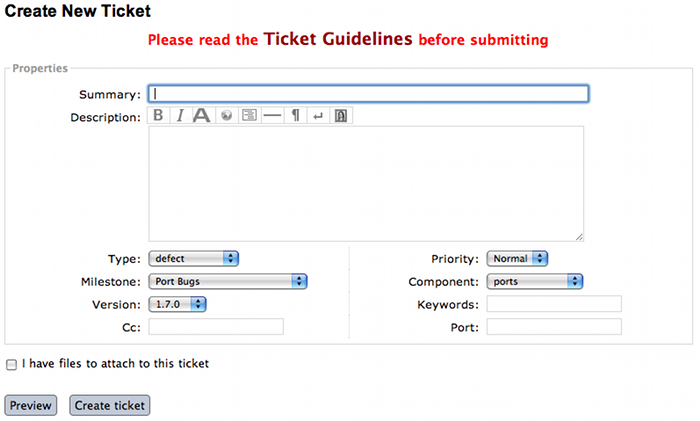
This is a short overview of the guidelines for Trac tickets. Please see below for longer and more detailed explanations.
TL;DR
| Field | Content | ||||||||||||
|---|---|---|---|---|---|---|---|---|---|---|---|---|---|
| Summary |
Example: openssl @1.0.1e_1+universal: DTLS handshake error messages with openconnect | ||||||||||||
| Description |
Describe your problem. Preformatted text (such as terminal
output) should be put in {{{. Please attach large
amounts of output rather than pasting.
Link to GitHub commits with links like
[changeset:.
Use the preview button!
| ||||||||||||
| Type |
| ||||||||||||
| Priority | Use normal or low. High is reserved for MacPorts developers. | ||||||||||||
| Milestone | Leave empty. | ||||||||||||
| Component |
| ||||||||||||
| Version | The version of MacPorts you are running. | ||||||||||||
| Keywords | maintainer if you are the port's
maintainer. haspatch if you are attaching
a patch. Full
list.
| ||||||||||||
| Port | The name of the port affected by this ticket. Separate multiple using spaces. Leave empty for non-port tickets. | ||||||||||||
| Owner/Cc | Full email address or GitHub username of the port's
maintainer. Run port info --maintainer
<portname> to
look this up. Do not add
<nomaintainer@macports.org> or
<openmaintainer@macports.org>. For ports with
multiple maintainers, only put the first maintainer into the
Owner field and all others in the
Cc field. You do not need to Cc
yourself. |
There are certain conventions used to ensure that Trac tickets convey as much accurate information as possible so problems and contributions may be acted upon efficiently.
Summary:
[port][version][concise description]Example: "rrdtool @1.2.23 +python Configure error - build failure"
Description: All details that might be relevant to someone reading the ticket. Be sure to mention the versions of your operating system and Xcode install.
Use Wiki formatting to ensure that text is formatted correctly. Link to GitHub commits with
[changeset:. For example, for a GitHub commit with URL https://github.com/macports/macports-ports/commit/bd5d6800828a3dcda1b65f3999fa748a365b168e, putGithubSHA/macports-portsoptional link text][changeset:bd5d6800828a3dcda1b65f3999fa748a365b168e/macports-ports commit bd5d680]in the description. It becomes the link, commit bd5d680. See TracLinks#LinkstoMacPortsonGitHub for details.Use the Preview button before submitting. If you want to post preformatted text such as a log or terminal output, make sure you use
{{{around the text or it could break the page layout. Example:...}}}
{{{
your error message here
}}}
Submitters are advised to trim inline pastes and logs to what's really relevant to the report, as otherwise overly large ticket pages can become unmanageable. Long output, such as the full log from a port build, should be added as an attachment, not pasted inline. See I have files to attach to this ticket below.
Type: There are five types of tickets.
defect - The default; any port/MacPorts build/runtime failures and/or documentation corrections.
enhancement - Tickets, with or without patches, created to enhance something that isn't failing its intended purpose.
update - Tickets, with or without patches, involving updating a port to a newer upstream version.
submission - Tickets created to submit Portfiles for software not currently available in MacPorts.
request - Tickets created to request the creation of a new port.
Priority: Assign a priority level to the ticket.
High - Reserved for the use of MacPorts team members, as they are the best fit to determine which reports warrant a higher priority over others.
Normal - The default. For normal port failures, non-critical enhancement requests, non-critical port failures.
Low - For mostly cosmetic improvements, documentation corrections/improvements, etc.
Not set - Anything that doesn't fit the categories high, normal, or low.
Milestone: Leave this blank. MacPorts developers will set this to the version of MacPorts that contains a fix for the ticket when they commit a change. Note that this is only meaningful for changes in MacPorts itself, since changes to ports are continuously provided to users. If the milestone is MacPorts Future no version of MacPorts with the fix has been released yet.
Component: Set what part of the MacPorts Project the ticket is to be filed against.
base - Tickets related to MacPorts base code.
guide - Documentation enhancements and error corrections, or patches to the MacPorts Guide.
ports - Tickets related to ports.
server/hosting - For MacPorts hosting & server-side issues.
website - MacPorts website enhancements and error corrections.
wiki - MacPorts Wiki enhancements and error corrections.
Version: Select the MacPorts version you are using when it is applicable.
Keywords: Type any keywords that might help when searching for tickets. It is not useful to list words here that already appear elsewhere in the ticket. Keywords also serve as tags; for example, use “tiger” if reporting a bug that only affects Mac OS X 10.4, “haspatch” if a fix is attached to the ticket, “maintainer” if you are the port's maintainer, or “LP64” if reporting an issue that only affects 64-bit platforms.
See the TicketsKeywordGuidelines wiki page for a clickable list of all keywords.
Cc: Anyone else besides the ticket reporter and assignee who would like to be kept involved in the development of the ticket. Multiple email addresses or GitHub usernames should be separated with a comma and a space (e.g.,
neverpanic, you@example.org, maintainer@macports.org).When reporting port-related tickets, make sure you add the port maintainers email address or GitHub username to the Cc: field so they are notified of the ticket (unless you have commit access, then see Assign To: below). You can obtain the email address or GitHub username of the port maintainer by running port info --maintainers
[port]Assign To: For tickets on ports, enter the email address or GitHub username of the port's maintainer (use port info
[port]to find this). If multiple maintainers are listed, enter the first maintainer's email address or GitHub username here and enter the remaining maintainers' email addresses or GitHub usernames in the Cc field. Exclude the email address<openmaintainer@macports.org>if it appears. If the maintainer's email address is<nomaintainer@macports.org>, leave the field blank.Only project members and the reporter of a ticket can edit this field.
Port: For tickets on ports, enter the name of the port (or ports, space-separated, when multiple are affected).
I have files to attach to this ticket: Use this checkbox to attach files to the ticket immediately after you create it. Or you can attach files later using the Attach File button.
If the file you are attaching is larger than 256 KiB, please compress it with bzip2 or gzip first to save space on the server and bandwidth for those downloading it, as Trac will not preview files above that size anyway.
The MacPorts project uses the Git distributed version control system to manage the code for the entire project. Our master repositories are hosted on GitHub.
We maintain public repositories for almost all our project code and documentation, including a GitHub repository for the MacPorts system itself, for the MacPorts ports, and even for the guide you are reading right now.
If you're not familiar with Git and need an introduction, we recommend the book Pro Git, by Scott Chacon and Ben Straub. The book is available for free online, and is published under a Creative Commons license.
You should feel free to fork any of our code repositories, make improvements to the code, and contribute them back to us via a GitHub pull request. We are grateful for improvements to absolutely everything, including new ports, fixes to ports, improvements to our base software, improvements to our documentation and our web site, or anything else you see.
The main steps for submitting a pull request are:
Make your changes in your own Git repository:
Fork the appropriate repository, say macports-ports.
Create a branch for your changes.
Make your changes.
For changes to ports and code, please follow the information elsewhere in this guide, and test your changes carefully.
Changes to Portfiles should also pass port lint.
Commit your changes to your branch, making sure to follow the MacPorts standard for commit messages.
Be sure to rebase your changes so as to minimize the number of commits. Ideally, you should have just one.
(There are exceptions. If you have several unrelated fixes, or you're changing multiple packages, etc., you might need more than one commit. The point is to minimize them, ideally with one commit per logical change.)
Push the change branch to your own GitHub repository.
Make a pull request from your branch in your own git repository to the appropriate MacPorts repository.
You can do this on the appropriate GitHub page. For example, you can request a pull of a Portfile on the macports-ports repository pull request page.
Go through the process of waiting for the CI system to build your new port, receiving feedback from our team, possibly being asked to make changes to your requested pull, and making those changes. (If you are asked for additional changes, please squash them to avoid unnecessary commits.)
We try to process pull requests very quickly. If you do not
see activity on your request within a few days, please feel free
to get in touch with us on the
<macports-dev@lists.macports.org> mailing list to
request a review and/or commit. Please include a link to the pull
request in your email.
You may contribute new ports and enhancements of any kind to already existing ports using Trac tickets. However, we prefer that you open a pull request on GitHub, in which case no Trac ticket is required.
The GitHub pull request method is strongly preferred over submitting Trac tickets. Submitting a Pull Request will likely result in your contribution being merged into MacPorts much faster, as the workflow is much easier for the maintainers.
Ports are contributed by following these steps. See the Ticket Submission Guidelines for a description of all fields.
Please run
%%port lint --nitpick $portnamewhere
$portnameis the name of the port you are submitting. Please fix any warnings and errors.Either submit the new port through a pull request on GitHub...
...or create a Trac ticket.
Set the type to submission.
Set the component to ports.
Set the port field to the name of the new port.
Attach the
Portfileand any required patchfiles to the ticket.
If your ticket or pull request doesn't receive any attention within a few days you may send an email to
<macports-dev@lists.macports.org>and request a review and/or commit. Please include a link to the ticket or pull request.
Enhancements to existing ports may comprise new functionality for
a given port, bug fixes or even simple version updates. They should
always be contributed as patches against the current
Portfile. See the Ticket Submission Guidelines for
a description of all fields.
Create a
Portfilepatch with your changes. See Portfile Development for more information on how to edit Portfiles.Please run
%%port lint --nitpick $portnamewhere
$portnameis the name of the port you modified. Please fix any warnings and errors before submitting your changes.Either submit the port update through a pull request on GitHub...
...or create a Trac ticket.
Set the type to enhancement for miscellaneous enhancements, to defect for bug fixes, or to update for version updates.
Set the component to ports.
Set the port field to the name of the port you want to change.
Put the maintainer's email address or GitHub username into the Cc field. You can use
%%port info --maintainer $portnamewhere
$portnameis the name of the port you want to modify. Note that<openmaintainer@macports.org>and<nomaintainer@macports.org>are not real people and should thus not be Cc'd.Attach your Portfile patch file and any new or changed patch files to the ticket.
If your ticket or pull request doesn't receive any attention within a few days you may send an email to
<macports-dev@lists.macports.org>and request a review and/or commit. Please include a link to the ticket or pull request.
MacPorts is always looking for people that want to take care of a certain package. If you notice an outdated port, a bug in a port or simply a port without maintainer that you are interested in, feel free to volunteer as maintainer. To become a maintainer you need:
An email address and a GitHub account.
A copy of the
Portfile. Do not worry if you don't know where to find one yet. There's more documentation on that below.An account in the MacPorts Trac, (you'll log in with your GitHub account).
Interest in the software you want to maintain and some time.
You do not need:
Commit access to the MacPorts repository. Instead, you open pull requests in GitHub (or create patches and open tickets in Trac.) You can, however, apply for commit access once you have some experience in maintaining ports. In fact, we would like to encourage you to apply after a few months.
Expert knowledge of the software you want to maintain or experience in
Portfileprogramming. You can pick those up along the way. Your knowledge about the software you want to maintain is probably more than what most other MacPorts developers have, given the number of ports MacPorts has. Consult Chapter 4, Portfile Development chapter and Chapter 5, Portfile Reference on how to write aPortfile. If your questions are not answered there, please ask on the<macports-dev@lists.macports.org>mailing list.
To become the maintainer of a port, first check whether the port already has a maintainer. Run
%%port info --maintainer $portname
where $portname is the name of the port you want
to maintain. If the output is
maintainer:
the port is unmaintained and you are more than welcome to take it over. If the output lists a different email address, you can still co-maintain the port, but you should contact the existing maintainer(s) first.
Once you have verified that a port is unmaintained or the existing maintainer has invited you to co-maintain the port of your choice, follow these steps to become a maintainer:
Locate the port's directory and make a copy. MacPorts can help you locate the directory that contains the
Portfileby runningport dir $portname. Copy this directory to a separate location (so you can easily generate a patch later) that is readable by the macports user. In general, your home directory does not fulfill that requirement, but/var/tmpdoes.%%cp -r $(port dir $portname) /var/tmpCheck
/var/tmpfor the new directory. In most cases, its name should be equal to the name of the port you want to maintain. In those few cases where it is not (i.e., the so-calledsubportsfeature is used), check the output ofport dir $portnamefor the correct name.Change to the new directory and run
port
              info
to make sure everything went right. Note that running any port command without a port name tries to use thePortfilein the current directory. This is very helpful when testing modifications or new ports, so keep this in mind.%%cd /var/tmp/$portname%%port infoIf you don't see info output for the port, but an error message instead, it will usually be in the following form:
Can't map the URL 'file://.' to a port description file ("couldn't read file "Portfile": permission denied").
Please verify that the directory and portfile syntax are correct.
To use the current port, you must be in a port's directory.
Pay attention to the part in the brackets in the first line. It will either contain a permission problem (in which case you need to adjust the permissions of your
Portfileand the folders leading up to it), or a Tcl error message, in case of syntax errors in thePortfile. Also check that the copy of the working directory is in fact the current working directory in your shell.Open the
Portfilein your favorite editor and look for the line that starts withmaintainer. Deletenomaintainerfrom the line if it exists and add your own email address and GitHub username, grouped together with curly braces. Email addresses should be written in the formdomain.tld:localpart. (The address is obfuscated to prevent email harvesters from automatically grabbing your address.) For GitHub usernames, prefix your username with an@sign. For example, if your email address isjulesverne@example.organd your GitHub username isjverne, your entry on themaintainersline should read{example.org:julesverne @jverne}.At this point, please read Section 7.4.1, “Non-Maintainer Port Updates” and familiarize yourself with the meaning of
openmaintainer. Consider addingopenmaintainerto speed up and simplify small updates of your port. If you decided to allow minor updates without consultation, addopenmaintainer, separated with a space, to themaintainerline of thePortfile.Once you are done, save the file and verify the
Portfilestructure using MacPorts' builtin lint check:%%port lint --nitpickYou will likely see at least one error:
Error: Portfile parent directory tmp does not match primary category $XYZ
You can safely ignore this message. It is printed because the copy of the port's directory is not in a directory named after the port's primary category, but in
/var/tmpinstead. Please try to address all other warnings and error messages, though. If you need help, feel free to continue and add a note to the ticket you will create asking for instructions.Finally, run
port infoagain. The maintainers line in the output should now contain your email address or GitHub username.Note
If you made changes other than the maintainer line, you might want to test build and installation as well. To do that, run
sudo port destrootin the port's directory. If you seeError: Unable to execute port: Could not open file: /private/var/tmp/somewhere/Portfile
check the permissions of the
Portfileand all folders above it. They must be readable by themacportsuser. The easiest way to ensure this is to run%%chmod -R go+rX /var/tmp/$portnameIf the port fails to build, see the
main.logreferenced in the error message for details. If the build completes successfully, runsudo port cleanto clean up all leftovers.Create a patch from the changes you made to the
Portfileand possible related files. To do that, run%%diff -ru $(port dir $portname) . > change-$portname-maintainer.diffin the directory where you edited the
Portfile. You can inspect the generated unified diff inchange-$portname-maintainer.diffif you want.If you are only changing the maintainer, file a pull request on GitHub.
You may also file a new ticket in Trac to change the maintainer, though GitHub pull requests are preferred. Set type to enhancement. Leave the milestone field empty. If you added yourself as co-maintainer, add the other maintainers in the Cc field. Finally, fill in the port field, set keywords to
haspatch(because you are attaching a patch), check the box that you want to attach files to the ticket and submit. After submission, attach the patch you created in the previous step.If you are also fixing a bug, make a separate commit for that in your pull request, or attach a separate patch for that change to the same ticket. If you are fixing a bug that already has a ticket, attach a patch fixing the bug there and file the maintainer change in a separate ticket (with a separate patch) as discussed above. In general, please create a separate patch for each semantic change. Doing so simplifies reviewing. It enables each independent change to be accepted without worries about conflicts that sometimes arise when several changes are rolled into one patch. Do not worry that you cannot change the keywords to
haspatchon existing tickets.If your pull request or ticket doesn't receive any attention within a few days you may send an email to
<macports-dev@lists.macports.org>and request a review and/or commit. Please include a link to the pull request or ticket.
Once you are the maintainer for a port, all new pull requests
and tickets for this port will be assigned to you.
You are expected to take a look at these pull requests and
tickets, give advice and try to debug problems. If you are stuck, do
not hesitate to ask on the
<macports-dev@lists.macports.org> list.
Port maintainers normally are given commit privileges to the Git repository so they can make updates to their own ports as described in Section 7.6, “MacPorts Membership”. However, The MacPorts Project does not restrict commit privileges for maintainers, so before a person other than a port's maintainer updates a port it is a good practice to inform a port's maintainer. See details below.
If you have a port update or bugfix for a port you do not maintain, to respect the rights of the port maintainer you should follow the following guidelines:
If a port's maintainer is
<nomaintainer@macports.org>, you may feel free to make updates and/or take maintainership of the port.If a port's maintainer contains the address
<openmaintainer@macports.org>, this means that the author allows minor updates to the port by other committers without contacting them first. But permission should still be sought for major changes.Committers are expected to investigate as thoroughly as necessary to confirm that an update is in fact minor. Some projects have made quite major changes with only a tiny change to the version number. And of course a committer should always verify that a port not only builds but works correctly after a change, before pushing it.
Pull requests for maintained ports should not be merged by anyone other than their creator or the port maintainer until the 72-hour timeout period has passed, even if the port is openmaintainer. This is because the change is either from a non-committer, or from a committer who could have just pushed the change directly, and by opening a PR is signalling a desire to have the change reviewed by the maintainer.
Create patch file(s) as necessary, attach them to a Trac ticket, and assign the ticket to the maintainer (or Cc the maintainer, if you are unable to assign tickets).
Wait for a response from the maintainer. The maintainer should apply the patches and close the ticket within 72 hours.
However, for maintained ports without
<openmaintainer@macports.org>, there are some conditions
under which maintainer permission may be waived:
If the maintainer does not respond within 72 hours, you or another committer may review the patches and update the port. The log message of this commit must explain that you are taking advantage of maintainer timeout and include a reference to the ticket. If you are not a committer you may send an email to
<macports-dev@lists.macports.org>and request the updates be committed.A port is abandoned by its current maintainer. A port against which a Port Abandoned ticket has been filed (see below) can be updated without contacting the maintainer.
A critical port is broken that affects many users.
A port may be considered abandoned if any of the following apply:
A bug has not been acknowledged for more than three weeks after a ticket is filed.
All tickets (and/or pull requests) filed against the port have been resolved with no input from the maintainer, after the 72-hour timeout, for a significant period of time (at least three weeks). This needs to involve a reasonable number of tickets; one timeout doesn't make a port abandoned.
The listed maintainer address bounces, and no alternate way of contacting the maintainer is known.
If you wish to initiate the Port Abandonment protocol and optionally volunteer as the new maintainer:
File a new Trac ticket with the summary line: [Port Abandoned] portname.
The ticket should be assigned to the maintainer. Non-macports team members should Cc the maintainer.
Set the ticket Type to Defect.
In the Description field, refer to any unacknowledged ticket(s).
In the Port field, indicate which port is abandoned.
The Port Abandoned ticket may be closed when the new maintainer is assigned, and the original ticket(s) with the updates may be resolved as usual. The former maintainer should be removed from all other tickets on which they were assigned as owner. The Port Abandoned ticket should stay open for the usual 72-hour timeout period, to give the maintainer one last chance to indicate that they have not actually abandoned the port.
The sources for this guide are kept in a Git repository on GitHub. If you spot any error or outdated information, you are encouraged to submit a pull request following the steps outlined below.
We use a triangular workflow to carry changes from contributors to the project. You get the latest guide source code from the main repository on GitHub, updating your own "cloned" copy of the repository on your workstation. You make changes on your workstation, in a Git branch. You push the Git branch with your changes to your "forked" copy of the repository in your own GitHub account. Then GitHub helps turn that branch into a "pull request". MacPorts developers can review and discuss the pull request with you, and finally decide whether to accept it. This workflow is described in GitHub's guide, Forking Projects.
Follow these one-time steps to set up the parts of the workflow.
With your web browser, log in to GitHub. Go to this guide's main Git repository at https://github.com/macports/macports-guide.
Fork your own copy of the main guide repository. Click the button, at the top-right of the repository window. A dialogue may appear: "Where should we fork macports-guide?" Select your GitHub username. A message appears, "Forking macports/macports-base. It should only take a few seconds." Then GitHub moves you to a page labelled, "
username/macports-guide, forked from macports/macports-guide". This page shows your "forked" copy of the repository, in your own GitHub account.On your workstation's command line, clone a copy of the main guide repository. Start in a directory which can contain the working directory for your local "clone" copy.
$git clone https://github.com/macports/macports-guide.git$cd macports-guide$git remote addusernamehttps://github.com/username/macports-guide.gitInstall the required ports:
$sudo port install libxml2 libxslt docbook-xsl-ns docbook-xml-5.0
For each change you want to make, follow these steps through the triangular workflow. In general, for one pass through this workflow, make only one change or set of related changes, in one area of the documentation. When changing different things, it is preferable to propose separate pull requests.
From your workstation's command line, within your local repository directory, switch to your
masterbranch. Then, pull the latest contents of the master repository to make your repository current.$cd macports-guide$git checkout master$git pull originCreate a Git branch off the
masterbranch to hold your changes. Thebranch-nameis a concise string which describes the effect of your change. Generally, use words of ASCII letters and digits, separated by underscore'_'or dash'-', e.g.clarify_branch_creation_steps. (See git check-ref-format for detailed limitations.) If your change fixes a Trac ticket, include the ticket number in the branch name, e.g.configure-compiler-60331.$git checkout -bbranch-nameMake your changes to the file in the
guide/xml/directory that corresponds to the section you want to make changes to.$$EDITOR guide/xml/guide.xmlVerify your changes are still valid XML. If the make validate command reports errors, fix the XML sources until you see no more error messages.
$make validateConvert the guide to HTML, and proofread the new version in your browser.
$make guide$open guide/html/index.htmlCommit your changes to the local branch and describe your changes in the commit message. See also our wiki page, CommitMessages, which explains how to write good commit messages.
$git commit -aPush your local branch to your fork of the guide's repository on GitHub.
usernameis your GitHub user name, under which your fork resides.$git pushusernameNext, turn your branch into a "pull request" (PR) on GitHub.
With your web browser, go to this guide's main Git repository at https://github.com/macports/macports-guide.
GitHub will likely show you a message that a branch on your forked repo, with your
branch-name, "had recent pushes". There is a green button, . Push this button.If GitHub does not show you that message, create the pull request yourself. Click on the "Pull requests" tab. Click on the green button, . The page changes to say "Compare changes", and there are a pair of buttons, "base: master" and "compare: master". Click on the "compare: master" button, on the right. A dialogue appears, "Choose a head ref". Type your GitHub username, followed by colon
':'. The two buttons become four, with the rightmost button reading "compare:". Click on the "compare:" button. The list of your branches appears. Click on the branch which you want to turn into a pull request. A green button appears, slightly further down the page. Click on this button.A dialogue appears. The first line of your commit message is in the title, and the rest of your commit message is in the body. Edit these as necessary, then confirm. Your pull request now appears in the list of pull requests.
Now, monitor your GitHub account for messages. MacPorts developers may comments and discussion about your pull request. Respond to comments as necessary.
You may want to modify your proposed change. Modify it by repeating the "make your changes" step above, and all the subsequent steps through pushing your branch to your fork on GitHub. GitHub will incorporate changes to your fork into the pull request.
Once the MacPorts developers are satisfied with your pull request, they will merge it with the main guide respository.
A requirement for a person to become a MacPorts committer is to first become involved and contribute to the project. This may be done by having a record of contribution to the project in several of the following ways:
Contributing new ports.
Fixing bugs in existing ports.
Volunteering as a maintainer of non-maintained ports.
Involvement on MacPorts development and/or user support mailing lists.
Contributing with documentation.
To apply for MacPorts commit rights, send a brief email to the
PortMgr team at <macports-mgr@lists.macports.org> entitled
"Commit access: Your Name" with the
following contents:
a description of your application and why you think you deserve commit rights. Include evidence of contributions to MacPorts as described above; at best add direct links to Trac tickets or Trac searches that make the review easier for the PortMgr team.
your github username. This will be used as the identity the "handle", as part of your
handle@macports.orga real e-mail address to which you'd like your MacPorts alias to forward.
The PortMgr team will consider all applications and provide an appropriate response as soon as they get to it.
The MacPorts PortMgr team is the steering group for The MacPorts Project. Its membership is usually determined by public elections among project members; the current members of the team can be found on the MacPorts Developers wiki page.
They are responsible for matters such as:
approving new project members (i.e., granting commit rights);
setting general guidelines for the project;
dispute resolution;
managing the projects infrastructure; and
engineering releases.
This section defines a number of words which may be new to the reader. These are all defined in the context of Macports instead of as general purpose definition.
MacPorts Guide Terms
- activate phase
- automake
- autoconf
- API
- destroot phase
- port binary
- build
- build phase
- checksum
A checksum is a small piece of data, derived from an original that can be used to ensure that two files are identical.
- checksum phase
- compile
- configure
- configure phase
- dependency
- destroot phase
- diff
- extract phase
- fetch phase
- free software
- global keyword
- gunzip
- keyword
- keyword argument modifier
- keyword list modifier
- library
- MacPorts
A system for compiling, installing, and managing free and open source software comprised of an infrastructure called MacPorts base and a collection of ports. MacPorts current port collection defines the software may be installed.
- open source software
- patch phase
- patch file
- pextlib
- phase
- port
- port command
- port image
- port maintainer
- port phase
- port phase keyword
- PortGroup
- Portfile
- registry
- rsync
- selfupdate
- shell
- StartupItem
- Subversion
- sync
- tar
- Tcl
- Tcl extension
- Trac
- Unix
- unzip
- variant
- Xcode Tools
- X11
- zip