The MacPorts Project uses a system called Trac to file tickets to report bugs and enhancement requests. Though anyone may search Trac for tickets, you must have a GitHub account in order to login to Trac to create tickets.
Clean and try again
If a build fails or is otherwise interrupted, and you try again, MacPorts tries to pick up where it left off. Sometimes this causes new problems, and even if it doesn't, it means that log messages from earlier steps, which can be essential for figuring out why a build failed, are not included in the new log; MacPorts prints “Skipping completed” in the log for each previously-completed phase that was skipped. Before filing a ticket,
sudo port cleanthe port that failed, then try again.Check the problem hotlist
The Problem Hotlist contains possible solutions to problems that affect many MacPorts users. If a solution to your problem listed there works, don't file a ticket.
Search to see if a Trac ticket has already been filed
Avoid filing duplicate bugs. Search for duplicates by:
using the search bar that appears on each page
using the search page
browsing the list of categorized reports
making an advanced search by constructing a custom query
Is the problem an application error and not related to compiling and installing?
In general, application bugs should be reported to the developers of the app (“upstream”), not MacPorts. An application bug that affects a large number of MacPorts users might merit a MacPorts bug for informational purposes only, but this should be done sparingly.
Is the problem with a 'port upgrade' operation?
If so, try a 'port uninstall
foo' and then reinstall. You might also want to run 'port -nR upgrade --forcefoo' to rebuild ports depending upon portfoo. Note that it is safest and recommended that most users always upgrade with 'port upgrade outdated' to update all ports at once. Upgrading a single port can lead to software errors in other ports that have not yet been upgraded.
Once you are logged into Trac, you may click New Ticket and you will be presented with a new ticket window shown in the graphic below. Follow the Trac ticket guidelines below to fill out the form. If you are reporting a failed port install and a log was mentioned in the error, please use the I have files to attach to this ticket checkbox to add that log file to the ticket.
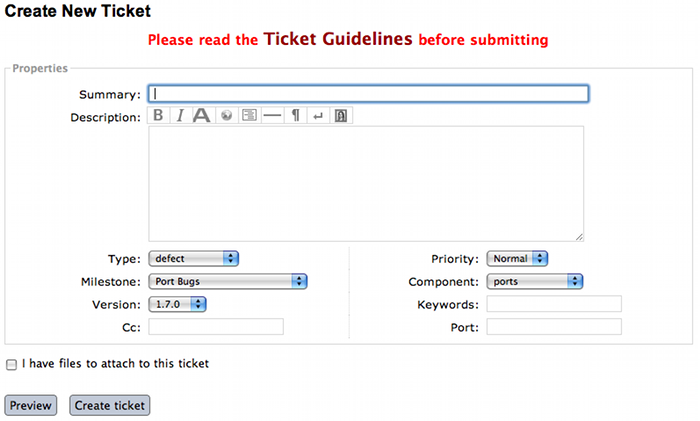
This is a short overview of the guidelines for Trac tickets. Please see below for longer and more detailed explanations.
TL;DR
| Field | Content | ||||||||||||
|---|---|---|---|---|---|---|---|---|---|---|---|---|---|
| Summary |
Example: openssl @1.0.1e_1+universal: DTLS handshake error messages with openconnect | ||||||||||||
| Description |
Describe your problem. Preformatted text (such as terminal
output) should be put in {{{. Please attach large
amounts of output rather than pasting.
Link to GitHub commits with links like
[changeset:.
Use the preview button!
| ||||||||||||
| Type |
| ||||||||||||
| Priority | Use normal or low. High is reserved for MacPorts developers. | ||||||||||||
| Milestone | Leave empty. | ||||||||||||
| Component |
| ||||||||||||
| Version | The version of MacPorts you are running. | ||||||||||||
| Keywords | maintainer if you are the port's
maintainer. haspatch if you are attaching
a patch. Full
list.
| ||||||||||||
| Port | The name of the port affected by this ticket. Separate multiple using spaces. Leave empty for non-port tickets. | ||||||||||||
| Owner/Cc | Full email address or GitHub username of the port's
maintainer. Run port info --maintainer
<portname> to
look this up. Do not add
<nomaintainer@macports.org> or
<openmaintainer@macports.org>. For ports with
multiple maintainers, only put the first maintainer into the
Owner field and all others in the
Cc field. You do not need to Cc
yourself. |
There are certain conventions used to ensure that Trac tickets convey as much accurate information as possible so problems and contributions may be acted upon efficiently.
Summary:
[port][version][concise description]Example: "rrdtool @1.2.23 +python Configure error - build failure"
Description: All details that might be relevant to someone reading the ticket. Be sure to mention the versions of your operating system and Xcode install.
Use Wiki formatting to ensure that text is formatted correctly. Link to GitHub commits with
[changeset:. For example, for a GitHub commit with URL https://github.com/macports/macports-ports/commit/bd5d6800828a3dcda1b65f3999fa748a365b168e, putGithubSHA/macports-portsoptional link text][changeset:bd5d6800828a3dcda1b65f3999fa748a365b168e/macports-ports commit bd5d680]in the description. It becomes the link, commit bd5d680. See TracLinks#LinkstoMacPortsonGitHub for details.Use the Preview button before submitting. If you want to post preformatted text such as a log or terminal output, make sure you use
{{{around the text or it could break the page layout. Example:...}}}
{{{
your error message here
}}}
Submitters are advised to trim inline pastes and logs to what's really relevant to the report, as otherwise overly large ticket pages can become unmanageable. Long output, such as the full log from a port build, should be added as an attachment, not pasted inline. See I have files to attach to this ticket below.
Type: There are five types of tickets.
defect - The default; any port/MacPorts build/runtime failures and/or documentation corrections.
enhancement - Tickets, with or without patches, created to enhance something that isn't failing its intended purpose.
update - Tickets, with or without patches, involving updating a port to a newer upstream version.
submission - Tickets created to submit Portfiles for software not currently available in MacPorts.
request - Tickets created to request the creation of a new port.
Priority: Assign a priority level to the ticket.
High - Reserved for the use of MacPorts team members, as they are the best fit to determine which reports warrant a higher priority over others.
Normal - The default. For normal port failures, non-critical enhancement requests, non-critical port failures.
Low - For mostly cosmetic improvements, documentation corrections/improvements, etc.
Not set - Anything that doesn't fit the categories high, normal, or low.
Milestone: Leave this blank. MacPorts developers will set this to the version of MacPorts that contains a fix for the ticket when they commit a change. Note that this is only meaningful for changes in MacPorts itself, since changes to ports are continuously provided to users. If the milestone is MacPorts Future no version of MacPorts with the fix has been released yet.
Component: Set what part of the MacPorts Project the ticket is to be filed against.
base - Tickets related to MacPorts base code.
guide - Documentation enhancements and error corrections, or patches to the MacPorts Guide.
ports - Tickets related to ports.
server/hosting - For MacPorts hosting & server-side issues.
website - MacPorts website enhancements and error corrections.
wiki - MacPorts Wiki enhancements and error corrections.
Version: Select the MacPorts version you are using when it is applicable.
Keywords: Type any keywords that might help when searching for tickets. It is not useful to list words here that already appear elsewhere in the ticket. Keywords also serve as tags; for example, use “tiger” if reporting a bug that only affects Mac OS X 10.4, “haspatch” if a fix is attached to the ticket, “maintainer” if you are the port's maintainer, or “LP64” if reporting an issue that only affects 64-bit platforms.
See the TicketsKeywordGuidelines wiki page for a clickable list of all keywords.
Cc: Anyone else besides the ticket reporter and assignee who would like to be kept involved in the development of the ticket. Multiple email addresses or GitHub usernames should be separated with a comma and a space (e.g.,
neverpanic, you@example.org, maintainer@macports.org).When reporting port-related tickets, make sure you add the port maintainers email address or GitHub username to the Cc: field so they are notified of the ticket (unless you have commit access, then see Assign To: below). You can obtain the email address or GitHub username of the port maintainer by running port info --maintainers
[port]Assign To: For tickets on ports, enter the email address or GitHub username of the port's maintainer (use port info
[port]to find this). If multiple maintainers are listed, enter the first maintainer's email address or GitHub username here and enter the remaining maintainers' email addresses or GitHub usernames in the Cc field. Exclude the email address<openmaintainer@macports.org>if it appears. If the maintainer's email address is<nomaintainer@macports.org>, leave the field blank.Only project members and the reporter of a ticket can edit this field.
Port: For tickets on ports, enter the name of the port (or ports, space-separated, when multiple are affected).
I have files to attach to this ticket: Use this checkbox to attach files to the ticket immediately after you create it. Or you can attach files later using the Attach File button.
If the file you are attaching is larger than 256 KiB, please compress it with bzip2 or gzip first to save space on the server and bandwidth for those downloading it, as Trac will not preview files above that size anyway.